



eric escobar
Community Manager
Community Manager
October 11, 2023
Answered

Does My Camera Work with Auto Detect Log Video Color Space?

  • October 11, 2023
  • 2 replies
  • 983 views

Premiere Pro, version 23.6 and later, offers support for automatic detection and interpretation of some camera log video color space formats.


To enable this feature, you have to make sure you have “Auto Detect Log Video Color Space” turned on. In Premiere Pro v23.6, you can access this control via File > Project Settings > Color and then checking this box:



In Premiere Pro v24 and later, you can either use that method to enable the feature, or you can access it in the new Lumetri Settings panel under the Project Settings section:
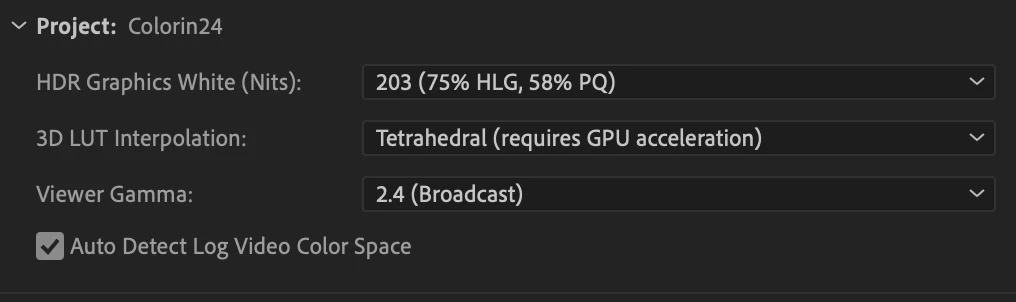


It can sometimes get a little confusing because some cameras offer log video space in multiple formats (mp4, mxf, mov), while Premiere Pro's auto log detection and interpretation may only work with one of them.


In the cases where you recorded your video in log space, but the auto detection feature isn’t supported, or isn’t working, you can still use the new automated color management system. Simply override the default clip color space of Rec 709, and assign it the correct log color space.



Premiere Pro will now tone map the clip when working in a Rec 709 color space, and offer you the tone mapping controls. The clip will also correctly display as HDR media when working in a Rec 2100 HLG/PQ sequence.


Current List of Supported Camera Log Formats:


SONY

Log Video Color Spaces

S-Log2/S-Gamut

S-Log3/S-Gamut3

S-Log3/S-Gamut3.Cine

Supported Containers: MXF, Mov, MP4


CANON

Log Video Color Spaces

Canon Log2/Cinema Gamut

Canon Log3/Cinema Gamut

Supported Containers: MXF Only


PANASONIC

Log Video Color Spaces

Panasonic V-Log/V-Gamut

Supported Containers: MXF, MP4, Mov


APPLE IPHONE

Log Video Color Spaces

Apple Log/ Rec. 2020

Supported Containers: Mov


Correct answer Sumeet Kumar Choubey

yes, it appears they still don't support the Canon R6 or R7 with Clog3 in an mp4 format. This list is from April and I don't see a new update on it:
https://helpx.adobe.com/premiere-pro/using/auto-detection-of-log-camera-formats-and-raw-media.html


Hi there,

Currently, CLog3 from R6/R7 in mp4 format is not supported for auto-detection. We're working on adding native support for more cameras & formats. For the time being, you may manually assign the color space for the clip under Clip > Modify > Color > Override Media Color Space. Hope it helps. Let us know if you have any questions.


Thanks,

Sumeet

2 replies

A3user
Inspiring
August 21, 2025

Thanks! this answers why my Clog3 footage does not get recognized as clog3 by Premiere. It's in an mp4 format. Thi post is from 2023, is Premiere ever planning in supporting mp4 for the autodetect feature?

R Neil Haugen
Legend
August 21, 2025

They've updated the list dramatically since the above post.


Are you using the full color management settings available now? Do you have both auto detect log and auto tonemapping on?

Everyone's mileage always varies ...
A3user
Inspiring
August 26, 2025

yes, it appears they still don't support the Canon R6 or R7 with Clog3 in an mp4 format. This list is from April and I don't see a new update on it:
https://helpx.adobe.com/premiere-pro/using/auto-detection-of-log-camera-formats-and-raw-media.html

R Neil Haugen
Legend
October 11, 2023

Eric,


Thanks for this list, and the instructions. It's all so new for so many, and even an experienced color worker like myself can struggle to keep up at times.


I can normally suss out something that happens that I wasn't expecting. But then, I'm used to the different color management systems of several pro apps, so I've learned how to test and poke to see what happens. Most users simply don't have that knowledge base.


For the vast majority, they may need your list printed and taped near their monitor for some time. Simply the safest way to keep working when you can't remember every flipping new detail ... 


Neil

Everyone's mileage always varies ...