Brainiac
November 10, 2020
Answered

Drag and Drop Files Not Working

  • November 10, 2020
  • 12 replies
  • 22820 views

Hello Everyone.

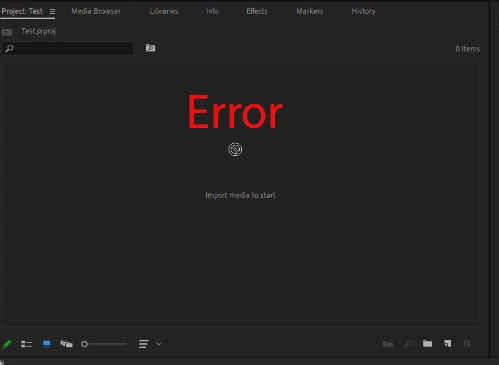
I can Import files into Premiere, but If I drag any Clip, Image, Sound Clips, I see the Error sign.

I noticed this is also happening with Audition, and After Effects. I think there could be some kind of Compatibility issue between Windows and Adobe.

Would you please help?

Thank you very much.
This topic has been closed for replies.
Correct answer animationlife

UPDATE: UPDATE: UPDATE;

I FIXED THE ISSUE. THIS IS WHAT I DID

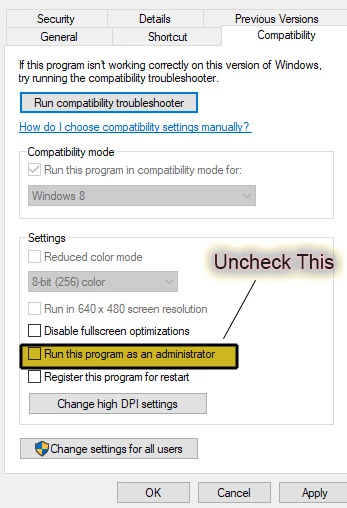
Right Click on Premier Pro-More- Open File Location- Right-click on Premiere Pro- Properties- Compatibility

I Unchecked Run this Program as an administrator.

Also, I did it for After Effects, and Audition.

Now If I want to drag/drop from explorer it works.

Here is the screenshot:

12 replies

New Participant
October 28, 2021

I have found you can drag x2 of everything but not x1 ? not sure why

Kevin-Monahan
Community Manager
Community Manager
February 14, 2022

City Soft,

It's probably this: Source Patching. Make sure your V1 and A1 tracks are patched on the far left.


Thanks,

Kevin

Kevin Monahan - Sr. Community & Engagement Strategist – Pro Video and Audio
animationlifeAuthorCorrect answer
Brainiac
February 11, 2021

UPDATE: UPDATE: UPDATE;

I FIXED THE ISSUE. THIS IS WHAT I DID

Right Click on Premier Pro-More- Open File Location- Right-click on Premiere Pro- Properties- Compatibility

I Unchecked Run this Program as an administrator.

Also, I did it for After Effects, and Audition.

Now If I want to drag/drop from explorer it works.

Here is the screenshot:

New Participant
October 16, 2021

Thank you !!! BEST

R Neil Haugen
Brainiac
November 16, 2020

Drag/drop from Finder/Explorer is not highly recommended. And can cause problems especially if you have media that has separate audio, like a lot of AVCHD/mxf clips do. Where the audio files are in separate directories, and metadata is used to link them together for playback.


There are also other things though, that are in the file header/metadata sections, and that may or may not get properly ingested into Premiere's media database when using the Finder/Explorer drag/drop process.


It's easy to add 'Favorites' to the top of the Media Browser so the folders you need to go to are right there all the time. And you are going to get the best performance of your project that way. So I always strongly suggest and teach adding media in the two better processes provided.


I see no speed or other benefit to other workflows.


Neil

Everyone's mileage always varies ...
Brainiac
November 17, 2020

Mr. Neil

I will Listen to your Advice.

Thanks Again

R Neil Haugen
Brainiac
November 15, 2020

So you are having troubles importing by drag/drop from Explorer.


What about the better importation/ingestion methods, from the MediaBrowser panel or righ-clicking in the Project panel, selecting "Import". Does that work?


Neil

Everyone's mileage always varies ...
Brainiac
November 16, 2020

Mr. Neil.


I can easily Import any files, using the File-Import, and Media Browser, or Right-Clicking in the Project panel with no problem.

This is also happening In After Effects, and Audition

Thanks.

MyerPj
Community Expert
November 15, 2020

Why in the first shot are you using "Test" project and then in the other shots it switches back to 'Drag and Drop'?


Close windows, turn off the second monitor. Test it... (and reset PP to the Edit workspace and 'Restore to saved layout'

Brainiac
November 15, 2020

Dear MyerPj.

Ok, I create a new folder called: Nature Shooting, I have a new Premiere Project name: Nature Shooting. I did Turn Off the Other Monitor Completly, I did the Restore to saved layout for the premier project. Nothing changed.

I use this technique for many years, and It always worked fine, but now It Is not working with Premiere, Audition, and After Effects.

I find this Forum Conversation, It looks like It could be a Bug Issue

https://community.adobe.com/t5/premiere-pro/faq-how-to-solve-issues-related-to-undocked-panels-in-premiere-pro-v14-5/m-p/11594757?page=10#M310525


Here is the screen-shots

Thanks.


MyerPj
Community Expert
November 14, 2020

How do you keep ending up with multiple project windows or projects open.


Look around and find that "Untitled" project saved to disk somewhere and rename it if you want it or delete it.


Is that your folder on the desktop named 'drag and drop'. Try it from some other folder. Try it with different files you have not used yet. It says sherloc.png on the timeline. Do you not have even one standard 1080p clip per my last message?

Brainiac
November 15, 2020

Ok, I just opened my other Computer, using Premiere. I can Easily Drop files into the premiere.

But with my first New Computer, I am using the same Technique, and It not working.

NOTE: There are Two Monitors connected to my new Computer, and Only One Monitor connected to my older Computer

Here is the screen-shots

Thanks.


MyerPj
Community Expert
November 14, 2020

In both pictures here you have no files in the projects. Can you import a single 1080p very standard clip into a brand new project. If so, then can you drop that into the (should be empty) timeline window and thus starting a sequence.


Send a screenshot of the above - the whole PP application.

Brainiac
November 14, 2020

Here is the Screen-shots

MyerPj
Community Expert
November 14, 2020

Run the Adobe Cleaner after you uninstall the programs and before you re-install them:
Also, reboot your computer between steps even if you are not asked to...

https://helpx.adobe.com/creative-cloud/kb/cc-cleaner-tool-installation-problems.html

Brainiac
November 14, 2020

UPDATED;UPDATED;UPDATED

Dear MyerPj.


First of all, Thank you so much for your advice and help. I appreciate it very very much.

I did Follow your instruction, I ran the Cleaner as an Administrator and Uninstalled all the Adobe apps, and Restarted Computer, and Ran the Cleaner again, Restarted the Computer and I was able to Download my Desire Apps.

The only problem I have is the same old Issue, I can easily Import files, Videos, Images, and Sound-clips Into Premiere, Audition, and After Effects, But I can not use Drag and Drop. Also, the same Issue as before, If I use Photoshop and Bridge2021, It is very Slow, But using Photoshop 2020, with Bridge 2020 is much better.

Thanks Again.


Peru Bob
Community Expert
November 11, 2020
Brainiac
November 11, 2020

Dear Peru.

Yes, same issue. I can easily Import any Clips, Sounds, Images. But If I Drag, and Drop, I see that Circle Icon

R Neil Haugen
Brainiac
November 10, 2020

I've never seen that message before, but ... I'm not seeing any media imported into that project file. If you had media imported into the project, we'd see it listed there.


Neil

Everyone's mileage always varies ...
Community Expert
November 10, 2020

I'm guessing they've typed "Error" onto there and are just showing the little circle with the bar across it.

Brainiac
November 11, 2020

I am Sorry I Typed the Error. The Error is the Circle Icon.

sorry for confusion