


- Home
- Premiere Pro
- Discussions
- No, you need to import so Premiere can stitch the ...
- No, you need to import so Premiere can stitch the ...

Copy link to clipboard
Copied
Is there any way to drag and drop a sequence of images into Premiere (and AME) so that it is interpreted as a sequence rather than individual images?


 2 Correct answers


Drag and drop is a bad habit.
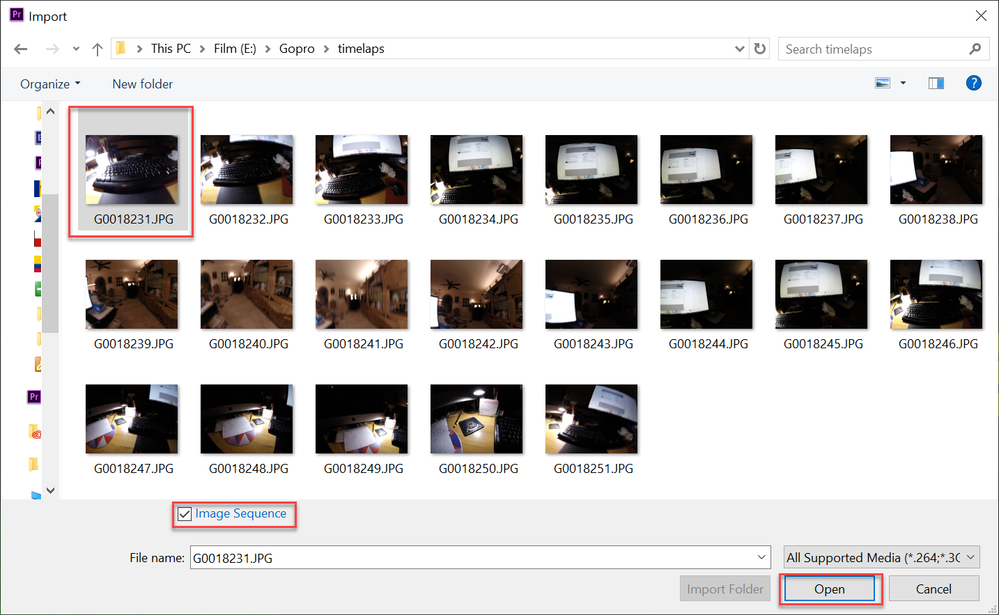
Image sequence (which is like a movie clip) needs to be sequential with simple names such as 0001.jpg, 0002.jpg, 0003.jpg etc.
File/import: Select first image, check image sequence and hit OK.

I didn't know it was a bad habit. Our team uses it everyday in other apps like Nuke, 3dsMax, Maya, etc.
So the answer is, no, there is no way to drag and drop image sequences into projects?
Bold added for emphasis by Mod.
 10
Replies
10
10
Replies
10

Copy link to clipboard
Copied
Drag and drop is a bad habit.
Image sequence (which is like a movie clip) needs to be sequential with simple names such as 0001.jpg, 0002.jpg, 0003.jpg etc.
File/import: Select first image, check image sequence and hit OK.
Copy link to clipboard
Copied
I didn't know it was a bad habit. Our team uses it everyday in other apps like Nuke, 3dsMax, Maya, etc.
So the answer is, no, there is no way to drag and drop image sequences into projects?
Bold added for emphasis by Mod.
Copy link to clipboard
Copied
No, you need to import so Premiere can stitch the images into one movie file.
Copy link to clipboard
Copied
Thanks for the clarification. Feature Request!


Copy link to clipboard
Copied
Hi Pat,
Would this Feature Request fulfill your needs?
If so, upvote: https://adobe-video.uservoice.com/forums/911233-premiere-pro/suggestions/37009132-allow-batch-image-...
This would be a good one to upvote since "Yenaphe" is now an engineer on the DVA team.
If not, create a new one that suits your needs better. Place the link here and we can all upvote.
Sorry for the trouble
Thanks,
Kevin
Copy link to clipboard
Copied
That seems to be exactly what I needed. Thank You
Copy link to clipboard
Copied
Hi,
If this were an editing class I was teaching (I did this for years before I worked at Adobe), I'd say this about dragging items into the Timeline.
IT'S SLOW.
I was also fond saying something like, "Keyboard driven editors get to Miller Time much faster than dragger/dropper slowpokes."
I can elaborate. At length. Let me know if you'd like me to do that. Or...I'll just shutup and return to my corner.
Regards,
Kevin
Copy link to clipboard
Copied
Thanks for the feedback Kevin. As a 3D animator and compositor, I'm all about keyboard shortcuts and Miller Time. This too is one of those time saving things I'm looking for.
When I have 10 folders with renders from 10 locations on the network... Aint nobody got time to navigate through the import dialogue. The folders are right there on my 5th monitor, just drag and drop and we good. One can dream.
Thanks for upvote link, I've done my part. Keep rocking.

Copy link to clipboard
Copied
Exactly. Importing through Import window is much slower, you also can't use things like Recent files or utilities that show latest assets... I would have sworn that AE/Premier HAD this feature before, like holding Opt/Alt when dragging.

Copy link to clipboard
Copied
100%
There are so many different use cases for sofware that it absolutely ridiculous to suggest some work flow is a bad habit.
I have a rendered sequence and I want to make video clip to throw in slack/teams ASAP. Drag and drop should be an option. Full stop.
Even if someone doing professional editing was a keyboard maestro and found drag and drop clumsy _for them_.


Get ready! An upgraded Adobe Community experience is coming in January.
Learn more
 AdChoices