Exit
  • Global community
    • Language:
      • Deutsch
      • English
      • Español
      • Français
      • Português
  • 日本語コミュニティ
  • 한국 커뮤니티
0

Editing or Export Problems

New Here ,
Dec 11, 2020 Dec 11, 2020

Hello and I hope everyone is staying safe.

Im posting on here because I cant seem to solve a problem that keeps coming up. I film on an extra wide curved monitor. And when I edit the video it looks great. However, when I upload the video to Youtube it dosen't fill the screen. The video sits in the middle of the screen with black screen all around it. Any suggestions on how to fix this or wha the issue is?

Thank You 

TOPICS
Editing , Export , Formats
232
Translate
Report
Community guidelines
Be kind and respectful, give credit to the original source of content, and search for duplicates before posting. Learn more
community guidelines
Community Expert ,
Dec 12, 2020 Dec 12, 2020

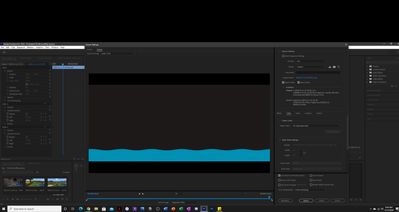
Post screenshot of export settings with left tab to output with image (not black).

Translate
Report
Community guidelines
Be kind and respectful, give credit to the original source of content, and search for duplicates before posting. Learn more
community guidelines
New Here ,
Dec 12, 2020 Dec 12, 2020

2020-12-12 (2).png

Let me know if you need/want to see anything else.

Translate
Report
Community guidelines
Be kind and respectful, give credit to the original source of content, and search for duplicates before posting. Learn more
community guidelines
Community Expert ,
Dec 12, 2020 Dec 12, 2020
LATEST

You export settings are set to (SD)avi which is not a very good choice.

Best is to use H.264/60 fps but you will never fill the frame in Youtube as its default set to 16:9 as your screen is not.

You will always have black bars top and bottom.


Translate
Report
Community guidelines
Be kind and respectful, give credit to the original source of content, and search for duplicates before posting. Learn more
community guidelines