Exit
  • Global community
    • Language:
      • Deutsch
      • English
      • Español
      • Français
      • Português
  • 日本語コミュニティ
  • 한국 커뮤니티
0

Export Error

Mentor ,
Dec 20, 2021 Dec 20, 2021

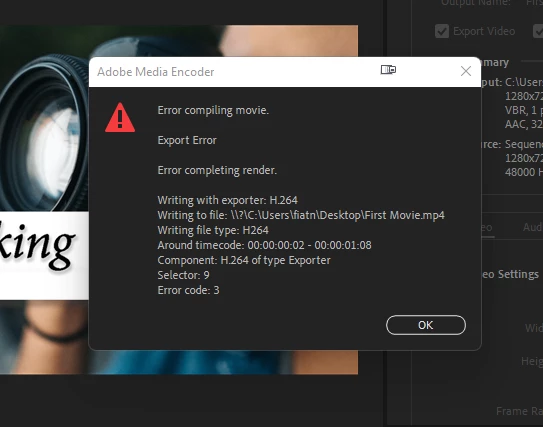
I tried to export a video but got an error message. I tried the method given in this link but I cannot find "export setting" as mentioned.

https://community.adobe.com/t5/premiere-pro-discussions/export-h-264-error/m-p/12514722#M378014
 

1.png

TOPICS
Editing
1.2K
Translate
Report
Community guidelines
Be kind and respectful, give credit to the original source of content, and search for duplicates before posting. Learn more
community guidelines

correct answers 2 Correct answers

Adobe Employee , Dec 20, 2021 Dec 20, 2021

Hi Maha,

Where it says "Hardware Encoding," choose Software Encoding instead. Let us know if that works.


Thanks,
Kevin

Translate
LEGEND , Dec 20, 2021 Dec 20, 2021

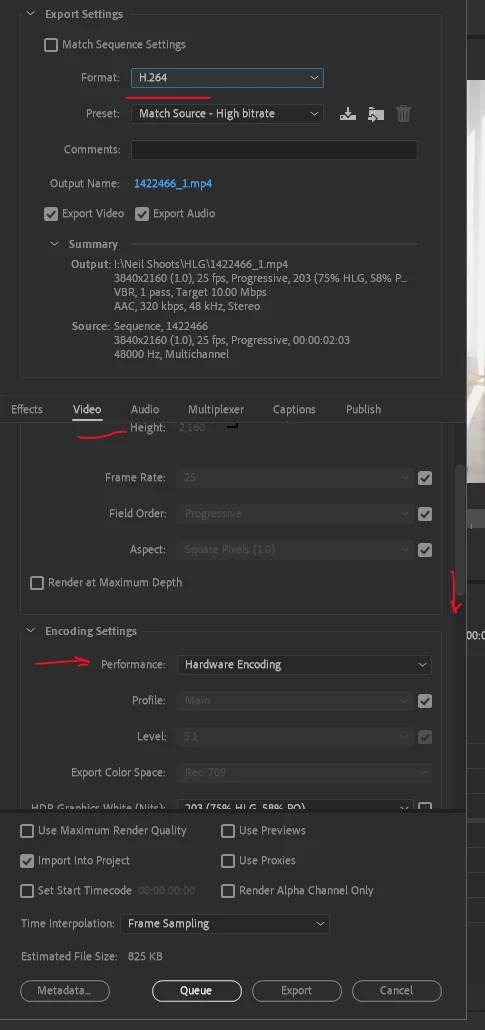
For H.264 exports, you go down to the Video tab, scroll down a bit until you get the option "Encoding Settings" ... see where mine shows "Hardware Encoding"?

RNeilHaugen_0-1640036604971.png


Just use that drop-down to change to Software Only.


You can also go into the Preferences for Premiere and Media tab of the Preferences dialog, un-check hardware encoding for H.264/HEVC files.


Neil

Translate
Adobe Employee ,
Dec 20, 2021 Dec 20, 2021

Hi Maha,

Where it says "Hardware Encoding," choose Software Encoding instead. Let us know if that works.


Thanks,
Kevin

Kevin Monahan - Sr. Community & Engagement Strategist – Pro Video and Audio
Translate
Report
Community guidelines
Be kind and respectful, give credit to the original source of content, and search for duplicates before posting. Learn more
community guidelines
Mentor ,
Dec 20, 2021 Dec 20, 2021

Thanks, it works.

Translate
Report
Community guidelines
Be kind and respectful, give credit to the original source of content, and search for duplicates before posting. Learn more
community guidelines
LEGEND ,
Dec 20, 2021 Dec 20, 2021

For H.264 exports, you go down to the Video tab, scroll down a bit until you get the option "Encoding Settings" ... see where mine shows "Hardware Encoding"?

RNeilHaugen_0-1640036604971.png


Just use that drop-down to change to Software Only.


You can also go into the Preferences for Premiere and Media tab of the Preferences dialog, un-check hardware encoding for H.264/HEVC files.


Neil

Translate
Report
Community guidelines
Be kind and respectful, give credit to the original source of content, and search for duplicates before posting. Learn more
community guidelines
Mentor ,
Dec 20, 2021 Dec 20, 2021

Thanks.

Translate
Report
Community guidelines
Be kind and respectful, give credit to the original source of content, and search for duplicates before posting. Learn more
community guidelines
Mentor ,
Dec 20, 2021 Dec 20, 2021

Do you have any idea why Software Only works?

Translate
Report
Community guidelines
Be kind and respectful, give credit to the original source of content, and search for duplicates before posting. Learn more
community guidelines
LEGEND ,
Dec 20, 2021 Dec 20, 2021

The difference between the two options is based on the hardware in your computer. If your CPU doesn't have a rather recently designed H.264/HEVC that also has the encoding bits built into the chip, then the math processing for this has to be done by "regular" computational work.


That's what "software only" means, it's using mathematical computations rather than a built-in bit of the CPU to do the computation for the encoding.


Some CPUs have the capability, many don't.


Neil

Translate
Report
Community guidelines
Be kind and respectful, give credit to the original source of content, and search for duplicates before posting. Learn more
community guidelines
Mentor ,
Dec 20, 2021 Dec 20, 2021
LATEST

Thanks for the explanation. 

Translate
Report
Community guidelines
Be kind and respectful, give credit to the original source of content, and search for duplicates before posting. Learn more
community guidelines