


Participant
November 2, 2021
Answered

Export problem selector 9 error code 3 (H.264)

  • November 2, 2021
  • 16 replies
  • 67479 views

Hi

I have problems exporting my video in H.264 in premiere pro. I get the notification 'selector 9 error code 3'.

I have a Asus Vivobook 14 with an i5 processor. Before the summer, I had never problems exporting video's to that format. Now I am not able to export it in H.264

My adobe and premiere pro are updated to the latest version. So this will not be the issue.
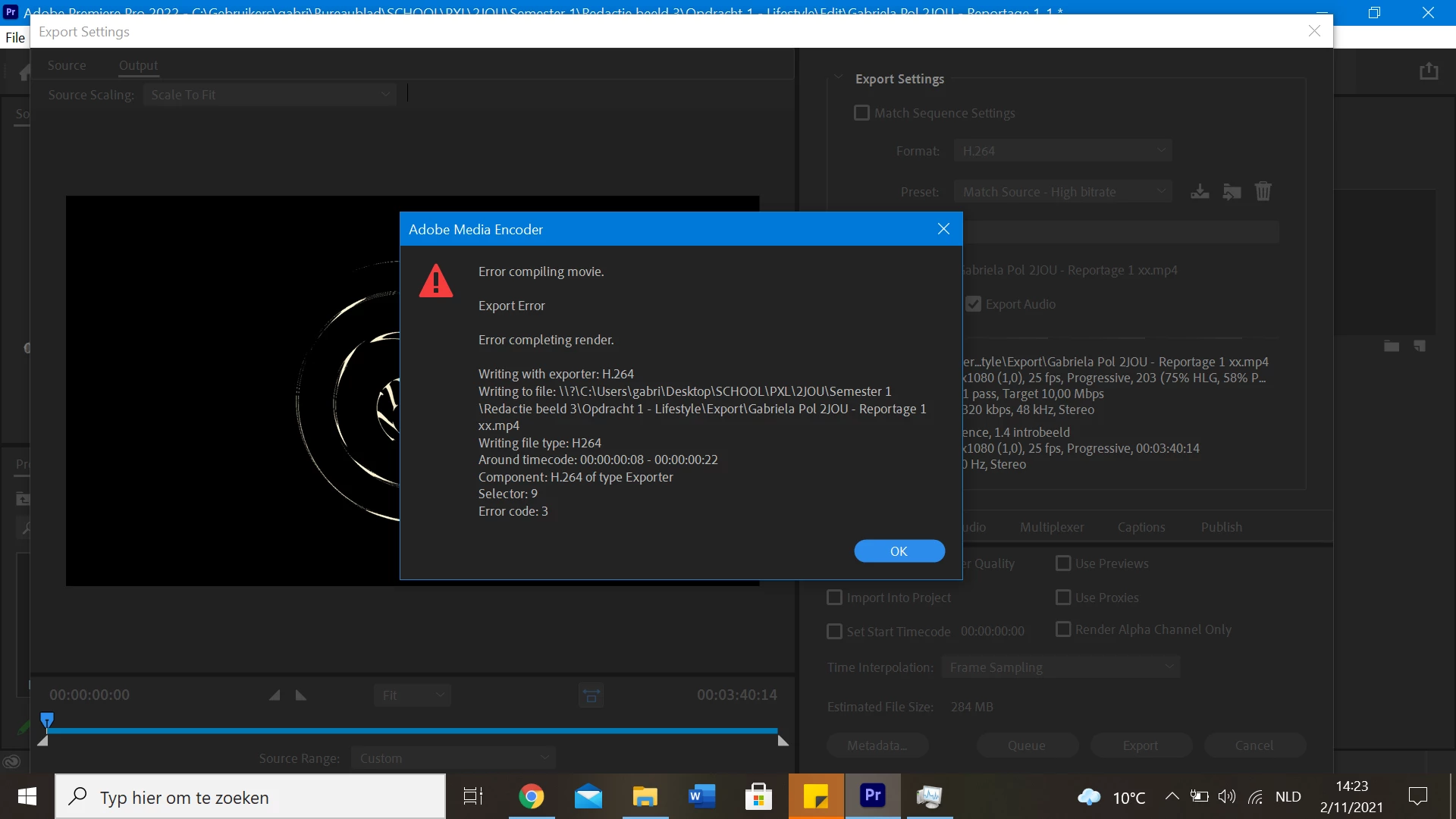
 

How do I solve this problem?

Thank you in advance!

Correct answer Joel Sheffield

As an addendum to that message, I found that when I disabled Hardware encoding, through edit>preferences>media it made the editing process impossibly slow.  So I couldn't move around in the clips easily.  My solution was to enable hardward encoding, restart the program, continue my edit, but then, before attempting to export the project, to go back to edit>preferences>media and disable hardware encoding.  This requires a restart of the program, but ok.  It works. I can then export an MP4 file.


Joel

16 replies

IslandFox
Participating Frequently
May 23, 2025

My issue was warp stabilizer glitching out. It was behaving in the buffer like it was good to go but then I went to effect controls it needed to be re-stablized. Once i restabilized export worked again.. Check your warp stabilizers!

Participant
March 14, 2025

Hi Guys,

Just had the same issue here. Premiere Pro 22.0.0 (old Mac... the latest I can run here)

After desabling all hardware acceleration, clearing media cache files, chaging the whole project to another location, creating another timeline... and every suggested solution here, I found out that the issue was in a 2 seconds cut of a .wav clip (red arrow in the attached screenshot here). The source audio file is perfect so I just deleted clip and inseted it again - the very same in-out, just identical.


boom - exported like a charm. Lost 2 hours of work trying to figure out this.

rayk76223196
Inspiring
January 9, 2025

Using Open CL worked for me.  I also had overlaping effects in 2 timelines, which caused a problem (render fail). Keep your timelines as clean and as simple as possible.

Inspiring
December 9, 2024

I know this question is from a long time ago buty I solved my issue with the Selector: 9
Error code: 4.  My c drive was full.  Made room on the drive and it processed.  I hope this helps someone.  Just wanted to put it out there.

Known Participant
November 4, 2024

this has been a constant issue in media encoder for me for the last couple of months. Something has changed in the software and they need to fix it. Setting to software only is not a solution. Not only is it unbearably slow, but it removes any GPU based effects from the clips on export which is utterly useless.

Participant
August 23, 2022

Es desesperante estar en una situaciaón que no sabemos ni que hacer, como el errror # 3 de media encoder, despues de mucho investigar, no logre solucionar el problema, siempre me pasaba con los archivos h264, estuve apunto de borrar el programa.

Pero una luz me ilumino, solucionando un problema parecido en premiere. Por lo que lo intente solucionar de la misma forma en Media Encoder. SOLUCIÓN: cuando se exporta en >ajustes preestablecidos>ajustes de exportación>panel video>ajustes de codificación>opción Codificación de Software.  Luego lo exportas normalmente y ya esta. Espero que les sirva de ayuda. Si tienen dudas sobe este tema te invito a mi perfil de instagram : @vammastudio

Participant
May 23, 2022

Sorry if answered, but I had the same error and the solution that worked for me was to Export using Media Encoder and leave Media Encoder open. I was producing multiple short clips and every clip that I tried to produce would give the same error code. So, I finally tried leaving Media Encoder open and it was like magic. It worked smooth! Good luck!

Participant
October 27, 2023

Hi Clint,


i was just reading these posts as i have the error ' error compiling movie - a low level exception occured, selector 9, error code 3. Could you take me through what worked for you? - you mentioned leaving media encoder open- im not quite sure what you mean. Many thanks in advance if you have the time to reply. hannah

Kevin-Monahan
Community Manager
Community Manager
October 27, 2023

HI @hannahf57212844,

Sorry for the error. Is it possible to take a screenshot of your error? We can help you better with that.


Thanks,

Kevin

Kevin Monahan - Sr. Community & Engagement Strategist – Pro Video and Audio
Participant
December 24, 2021

Tried switching off hardware decoding, have plenty of space, error caused by updating to 2022 seems like since was working fine on old version. SMH

Participant
December 20, 2021

If your hardware encoding doesn't work, try updating the drivers for your  graphics cards.
Aside from that, exporting with Software Encoding does circumvent the problem, as the others pointed out.

Participant
November 26, 2021

From ARGENTINA. 

I have the same problem. Error 3 in Adobe Media Encoder V.22 and Premiere with H.264 Codec.
Waiting for the NEW VERSION to be updated.
PLEASE!

Participant
May 21, 2023

Hola! Uso pr 2023, instale la version 2022 y tengo el mismo problema, hace un mes que no puedo trabajar. Encontraste la solucion?

China


Hello! I use pr 2023, I installed version 2022 and I have the same problem, I haven't been able to work for a month. Did you find the solution? 

  • Ty Chini

Kevin-Monahan
Community Manager
Community Manager
May 22, 2023

HI Erika,

I received your message and it looks like you have an unknown error for exporting footage. Is that right? Check the Warp Stabilizer effect at 6:13 in the Timeline. If you remove it, can you export then? Let us know. You may need to adjust the effect, shorten the clip, or work around the issue in another way. I hope the advice helps. 


Thanks,
Kevin

Kevin Monahan - Sr. Community & Engagement Strategist – Pro Video and Audio