


Copy link to clipboard
Copied
This seems like an easy answer, but I can't seem to figure out how to ONLY export captions (without the video).
Is there a way to export ONLY closed captioning? It takes so long to make a video with the sidecar .scc.


 1 Correct answer
Thanks guys,
These are good suggestions. It's close, but not perfect.
@Samedog, I have cuts in my captions, so I can't export my captions as one full asset.
@Jeff, thanks for this, but it wasn't quite what I was looking for, but reading the article helped me think outside the box.
Here's what I do now:
Instead of exporting a movie file and sidecar .scc file. I set the settings to export the audio only with the sidecar .scc. It still takes about a minute to export, but at least it won't take an hour
...
 6
Replies
6
6
Replies
6


Copy link to clipboard
Copied
In what form do you want the closed captions exported in? and for what purpose?
Copy link to clipboard
Copied
I'm just looking to attain a sidecar .scc file.
The purpose is for the line of work that I do. sometimes, I want to export a .scc file, but not the video. I'm sure an .scc file will take a second to export, but when you add the video, it takes like an hour.


Copy link to clipboard
Copied
Have you followed these instructions?
Copy link to clipboard
Copied
Highlight the caption in the Bin, then select File/Export/Captions.
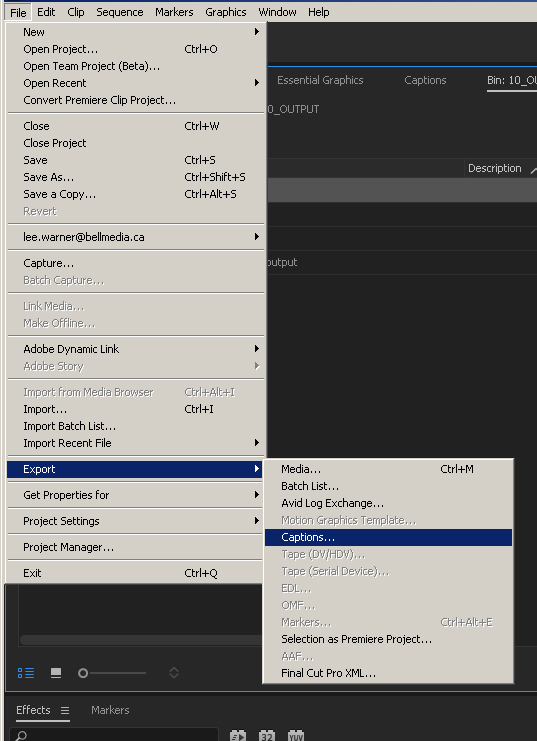
Correct answer by
NessUSF
AUTHOR
Copy link to clipboard
Copied
Thanks guys,
These are good suggestions. It's close, but not perfect.
@Samedog, I have cuts in my captions, so I can't export my captions as one full asset.
@Jeff, thanks for this, but it wasn't quite what I was looking for, but reading the article helped me think outside the box.
Here's what I do now:
Instead of exporting a movie file and sidecar .scc file. I set the settings to export the audio only with the sidecar .scc. It still takes about a minute to export, but at least it won't take an hour to export (this is the time I get for exporting the video file with it)
Thanks all!

Copy link to clipboard
Copied
Appreciate the info - but what should be done if the captions were supplied as an SCC but the start of said SCC file is not 00:00:00:00 but at the first caption instead?
Will exporting caption from the Bin not get me a file exactly the same - out of sync if aligned frame 1 to frame 1?


Find more inspiration, events, and resources on the new Adobe Community
Explore Now
 AdChoices