

Participant
January 25, 2018
Answered

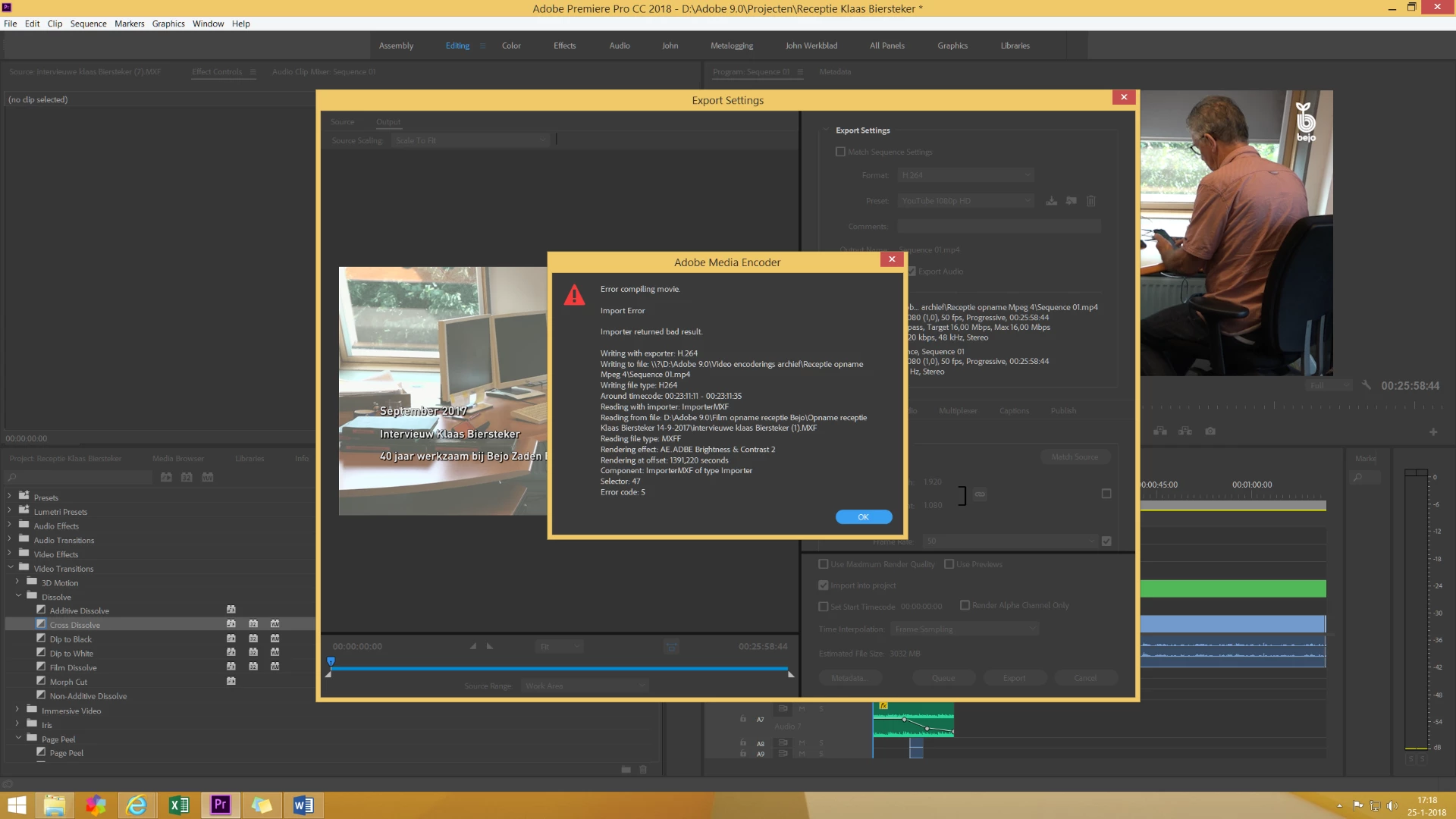
Exporting video give's error code 5

  • January 25, 2018
  • 4 replies
  • 41153 views

Januari I have updated premiere pro cc to; version 2018

Every time I try to make an export ill get an error at the same time pad, with Selector:47 and error code 5.

What do I do Wrong?
    This topic has been closed for replies.
    Correct answer gerikp

    In your error box, it says something happened "Around timecode: 00:23:11:11 - 00:23:11:35"

    Go take a look at those frames and see what is there. Perhaps it's an effect, a third-party plugin, a photo, a font? Something at that timecode is causing the error.

    4 replies

    Participant
    November 16, 2023

    I also just had this error, and discovered that my error was referencing an "Online-Only" file stored in Dropbox. Although I was not getting a "Missing Link" error, because it was not actually missing, it was giving me this error because the full file was not being linked. Once I downloaded the problem file locally from Dropbox it exported fine. Hope this helps someone else.

    Participant
    August 6, 2019

    I had the same issue. I used brightness & contrast and I got error code 5 and I solved the problem by using the Encoding so go to >file>export>media>queue and you will get your file done with no problem!

    billp68324943
    Participant
    March 3, 2019

    I have gotten the same error code.  My project involves a two camera angle multi-cam export.  I've swapped camera angles, rendered the audio separately, tried exporting the video separately - and am still getting the error with the range floating within a 1 minute time frame.  I don't have any effects or graphics at that point.  I've also substituted original camera footage in place of the multicam.  Any other suggestions I can look at?

    Thanks in advance for your guidance.

    Bill

    Inspiring
    May 9, 2019

    billp68324943  wrote

    I have gotten the same error code.  My project involves a two camera angle multi-cam export.  I've swapped camera angles, rendered the audio separately, tried exporting the video separately - and am still getting the error with the range floating within a 1 minute time frame.  I don't have any effects or graphics at that point.  I've also substituted original camera footage in place of the multicam.  Any other suggestions I can look at?

    Thanks in advance for your guidance.

    Bill

    Very similar situation that I am in. Also multicam footage

    Error report:

    "

    Export Error

    Error compiling movie

    Export Error

    Error completing render.

    Writing with exporter: H.264

    Writing to file: \\?\C:\Users\Isaac Svensson\Desktop\RMED EXPORT\RMED-.mp4

    Writing file type: H264

    Around timecode: 00;13;59;06 - 00;13;59;15

    Component: H.264 of type Exporter

    Selector: 9

    Error code: 5

    "

    Odd things happen for me:

    • No matter how I export this video, the error occurs right around the same time.
    • I've flattened the footage, swapped it, gotten rid of it. turned on and off color correction... No change.
    • I exported a .mov which worked. but it was 500+gb
    • I tried to compress that .mov and got the same error as when trying to export straight from Premiere at the same time.
    • I removed the footage and the surrounding footage and audio... Nothing in that spot left. Same error, same place.
    • I can't even thing of anything else to try except removing the new ram I put in my computer a month ago to see if that helps.
    владимирк67174371
    Participant
    June 15, 2019

    The exact same mistake I have. Multicamera (2 cameras). Export to H264. https://yadi.sk/i/bwWfsOb5mxsJyg

    bwWfsOb5mxsJyg

    What I tried out and it did not help:

    1. Saved the project to other folders and desktop.
    2. Flatten video
    3. Encode 13:50 - 14:00 and past this video in timeline
    4. Encode all audio and replace in timeline
    5. Tried to export the project in parts.
    6. Changed GPU to CPU.
    7. Prayed to satan

    Nothing helped!!!

    gerikp
    Community Expert
    gerikpCommunity ExpertCorrect answer
    Community Expert
    January 25, 2018

    In your error box, it says something happened "Around timecode: 00:23:11:11 - 00:23:11:35"

    Go take a look at those frames and see what is there. Perhaps it's an effect, a third-party plugin, a photo, a font? Something at that timecode is causing the error.

    Participant
    January 25, 2018

    Thanks for your answer. There was no picture or other graphic in the mentioned timecode. But I had an PSD logo on the total timeline from begining to the end of the timeline that gave the Error. And that was not what I had expected by the mening of the error. There was mentioned 00:23:11:11 - 00:23:11:35. By removing and replacing the logo everything worked well. Thanks.

    Participant
    November 6, 2018

    In my case it was because of frame sequence error. Also, it maybe drop frame fault.
