


- Home
- Premiere Pro
- Discussions
- Re: GPU Render Error | Nvidia GTX 1080 | Premiere ...
- Re: GPU Render Error | Nvidia GTX 1080 | Premiere ...
GPU Render Error | Nvidia GTX 1080 | Premiere Pro CC (2017)

Copy link to clipboard
Copied
Hi everybody,
Recently we switched from a Mac Pro (Late 2013) to a Windows PC.
Here are our specs:
Asus X99-A II
Intel Core i7-6900K
Asus GTX 1080 STRIX GAMING NVIDIA 8GB D5X
64 GB Corsair D432GB 2400-16
Unfortunately everytime we want to render our sequence in Premiere we get the following GPU render error
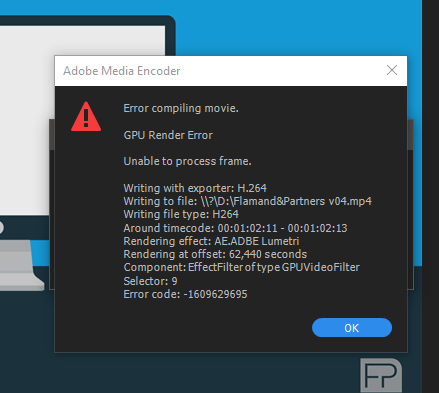

We tried rendering the sequence in 1080p or 4K.
Different formats like H264 and Quicktime. CBR, VBR 1, VBR 2, nothing really helps.
We literally tried everything.
The weird thing about this GPU error is that the point of failure is always somewhere else.
The footage we are editing is from our RED Epic-W mostly shot in 6K or 8K RAW.
Our composition is 3840 x 2160.
We used different dynaminc links between PR and AE, some with the RSMB plugin.
Setting RSMB to render by CPU instead of GPU doesn't help either.
We can render the sequence in three different parts and then combine them together.
But thats a big waste of time.
I can't imagine that one of the most popular graphic cards is not supported by Adobe.
We've run a few benchmarks to stress the GPU (FurMarck, Valley Benchmark, etc).
The GPU usage was 100% for a few hours, it stayed very cool at 57° and didn't fail at all.
Does somebody have the same problem? Any idea how can we solve this?
Thanks in advance.
Greetings,
Thibaut De Winter


 36
Replies
36
36
Replies
36



Copy link to clipboard
Copied
Similar problems I was having just went away when I upgraded to 2017 and a GTX 960. I'm very surprised you're still having this issue.
What worked when I did have the issue was turning off CUDA.
Copy link to clipboard
Copied
Thank you for the answer.
The render time goes from 25 minutes (with CUDA turn on) to 1 hour and 32 minutes with it turned off...
Do you have any other methods to fix this error?

Copy link to clipboard
Copied
Try different driver versions I have found lots of problems on my multi OS, multi Premiere version test system.
Copy link to clipboard
Copied
Thank you Bill,
We tried a few different drivers (old ones too) but we are still getting the GPU error.
Is it possible that we have a faulty card? Altho the benchmarks we tested run perfectly smooth?

Copy link to clipboard
Copied
Same issue here. ANY help would be much appreciated. I've thrown it into a new sequence, reformatted the computer, reinstalled Adobe Premiere.
It's not a problem with the CUDA supported .TXT document right? I've seen that solution in multiple places but since I have the option to enable CUDA then my GPU should be in the .TXT already.
Copy link to clipboard
Copied
There is no longer a cuda_supported_cards.txt in Premiere CC versions. It just automatically checks to see if your card has the correct characteristics. I do not have a GTX 1080 here to test but my GTX 1060's work perfectly.
Copy link to clipboard
Copied
I've also not had this issue using the 1070 or 960. Only my much older 560 Ti showed this error, and only on 2015.3, not once on 2017.
Copy link to clipboard
Copied
Thanks for the update Jim.
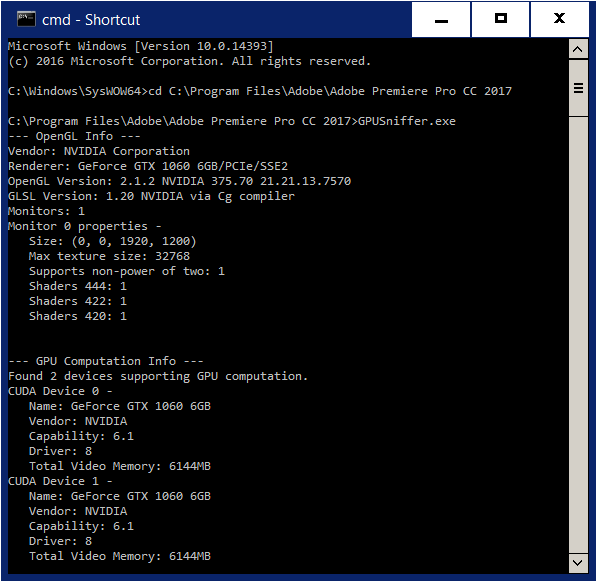
I wonder if either OP were to run GPUSniffer.exe and post the results here if it would give us any clue why this problem is popping up when you only saw it with an "obsolete" GPU. Here are my results running GPUSniffer from a Command Window with both my GTX 1060's installed.
Copy link to clipboard
Copied
More data couldn't hurt.
Copy link to clipboard
Copied
Hi Bill,
After executing GPUsniffer I got this results, hopefully you can deduce something from it.
Thanks in advance!
Copy link to clipboard
Copied
Thanks for your submission but as you could see there is nothing wrong with Premiere's recognition of your 1080. I will go back and review the whole thread on your problem.
Copy link to clipboard
Copied
How about downloading and running my PPBM benchmark and see if you get that same error to try to isolate the problem a little more..
Copy link to clipboard
Copied
Hi Jim, the results are: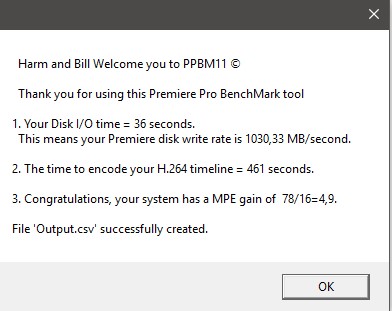
Today i tried to isolate the problem, with various test. Again without any success.
I experienced that if i open another program (Chrome or explorere) while encoding in PR of MediaEncoder, it would immediatly give me the GPU error.
Copy link to clipboard
Copied
One thing I do recall about this error was that doing anything else on the machine would often trigger it.
Copy link to clipboard
Copied
Congratulations you ran the benchmark almost perfectly. And it apparently did not throw an error.
The one score that apparently was not correct was the CPU only test of the export of the MPEG2-DVD timeline That is the 78 second number above in the results and is to small with your unoverclocked i7-6900 K, my 8core i7-5960X at 4.5GHZ score is ~250 seconds. Your GPU assisted export of that timeline with your GTX 1080 shows as 16 seconds which is very good score
I do not unerstand your score for the export of my H.264 export of 461 seconds as my similar export is about 50 seconds. Do you have Intel H.264 acceleration turned
off like this?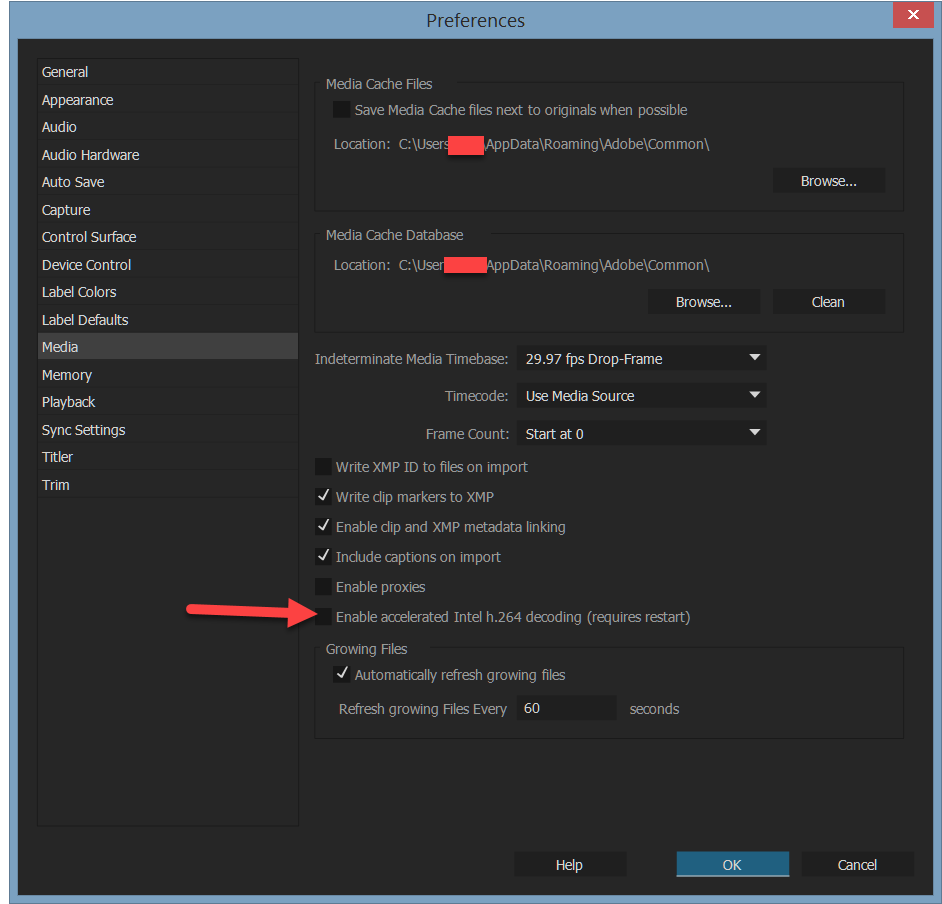
Your disk transfer rate of 1033 MB/second is great.
Copy link to clipboard
Copied
Bill, thanks once again for your time.
H264 acceleration is turned on, indeed.

Unfortunately the GPU error is still there, despite all the very interesting fixes in this topic.
Copy link to clipboard
Copied
Turn it off!
Copy link to clipboard
Copied
Bill, I turned it off (restarted PC) and re-render the sequence. Error is still there.
This time the GPU error popped up after 88%.
I thought enabling the H264 acceleration would be something positief.
Can you explain why it isn't?
Copy link to clipboard
Copied
If you are using certain Intel (built-in to the CPU chip) graphic processors then that can be used, but if you are using your CUDA GTX 1080 having that checked can cause major problems.
Copy link to clipboard
Copied
having that checked can cause major problems.
I don't believe that's still true. Every issue I was having with the Intel option checked went away in 2017. Adobe did claim bug fixes with the setting for 2017, so seeing no difference here with that option unchecked does not surprise me.
Copy link to clipboard
Copied
Thank you Jim for your comment. I noticed that in 2017 it is not checked by default but I never ran Premiere with it checked. I will have to try that here.
Copy link to clipboard
Copied
One thing I do recommend is using a single, high res monitor. If very often just works better.
Copy link to clipboard
Copied
Have you tried my Premiere Pro Benchmark (PPBM)? I have seen several GTX 1080 based systems successfully run it and submit results.

Copy link to clipboard
Copied
Know bug. Work around is
Clear cache. Save project as a different name. Close PP. Restart pc. Open different name project. Copy and paste full sequence into new sequence. Save and close pp. Restart pc. Open media encoder now try it.
Awful solution but works 100% for me.

-
- 1
- 2

Get ready! An upgraded Adobe Community experience is coming in January.
Learn more
 AdChoices