



AlexHSTL
Participant
July 26, 2023
Answered

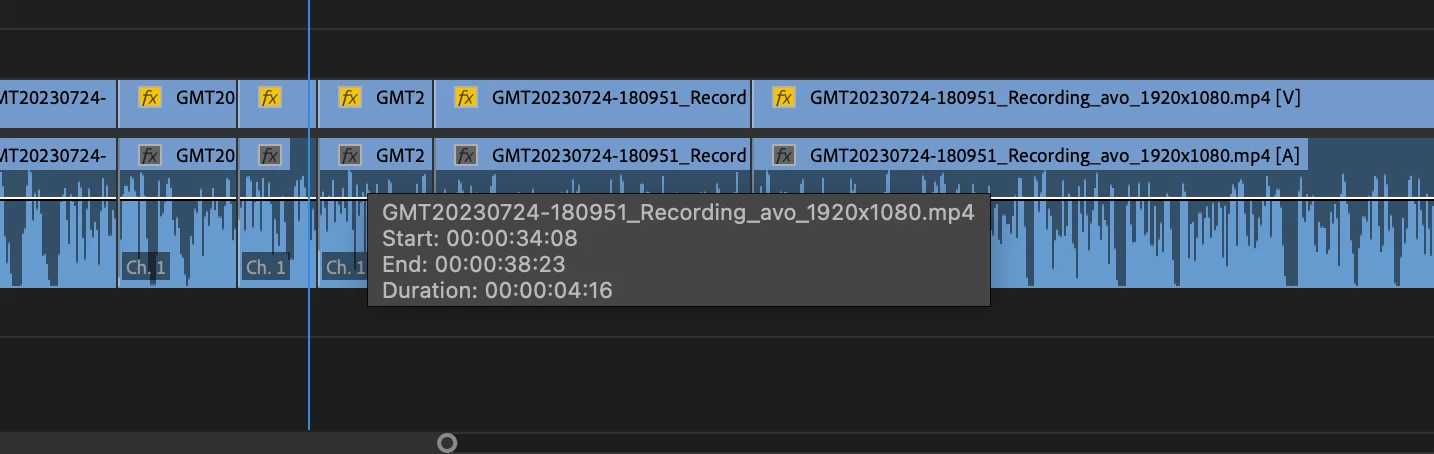
Hover Clip Info: How to turn off?
  • July 26, 2023
  • 3 replies
  • 587 views

Anyone know how to turn off this feature where the gray dialog box appears whenever the mouse hovers over a clip? I understand its use, but it's disrupting my keyboard workflow since it often covers audio waveforms and makes it harder to see cut points. Obviously it's as simple as moving my mouse, but would be nice to turn this feature off.

This topic has been closed for replies.
Correct answer Ann Bens

Unfortunately you cannot.

Make a feature request for this and I will upvote.

3 replies

AlexHSTL
AlexHSTLAuthor
Participant
July 26, 2023
Cutter61
Participating Frequently
July 26, 2023

I will also upvote.

Dan MonroDMONRO, LLCMac Studio (2023) M2 Max, 64gRAM, Currently running Ventura 13.7.2, Premiere 25.1.0 (73) & Beta 25.2.0 (68)MacbookPro (16-inch,2021) M1 Max, 64gRAM - Currently running Sonoma 14.6.1, Premiere 24.4 (62) & Premiere 25.1.0 (73)iMacPro (2017) 3ghz 10-core Intel Xeon W, 64gRAM, Radeon Pro Vega 64 16g - Currently running Ventura 13.6.1 Premiere 23, 24 & 25 & Media Composer 2023.3.1Homemade PC IntelCore i9 3.6ghz, 64gRAM, NVIDIA GeForce RTX 2080 Super - Currently running Windows 10 Pro 2004 & MC 2020.12
Ann Bens
Community Expert
Ann BensCommunity ExpertCorrect answer
Community Expert
July 26, 2023

Unfortunately you cannot.

Make a feature request for this and I will upvote.