
Inspiring
May 17, 2022
Answered

How do I edit 7 videos, generally?

  • May 17, 2022
  • 1 reply
  • 398 views

Hello, just wondering how the video editing workflow generally goes?


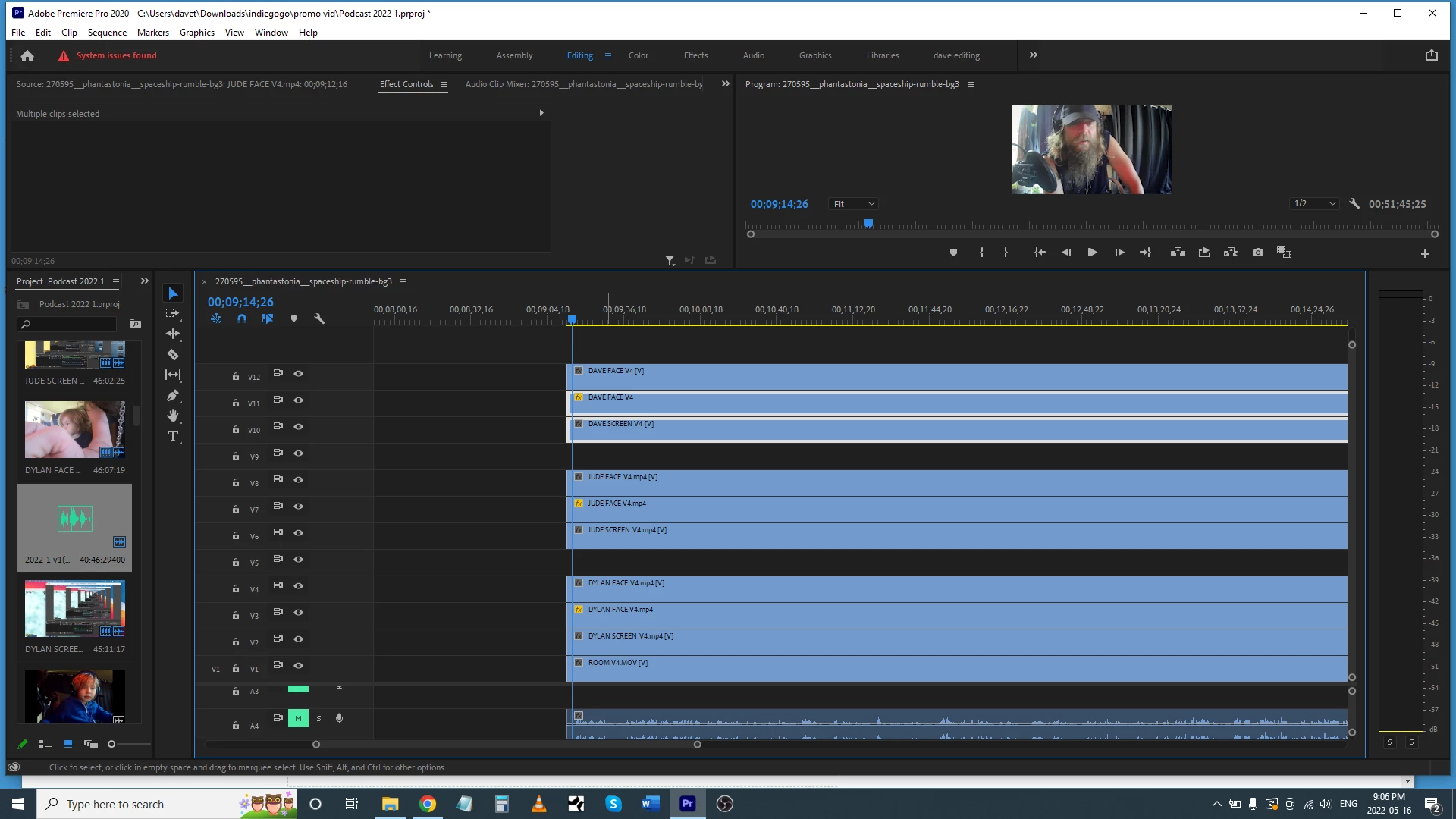
I've got 7 podcast face videos I want to edit so it shows whoever is talking (it shows 10 in the screenshot, because I have copies of each face vid overlaying their computer screen recording for their gameplay).  


I was wondering, how do I view the bottom video without having to hide (the slashed eyeball) the other 9 video channels?  Is there an easy way to do that?   Because with the other 9 not hidden, I only see the top video.


And to edit the 7 videos, do I have to cut out all of the videos except for the one I want to see?  Is there an easy way to do that?   (My background is audio mixing, and in studio one, if you have 'layers' (different takes) you can highlight the sections of each layer you want to have heard on the track, and it puts it up in the track.  Anything like this available?)
 

This topic has been closed for replies.
Correct answer Dave_DIR

Hi Kevin, thank you very much. I hope it works out as magically as all that! I'll try it tonight. I had manually synced up the clips with the sound, but not accurately, as the waveforms and the zooming ability is not as accurate as a digital audio mixing program.  The multicam sequencing function looks ideal.


Two more questions:


Is this multicam function standard on video editors? I'm just on the trial, and was going to try the DaVinci one after this.


Does the multicam sequencing work with video clips that are grouped? I have two videos that are grouped, a facecam on top of the screen recorder cam.


Thank you again

1 reply

Kevin-Monahan
Community Manager
Community Manager
May 17, 2022

Hey Dave,

You want to edit a multicam sequence. Here you go.


I hope it helps.


Thanks,
Kevin

Kevin Monahan - Sr. Community & Engagement Strategist – Pro Video and Audio
Dave_DIRAuthorCorrect answer
Inspiring
May 17, 2022

Hi Kevin, thank you very much. I hope it works out as magically as all that! I'll try it tonight. I had manually synced up the clips with the sound, but not accurately, as the waveforms and the zooming ability is not as accurate as a digital audio mixing program.  The multicam sequencing function looks ideal.


Two more questions:


Is this multicam function standard on video editors? I'm just on the trial, and was going to try the DaVinci one after this.


Does the multicam sequencing work with video clips that are grouped? I have two videos that are grouped, a facecam on top of the screen recorder cam.


Thank you again

Kevin-Monahan
Community Manager
Community Manager
May 18, 2022

Hey Dave,

You're welcome. Yes, most NLE software has a multicamera editing function. I'm not sure what you're asking in the second question. In NLE programs, clips are grouped in some fashion (in Premiere Pro, it's nesting that groups them. In Avid, you create a "group clip" for the clips). Come back with more questions or to clarify if you like.


Thanks,
Kevin

Kevin Monahan - Sr. Community & Engagement Strategist – Pro Video and Audio