Exit
  • Global community
    • Language:
      • Deutsch
      • English
      • Español
      • Français
      • Português
  • 日本語コミュニティ
  • 한국 커뮤니티
0

How to add all my files in a new Sequence ? (Script)

New Here ,
Feb 21, 2021 Feb 21, 2021

Hi ! I have a script :

This script download all my clips and import in my project (THIS PART IS DONE). 

Code :


function addFile(path) {
	app.project.importFiles([path], true, app.project.getInsertionBin(), false);
};


 Now when i finish this task (up all my videos in the projet). I have a new button (compose). I want to create a new sequence when i click them, and next i need to add clip by clip in this sequence ... how can i do that ? 

I can create sequence but after that i don't found a solution to add all imported clip in this sequence 😞


Thank for Help !


(PS : i'm french, sorry for this crappy english x))

 

TOPICS
Editing , How to , SDK , User interface or workspaces
412
Translate
Report
Community guidelines
Be kind and respectful, give credit to the original source of content, and search for duplicates before posting. Learn more
community guidelines

correct answers 1 Correct answer

Adobe Employee , Feb 22, 2021 Feb 22, 2021

You would use the insertClip() function, demonstrated in PProPanel.

Translate
Community Expert ,
Feb 21, 2021 Feb 21, 2021

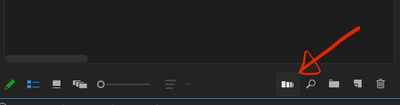
Screenshot 2021-02-21 at 20.27.45.png

Use the Automate to Sequence button - select your clips first.

Translate
Report
Community guidelines
Be kind and respectful, give credit to the original source of content, and search for duplicates before posting. Learn more
community guidelines
Community Expert ,
Feb 21, 2021 Feb 21, 2021

If you can this in a script you will have to wait for @Bruce Bullis 

Main while. select all clips in the project panel and drag them to the New Item Icon.

The order the clips are placed on the timeline depends on the way the clips are selected in the project panel.

Translate
Report
Community guidelines
Be kind and respectful, give credit to the original source of content, and search for duplicates before posting. Learn more
community guidelines
Adobe Employee ,
Feb 22, 2021 Feb 22, 2021
LATEST

You would use the insertClip() function, demonstrated in PProPanel.

Translate
Report
Community guidelines
Be kind and respectful, give credit to the original source of content, and search for duplicates before posting. Learn more
community guidelines