


Inspiring
May 25, 2016
Answered

How to enable NodeJs for HTML5 Panels

  • May 25, 2016
  • 3 replies
  • 9954 views

Hi All,

We are trying to implement downloading assets from url, in our Premiere pro Panel.

From the premiere pro sdk forum we came to know that by using NodeJs we can implement this feature(Downloading file with NodeJS in CEP extension )

Also we have gone through the github sample Nodejs.html (Samples/Nodejs.html at db6086245ee6b64466710056f60ca324fce12880 · Adobe-CEP/Samples · GitHub )

Here is the code and Panel screenshots:

function isNodeJSEnabled() {

  if (typeof(require) !== 'undefined') {

  $('#result').val("Node.js is enabled");

  } else {

  $('#result').val("Node.js is disabled");

  }

  }
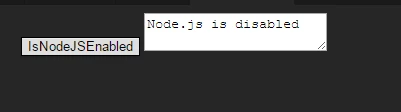
But when we run the code from our panel, we are getting the message  "Node.js is disabled".

We have added the following values in manifest file

<CEFCommandLine>

  <Parameter>--enable-nodejs</Parameter>

  </CEFCommandLine>

Downloading file with NodeJS in CEP extensionBut still we get the same result. "Node.js is disabled"

We are testing the panel in Windows 7,Adobe Premiere pro CC 2015.2 (9.2.0(41))

What are the steps we need to take care in-order to enable NodeJs in our panel?

Thanks and Regards,

Anoop NR

This topic has been closed for replies.
Correct answer Bruce Bullis

Davide Barranca's blog post is authoritative: HTML Panel Tips #19: CC2015.1 (CEP6.1) Node.js Fixes | Photoshop, etc.

3 replies

Thomas_Szabo
Inspiring
September 14, 2016

please check your 2nd line of your manifest.xml. It should say:

<ExtensionManifest Version="6.0" ExtensionBundleId="com.adobe.Test_Premiere01" ExtensionBundleVersion="1.0.1" ExtensionBundleName="Test_Premiere01" xmlns:xsi="http://www.w3.org/2001/XMLSchema-instance">

That will give you node.js. Have fun

Premiopolis
Inspiring
September 14, 2016

Sure enough, spot on solution.  Thanks Thomas for taking the time.

I've been looking to learn NodeJS since first hearing about it but never made the time.

Adobe plus Node.  Brilliant.

Thanks a million.

Inspiring
May 25, 2016

In addition, if you're going to use the Chrome debugger, the Adobe stuff has busted it in CC 2015.1 forward
Consult this issue thread for extra answers: Chrome Debugger scrolling is broken with CC 2015.1 update · Issue #35 · Adobe-CEP/CEP-Resources · GitHub

Bruce Bullis
Community Manager
Bruce BullisCommunity ManagerCorrect answer
Community Manager
May 25, 2016

Davide Barranca's blog post is authoritative: HTML Panel Tips #19: CC2015.1 (CEP6.1) Node.js Fixes | Photoshop, etc.

Premiopolis
Inspiring
August 31, 2016

I gave this a shot from a panel in Premiere Pro and was unsuccessful.

require("http") returns the following error: ReferenceError: require is not defined

I've got

     <RequiredRuntime Name="CSXS" Version="6.0" />

in the manifest in the <RequiredRuntimeList> tag

and

  <Parameter>--enable-nodejs</Parameter>

  <Parameter>--mixed-context</Parameter>

in the <CEFCommandLine> tag

Using a panel under Premiere that's otherwise working fine.

Using Premiere Pro CC 2015.3

Any ideas?

Bruce Bullis
Community Manager
Community Manager
September 14, 2016

What is <Parameter>--mixed-context</Parameter> doing?


That's for CEP7 apps.

(Thomas' advice is excellent.)