Wallison1
Participant
June 19, 2020
Respondido

How to fix "a low level exception occurred in: DeviceController:4"

  • June 19, 2020
  • 21 respostas
  • 42291 Visualizações

Last night I upgraded the Premiere for the last version and this message started to happen when I tried to edit a video. 

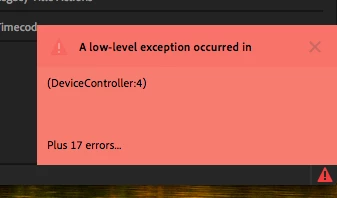
"A low level exception occurred in: DeviceController:4"


The screeshoot below shows the error
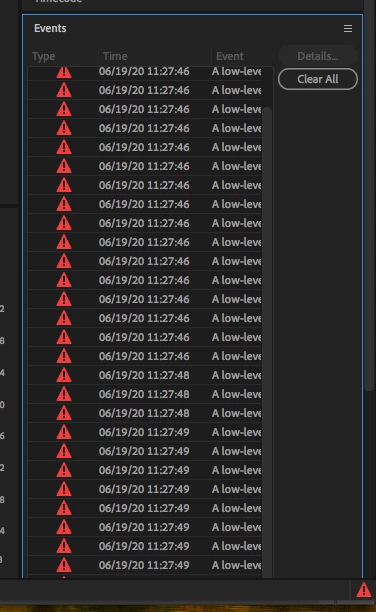
 

Now I can't add titles or do many things.


Tried some things like this and didn't work. 

https://community.adobe.com/t5/premiere-pro/how-to-fix-quot-a-low-level-exception-occurred-in-h-264-exporter-4-quot-please/m-p/11148457#M272520


Can somebody help me?

Este tópico foi fechado para respostas.
Melhor resposta por Mitch W

The issue only occurs in 10.13.6 and happens anytime the preferences are touched. It's irratating, but otherwise harmless. Update the Mac OS to resolve.

21 Respostas

Participant
June 30, 2020


Hi

You just have to enter the "Preferences" select Device Control and choose "Devices" None. The problem should be solved immediately.


Participant
July 3, 2020

You just have to enter the "Preferences" select Device Control and choose "Devices" None. The problem should be solved immediately.

------------------------------------------------------------------------------------


-- Thanks, I dont know why changing this setting in Premier fixed my Media Encoder Issue where it would distort/glitch the video it was rendering but it worked.


I am using Adobie 2020 with Mac OS High Sierra 10.13.6

mich777
Participating Frequently
July 20, 2020

Thank you!  I was having this issue on Friday after updating.  Crashed all day under deadline until I finally got my cut out!  I am on a mid 2017 imac with 10.13.6 

Also titles not working properly either.  I spent hours with Adobe's tech support removing the old CC apps and putting it all back together again.  This is super frustrating because I had the older versions loaded for other clients who have not updated in house.  Now I still have to figure out how to get the old versions of Adobe back.

Super frustrating.  Wish I had looked on this thread first. 


I hope this fix works!

Known Participant
June 30, 2020

Same problem after update to 14.3 on Mac OS 10.13.6. Supper laggy playback (worse than "normal" pp lag), often just a black screen indefinetly, and this low-level exception error. Another update, another-show stopper bug.


System requirements page says "macOS v10.13 or later" for both required and reccomended. If indeed "10.14 is probably where you want to be for 14.3" then update the recomended system requirements. Or... you know, test this stuff. We all uncovered this issue within seconds of upgrading. You have a whole department that tests releases. Right?


Either way, respectfully, get it together.


Until then, luckily there is a workaround:

File - > Export Final Cut Pro XML

Open in Resolve or FCP


Kevin J. Monahan Jr.
Community Manager
Community Manager
June 26, 2020

Wallison1,
I am so sorry for your frustration. I can see that you are not alone in getting this error. I suspect it is a bug related to your OS. Everyone on this thread is running macOS 10.13. Is it all possible to update your OS or test on another machine running macOS 10.14? I'd say 10.14 is probably where you want to be for 14.3. It is running perfectly here in my home in San Francisco on 10.14. Try it if you can. Sorry again for the issue.

Thanks,
Kevin

Kevin Monahan - Sr. Community and Engagement Strategist – Adobe Pro Video and Audio
FriNightCooking
Participant
June 26, 2020

I am unable to upgrade to 10.14 on my Mac.  So that isn't very helpful (for me).  The rollback version for Premiere was super helpful.  Thank you.

FriNightCooking
Participant
June 26, 2020

I'm having the same issue after upgrading.  And, consistently can repro the error...

- Switching Video Rendering and Playback to Software Only [Project Settings] did nothing.

- I do not use any type of capture card.  All my video is shot on high end cameras and imported from memory cards.

- Also, and probaby the most important, I can also trigger the error every single time by just trying to rename a seqence in the project panel.  Every time!


 PLEASE HELP!  I would love for you to fix this, but this is more than rediculous at this point, Adobe. 

At other creators recommendations, I'm downloading DaVinci Resolve and exploring alternatives as I have not choice if I wish to stay in business.

Participant
June 26, 2020

I am not seeing this error until I go to open a menu. Such as Preferences>Genreal or Edit>Project Settings>.
When I first open up it is fine until I start opening menus, then I get the same error. I can duplicate the error EVERY TIME when I open Premier Pro>Preferences>General. Not sure why...


System:  Imac (Retina 5k, 27 Inch, 2017)
macOS:  High Sierra v. 10.13.6
CPU:      3.8GHz Intel Core i5
RAM:    OWC 2x16GB 2400MHZ DDR4 SO-DIMM PC4-19200
              Apple 2x8GB   2400MHZ DDR4 SO-DIMM PC4-19200
Storage: 2.12TB Fusion Drive
Adober Premiere Pro v. 14.3

Participating Frequently
June 25, 2020

try disabling preferences / playback / enable mercury transmit. That did it for me

Participating Frequently
June 26, 2020

unfortunately did not solve it for me..

brendan42069333
Participating Frequently
June 24, 2020

Samezies 


I'm on an iMac 

Adobe Premiere Pro 14.3.0 (build 38)

MacOS 10.13.6 High Sierra

no peripheral capture cards or anything extra in use now

all CC apps are up to date


This issue interfered with my export of a linked AE comp, through Media Encoder, defaulting to the video content that was on the timeline hours ago, before I had done a "replace with After Effects composition" and created motion graphics in AE. 

Manually reimporting the AE comp and putting it on the PR timeline worked but that's a dumb extra step. 

Participating Frequently
June 22, 2020

Having the same problem, 

Adobe Premiere Pro 14.3.0 (build 38)

MacOS 10.13.6 High Sierra

no peripheral capture cards or anything else


posting here so that I am notified when the problem gets solved

Known Participant
June 23, 2020

I have the same version of PP and the same OS!  I’m using a 2016 MacBook Pro.


Known Participant
June 22, 2020

Hi,


I'm getting the same error message. My Premiere Pro automatically updated recently. It's version 14.3.0. Do you know what the problem means and how I can fix it?

Participating Frequently
June 26, 2020

I have the exact same issue. nothing helps. Exasperated. 

Known Participant
June 29, 2020

I've updated to OS 10.15.5 and I think the problem is now resolved. 

Community Manager
June 19, 2020

Hi Wallison1,


Sorry to hear about this. Are you experiencing this after updating to Premiere Pro v14.3? Also, please attach a screenshot of the Control Surface, Device Control, and Playback preference window in Premiere Pro.


Thanks,

Sumeet

Participant
June 20, 2020

Hi Sumeet-

I have no idea what happened but my error messages have stopped appearing.  Please lmk if by them disappearing I can somehow help others with this issue.

Thanks,

Andrea


Ann Bens
Community Expert
Community Expert
June 19, 2020

Wallison1

Please answer the question: Do you have a capture card or something simular.

Wallison1
Participant
June 19, 2020

Just found out that is Gráficos HD Intel® 3000.

It need to be at least one of this to work fine.


Well thank you anyway.