


Exit
  • Global community
    • Language:
      • Deutsch
      • English
      • Español
      • Français
      • Português
  • 日本語コミュニティ
  • 한국 커뮤니티
2

Inconsistent text (Arabic)

Guest
Jan 02, 2024 Jan 02, 2024

I have encountered an issue when using Amiri Arabic font downloaded via Creative Cloud.


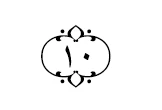
When using the font in Photoshop, the text is rendered correctly. However, when using the same font in Adobe Premier Pro, it is rendered incorrectly.

Text in unicode: (\06DD\0661\0660)


Photoshop 2023 (correct, text inside the symbol):
kjl31798958r6xo_2-1704257635453.png

Premier Pro 2023 (incorrect, the text is outside the symbol):

kjl31798958r6xo_6-1704258274917.png


Is there any specifc setting that I have to enable/disable in premier pro in order for this to work?


TOPICS
Effects and Titles , Error or problem , How to
1.2K
Translate
Report
Community guidelines
Be kind and respectful, give credit to the original source of content, and search for duplicates before posting. Learn more
community guidelines

correct answers 1 Correct answer

Adobe Employee , Jan 04, 2024 Jan 04, 2024

Hi -

This behavior is controlled by a combination of Contextual Alternates and kerning settings in PS. It will work in PS if you have the "Contextual Alternates" option on in the Character palette and you leave the kerning as Metrics, then the digits will be placed inside the End of Ayah. If either of these is not set, then the digits will be placed after. I added a screenshot of the Contextual Alternates button in the PS Character palette for reference (the CA button is the "o" with wings).
Unfo

...
Translate
Guest
Jan 02, 2024 Jan 02, 2024

I uninstalled both programs and reinstalled them after selecting "English يدعم العربية" from the dropdown menu in Creative Cloud profile settings. However, now both programs are broken, both Photoshop and Premier Pro are rendering the text outside the symbol.

Translate
Report
Community guidelines
Be kind and respectful, give credit to the original source of content, and search for duplicates before posting. Learn more
community guidelines
Community Expert ,
Jan 04, 2024 Jan 04, 2024

On my side, it works well inside of Photoshop, Illustrator, and After effects (all 2024 latest builds). In Ps, I've added the special character from the Glyphs panel and typed the numbers, Ps (also AI and Ae) inserted the numbers automatically for me inside that special character:

test arabic.png

Sadly, this process didn't work in Premiere (I used copy-paste between Ps and Pr), it looks like Pr doesn't have this kind of advanced text features that are supported by print and design software:

Pr test.png

Translate
Report
Community guidelines
Be kind and respectful, give credit to the original source of content, and search for duplicates before posting. Learn more
community guidelines
Adobe Employee ,
Jan 04, 2024 Jan 04, 2024

Hi @Deleted User ,

Thanks for writing in with this problem. Looks frustrating. I'm hoping Adobe Community Expert, Ali Jaber can assist. Ali can you take a look? @Ali Jaber.


Thanks,
Kevin

Kevin Monahan - Sr. Community & Engagement Strategist – Pro Video and Audio
Translate
Report
Community guidelines
Be kind and respectful, give credit to the original source of content, and search for duplicates before posting. Learn more
community guidelines
Adobe Employee ,
Jan 04, 2024 Jan 04, 2024

Hi -

This behavior is controlled by a combination of Contextual Alternates and kerning settings in PS. It will work in PS if you have the "Contextual Alternates" option on in the Character palette and you leave the kerning as Metrics, then the digits will be placed inside the End of Ayah. If either of these is not set, then the digits will be placed after. I added a screenshot of the Contextual Alternates button in the PS Character palette for reference (the CA button is the "o" with wings).
Unfortunately, we do not currently expose this option in Pr, so there is no way to access Contextual Alternates.


Mike


Translate
Report
Community guidelines
Be kind and respectful, give credit to the original source of content, and search for duplicates before posting. Learn more
community guidelines
Community Expert ,
Jan 04, 2024 Jan 04, 2024
LATEST

Thanks for the clarification, looking to have the Contextual Alternates option in Pr in the near future...

Translate
Report
Community guidelines
Be kind and respectful, give credit to the original source of content, and search for duplicates before posting. Learn more
community guidelines