


- Home
- Premiere Pro
- Discussions
- Re: Installing Encore In New Computer
- Re: Installing Encore In New Computer

Copy link to clipboard
Copied
Hello Everyone.
I purchased a new computer, and I have Signed Out the Creative Cloud, from my other computer. I have installed my Creative Clouds Apps such as Premiere Pro, and others, How can I Install the Encore. I remember the Latest version was Encore CS6. Also there are some additional files I may have to Install. Would you please let me know to to Install them.
Thank you very much.


 1 Correct answer


This is the link for info re using Encore CS6 with CC:
http://helpx.adobe.com/encore/kb/encore-cs6-installed-cc.html
You must install the library separately. See the link on that page for instructions. Some users (including my tests) have had trouble getting the download to complete.
And, the link on that page to the "using" Encore with CC tutorial (Using Encore CS6 with PremierePro CC « DAV's TechTable) is broken. It is here:
http://blogs.adobe.com/davtechtable/2013/05/using-encore-cs6-with-premierepro-cc.html

 11
Replies
11
11
Replies
11

Copy link to clipboard
Copied
This is the link for info re using Encore CS6 with CC:
http://helpx.adobe.com/encore/kb/encore-cs6-installed-cc.html
You must install the library separately. See the link on that page for instructions. Some users (including my tests) have had trouble getting the download to complete.
And, the link on that page to the "using" Encore with CC tutorial (Using Encore CS6 with PremierePro CC « DAV's TechTable) is broken. It is here:
http://blogs.adobe.com/davtechtable/2013/05/using-encore-cs6-with-premierepro-cc.html
Copy link to clipboard
Copied
Dear Stan.
Thank you very much, Ok, I am Installing the Premiere Pro CS6, From my creative clouds, and I am Downloading the following files:
Encore Content English File Size 1.7 Gig, and also Premiere Pro CS6 Content File Size 734 MB. These are my questions please:
1- I Uninstalled the Premiere Pro CS6, from Add/Remove Programs, Do I need to Install the Premiere Pro CS6 Content Files?
2- I have 512Gig SSD C Drive, and I have Two 2TB Hard Drives, Drive D and Drive E. I have Installed All my apps In the SSD C Drive, and All my files are in my E And D Drive that are each 2TB Regular Hard Drives. I have set up my system so If I add any files In my Desktop, it shows that they are from my D Drive, Therefore, my C Drive the SSD Drive is not getting filled up.
I noticed Encore Content files are almost 2Gig, can I installed them In my D Drive not my C The SSD Drive ?
3- When I open my Creative Cloud Apps, I do see the Premiere Pro CS6, Even though I have Uninstalled It from the Add/Remove Programs
I use Encore to Archive my favorite movies, and I think Its a wonderful program, and I don't know why Adobe Is not adding it to the Creative Cloud
Thank you very much for your help.

Copy link to clipboard
Copied
same problem here ! can't instal encore
Copy link to clipboard
Copied
Start a new thread and describe what you did. You install PR CS6 from the cloud desktop. Then keep PR CS6 or uninstall it. If you uninstall it, do so from the cloud.
Copy link to clipboard
Copied
Dear Stan.
I don't see the Premiere pro CS6 In my Creative Clouds. When I open Encore the program works, but no Library is available. I have downloaded the Zip file name Encore Content English, and there is on white color file there name: en-US.7z. I copied that file to my D Hard Drive and I created a folder name Encore Library, and Inside Encore Preferences, I selected that folder, still no Library is available. I think somehow I have to extract that en-US.7z file. would you please help me
Thanks.
Copy link to clipboard
Copied
On this page:
Missing library, templates, template projects in Adobe products
Go toward the bottom to "Additional solution: Install the Resource Central library content"
In a box below that you will see a link to download 7 zip.
Inside you will find some folders. One of them "library." INside library you'll see folders "corporate," "education," etc. Place those folders in the library folder you created.
Copy link to clipboard
Copied
Dear. Stan.
I have already Downloaded the 7 zip, and extracted the Encore Zip folder. It is extracted to one single file, I copy pasted into a folder in my D Drive. Inside Encore Preferences /Media/ Location/.. I Browsed my D Drive Folder. but nothing happening. I have also changed file locations and copy pasted into C:Program files/Adobe Encore/Preset, and still nothing happening.
UPDATED:
I found the Encore Library files In my older computer: They are as follow: Library, main, Styles, support,Template.
I have copy pasted all these folders in the folder that I created Inside my D Drive, I Opened Encore, Inside Encore Preferences /Media/ Location/.. I Browsed my D Drive Folder, and I selected the Library folder. Now, I do see the Library Contents, and the Styles, But nothing If I click on Library Toggle display of Images, Nothing shows
Copy link to clipboard
Copied
This should work. The files must be in the original folder structure.

Yes, you point Encore to the folder "library." The other library folders must be under that.

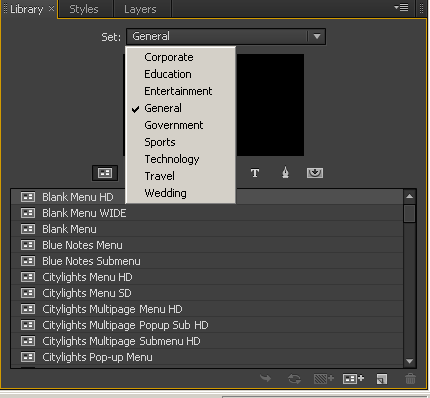
Also be sure that in Encore, you are in the library tab, and that you know which type of file you are selecting.

You can only have one library folder open at a time (General, Corporate, etc).
Copy link to clipboard
Copied
Dear. Stan.
First Of All, Thank you very much for your help, I appreciate it very much.
I think everything is working fine, except, Inside the menu: When I click on main, Styles, Support Files, Template, nothing comes up.
Also, clicking on Toggle Display of Images, and Toggle Display of buttons, nothing comes up. Toggle between Images only works for General. Here is the screen-shot of my folders.

Copy link to clipboard
Copied
See my post 9, first screenshot. Those are the ONLY folders that should be in your library.
The other folder are not Library. We'll comeback to those after we are sure the library is working.
If you select "Corporate" for the library set, can you toggle?
Copy link to clipboard
Copied
You only need the EncoreContentEnglish.zip. This unzips to a .7z, which unzips to a 3.67gig folder with 4 directories. You only need the library.
You can put the library anywhere you want (not like some of the Adobe files). Point encore to it using the preferences.
Did the PR uninstall give you the option of keeping EN?


Get ready! An upgraded Adobe Community experience is coming in January.
Learn more
 AdChoices