


Participating Frequently
July 22, 2024
Question

INVISIBLE PLAYHEAD

  • July 22, 2024
  • 4 replies
  • 420 views

Hi everyone,


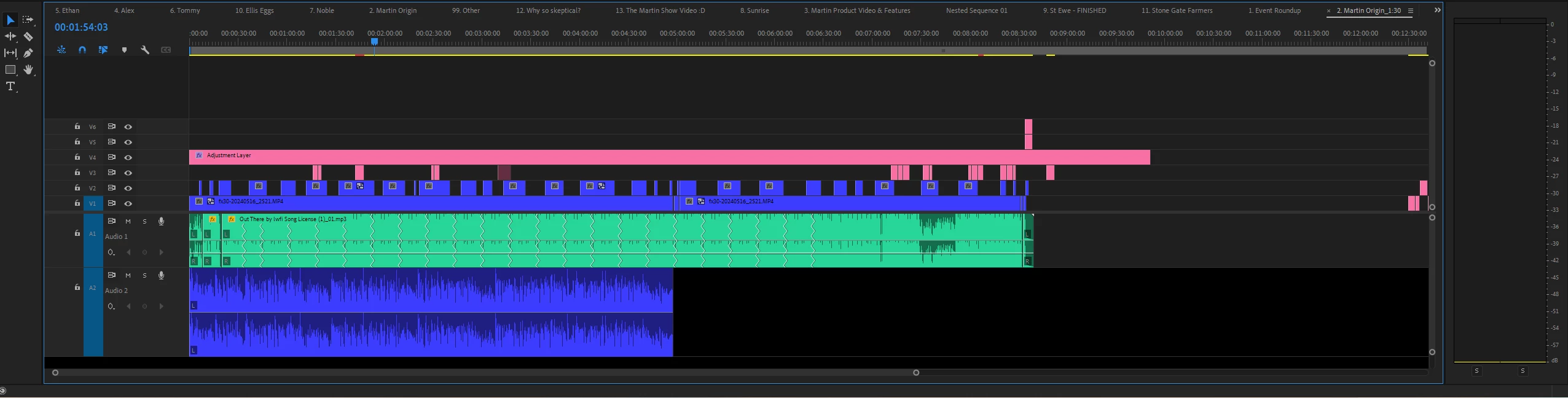
Has anyone experienced this as well? The playhead is invisible as well as half of the audio. I tried to look for answers on YouTube but nothing has worked. Please see the attached screenshot of my timeline.


I am hoping for all your responses! 


Thank you!


This topic has been closed for replies.

4 replies

MyerPj
Community Expert
Community Expert
July 22, 2024

Oh, I was going to suggest you clear your cache as a next step you may want to do anyway. I do every time there is an update to PP. Hold down shift as you start PP, then check to appropriate box...

MyerPj
Community Expert
Community Expert
July 22, 2024

Great! Glad you got it. 🙂

MyerPj
Community Expert
Community Expert
July 22, 2024

That is definitely a disappeared time indicator. (but I love the effect you have going where the audio waveform just appears as he speaks! 🙂 )


Do try a brand new project and let us know. You could also make a copy of your project and close all those open tabs on the timeline and see if that helps.

julscabAuthor
Participating Frequently
July 22, 2024

Hey, I created a new project file and tried to copy and paste the footage and music to the new timeline, but the problem is still there. I don't know what to do now. 

Averdahl
Community Expert
Community Expert
July 22, 2024
quote

Hey, I created a new project file and tried to copy and paste the footage and music to the new timeline, but the problem is still there. I don't know what to do now. 


By @julscab


It looks like a screen-redraw issue. Make sure that you use the latest Studio Driver from https://www.nvidia.com/Download/index.aspx if you have a Nvidia graphic card.


If nothing changes, try to reset the current workspace in Premiere Pro by going to Window > Workspaces > Reset to Saved Layout

MyerPj
Community Expert
Community Expert
July 22, 2024

Strange! Can you try a brand new project, with just a few clips (or even just one). Don't have multiple projects open, just the new one.


julscabAuthor
Participating Frequently
July 22, 2024

Thanks for your response! I apologize for forgetting to mention that I'm using Lucidlink for this project.