


- Home
- Premiere Pro
- Discussions
- It's baaaack: Loading ImporterQuickTime.prm
- It's baaaack: Loading ImporterQuickTime.prm

Copy link to clipboard
Copied
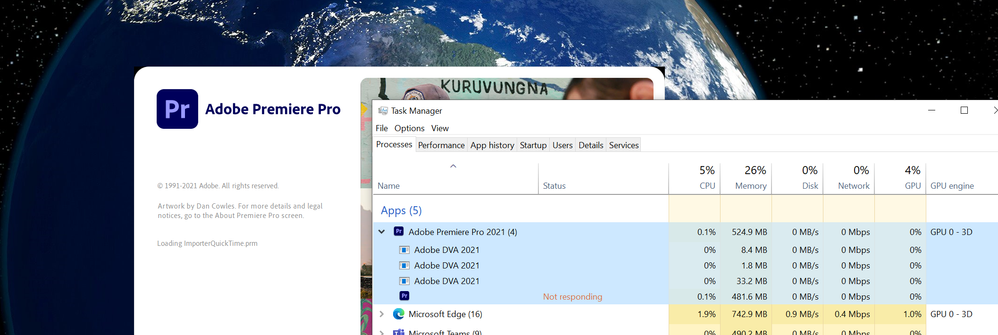
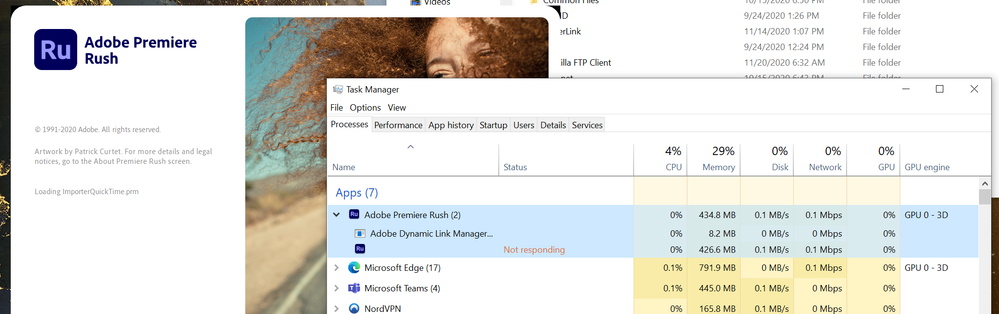
Lots and lots of posts on this from the beginning of Windows 10. Guess what? It's back after the latest update. Applies to Rush too. I tried downgrading the versions and it didn't help. Tried the Shift-Alt launch to clear all the settings. Just changed the file that Pr crashed on.
Windows 10 latest update as of Friday, Ryzen 9 3900X, 64GB, SSDs, 2070.
Screenshots of the crash...



 1 Correct answer
Well, I gave up. Blew away the PC and reinstalled everything from Windows on up. Now it's working.
So frustrating.

 12
Replies
12
12
Replies
12

Copy link to clipboard
Copied
Since I can't edit the post... That should read 32GB of RAM. My office PC has 64. Sorry...
Copy link to clipboard
Copied
Just for giggles, I completely uninstalled *all* Adobe apps. Then used ccleaner to scrub the registry. Rebooted, and installed only Rush (and the CC desktop). Crashes at the same place.
Did it again and only installed Pr (and CC desktop). Same thing.
Copy link to clipboard
Copied
Rolled back Windows updates to last month. No change.


Copy link to clipboard
Copied
Hi there!
Sorry about that. Could you try some suggestions mentioned here? https://community.adobe.com/t5/premiere-pro/faq-how-to-troubleshoot-premiere-pro-crash-at-launch/td-...
Let us know how it goes.
Thanks,
Kartika
Copy link to clipboard
Copied
Yep, did all that too.
Copy link to clipboard
Copied
Yeah, still not working.

Copy link to clipboard
Copied
Hi DurocShark2,
Sorry for your issue.
Could you create a new user account for testing and try to launch Premiere Pro in it?
Let us know how it goes.
Thanks,
Nishu

Copy link to clipboard
Copied
Hi DS,
Please try repairing Adobe folder permissions: https://helpx.adobe.com/x-productkb/multi/preferences-folder-read-only-error.html
Thanks,
Kevin
Copy link to clipboard
Copied
Saw that in another thread and tried it early on. No joy.
HOWEVER, I was so frustrated that I went and grabbed DaVinci Resolve. That won't run either! But the Windows Video Editor that comes with the OS works fine. It was something to do with the last update. Even though I rolled it back, the damage was clearly done.
This weekend I'll wipe the machine and reinstall everything from the OS up and see. However, I'd like Adobe to try to figure it out since the video apps are all that are broken, and Adobe has been my go-to (and paid for) tool.
Copy link to clipboard
Copied
Well, I gave up. Blew away the PC and reinstalled everything from Windows on up. Now it's working.
So frustrating.
Copy link to clipboard
Copied
Do not be surprised if the issue comes back, as it has returned numerous times at my station.
Bumping this for visibility since Adobe is clearly not taking this issue seriously.
Copy link to clipboard
Copied
Hi Charles,
Bumping this for visibility since Adobe is clearly not taking this issue seriously.
Yep, you can do that for the Premiere Pro Product Team if you post on User Voice, please try that. You can also search and see if anyone else has complained, like here. I can see that there really aren't a lot of posts there on QuickTime.prm. There should be. Create one. I'll help you by upvoting.
Regards,
Kevin


Get ready! An upgraded Adobe Community experience is coming in January.
Learn more
 AdChoices