

mrianwebb1983
Inspiring
October 6, 2017
Answered

Media Encoder opening, but not taking my queue requests from Premiere

  • October 6, 2017
  • 30 replies
  • 75320 views

Hi, I am having an issue with Media Encoder.

When I'm ready to send a sequence from Premiere, I hit "Queue" and Adobe Media Encoder opens, but then nothing happens. It does seem to receive the information from Premiere.

I have uninstalled and reinstalled both programs multiple times.

Any suggestions would be greatly appreciated. 
This topic has been closed for replies.
Correct answer elliottr44927822

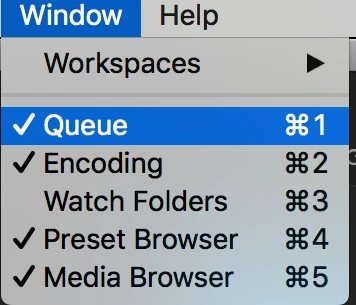
Double check that you aren't looking at the watch folder window pane instead of the queue in Media Encoder. I was having the exact same issue, and then I realized the area that normally shows the queue was the watch folder instead.

To fix, just click the menu: Window>Queue and all of my videos showed up.

30 replies

Participant
December 5, 2018

I had the same after updating to the 2019 versions of AE and AME. None of the solutions above helped. And the problem also occured in the 2018 versions now.

It appeared to be a problem in the Dutch version of Media Encoder. Setting the Mac O.S. language to English, delete Media Encoder from CC app, restart Mac and reinstall Media Encoder from CC app did the trick for me. (Could be working for other languages too to switch to English).

Best of luck!

Participant
October 19, 2018

Hi, after updating to After Effects CC 2019 and Media Encoder CC 2019, whenever I in After Effects say: "Add to Media Encoder queue"Media Encoder opens, but nothing is added. Please fix the bug Adobe!! Anyone who had the same problem and a solution?

R Neil Haugen
Legend
October 19, 2018

There isn't a 'bug' to fix. Your two apps are just not communicating properly through the CC Desktop app, it's something you need to futz with. Annoying? Yea, been there done that 3-4 times over the years since the first CC version.

I'd suggest signing out of the CC Desktop app, reboot, sign back in ... see if it works.

Current builds ...

PrPro:             13.0 build 225

Me:                 12.0 build 203 (or something like that, might be 202)

AfterEffects:    16.0.0 build 235 (again, I think that's the last number)

Neil

Everyone's mileage always varies ...
Participant
June 27, 2018

I Had this in CC2018 for hours trying to add compositions from AE to no avail

My solution: "Pull instead of push"

1. GO to media encoder
2. Select add source in the menu
3. I added one of the temporary files AE creates in the AME folder, but try with any media file.
4. Boom, queue reappeared even with all the items I'd been trying to add.
5. Deleted all items in the queue
6. Now "Add to AME Queue" in AE worked again

Participant
May 31, 2018

Funny thing is, the answer was there for a month (by jonathant7518206) before elliot posted his, just wasn't using a picture so people overlooked it.

But yeah...such a simple bug solution caused way to much fuss XD

Batsuestudio
Participant
May 13, 2018

I did have the same issue. I FIXED it uninstalling both programs and deleting the following folders:

~/Documents/Adobe/Premiere Pro/12.0.

~/Documents/Adobe/Adobe Media Encoder/12.0.

Participant
May 2, 2018

Try clicking Window > Workspaces > Revert Workspace

It WORKED for me.

Somehow I 've hidden some interface itens.

elliottr44927822Correct answer
Participant
March 30, 2018

Double check that you aren't looking at the watch folder window pane instead of the queue in Media Encoder. I was having the exact same issue, and then I realized the area that normally shows the queue was the watch folder instead.

To fix, just click the menu: Window>Queue and all of my videos showed up.

Participant
April 4, 2018

I can't believe the answer was this simple! Months of this problem...and I was in the wrong window view :O

Legend
April 4, 2018

homer-simpson-doh.gif?w=290

Orf
Known Participant
March 27, 2018

Interesting. I didn't have the problem UNTIL I updated to 2018.

Participating Frequently
March 14, 2018

I had that happen to me when I installed CC2018.  Spent a good part of the day reinstalling and trashing prefs.  The step that worked was deleting the folder ~/Documents/Adobe/Premiere Pro/12.0.

Apparently trashing preferences doesn't trash everything.

P.S. Maybe make a backup of the folder first.

Batsuestudio
Participant
May 13, 2018

Thanks a lot! It worked for me! I also had to delete the files related to AME.

Inspiring
March 14, 2018

For me, the first item will populate in the queue, but nothing after that. Generally, I start encoding immediately after the first thing is added.

However, I've had success if I don't start encoding! Then the other items will be added to the queue. If encoding has been started, nothing else will add to the queue even if I pause, wait until it finishes, quit Premiere, quit AME, etc.