Exit
  • Global community
    • Language:
      • Deutsch
      • English
      • Español
      • Français
      • Português
  • 日本語コミュニティ
  • 한국 커뮤니티
4

Mercury Transmit either does not work or chooses the wrong monitor

Participant ,
May 14, 2019 May 14, 2019

I am having a frustrating issue with my Mercury Transmit function on Premiere Pro (13.1.2) and After Effects (16.1.1). Every time I open either program after my computer has been shut down, Mercury Transmit is no longer working correctly. It usually does not transmit anything, or sometimes but rarely, it is transmitting to a wrong monitor.

Frustratingly, when I go in to Preferences > Playback in Premiere (or Preferences > Video Preview in AE) and I switch the transmit to the correct (4K) monitor, when I hit OK, it either does not transmit, or transmits to an incorrect 1080 monitor. When going in to the preferences after this error, it shows the wrong monitor check box is checked.

Example in Premiere:

I go in to Preferences > Playback and select my 4K monitor as the monitor I want to transmit to:

Screen Shot 2019-05-14 at 1.05.32 PM.png

After hitting OK, nothing is transmitting, so when I go back in to my preferences, the wrong monitor is selected:
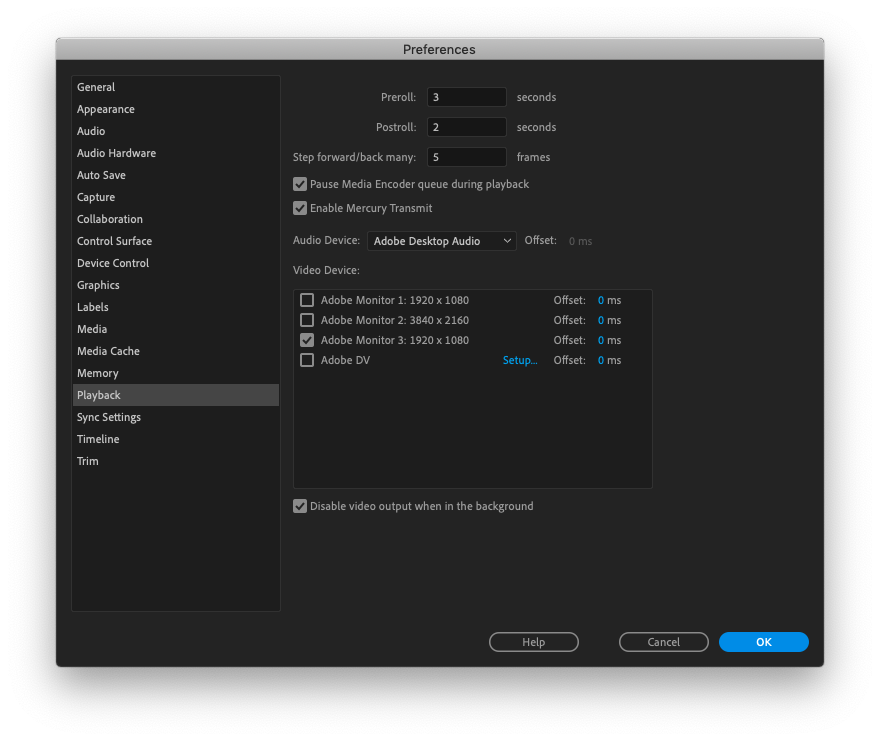
Screen Shot 2019-05-14 at 1.07.17 PM.png

My computer recognizes all of the monitors correctly, and I even took advice from another post where I unchecked 'Automatically rearrange Spaces based on most recent use' in Mission Control. That didn't help.
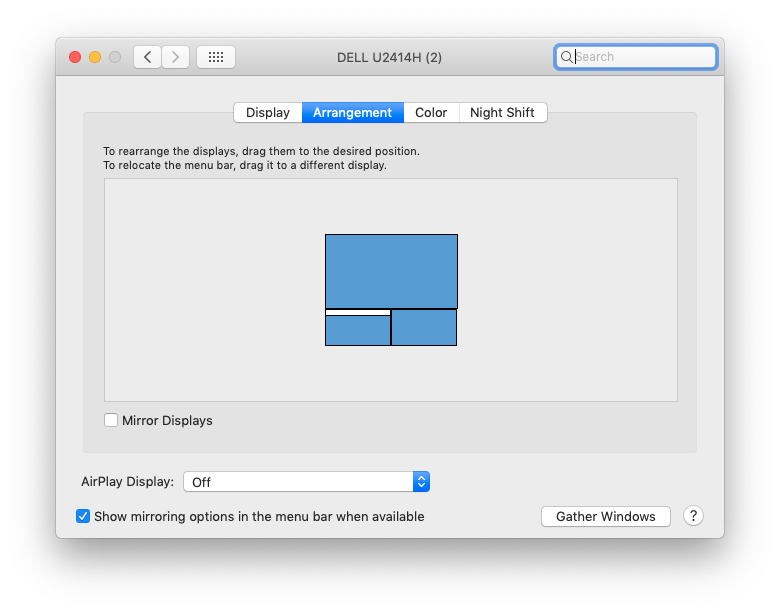
Screen Shot 2019-05-14 at 1.02.01 PM.png

Screen Shot 2019-05-14 at 1.11.54 PM.png

Workarounds that have worked to solve this issues for me in the past are now not working:

  • Toggling "Enable Mercury Playback" off, closing preferences, opening again and toggling it back on
  • Switching from a Thunderbolt>HDMI to a HDMI>HDMI
  • Resetting all program preferences (which is an unacceptable solution)
  • Restarting my computer

This is a very time-consuming and infuriating problem. Does anyone have any theories why my computer is acting this way and how I can fix it?

17.1K
Translate
Report
Community guidelines
Be kind and respectful, give credit to the original source of content, and search for duplicates before posting. Learn more
community guidelines
Adobe Employee ,
Oct 04, 2023 Oct 04, 2023

Hi Neil. NP.  I'll look into this.  

Translate
Report
Community guidelines
Be kind and respectful, give credit to the original source of content, and search for duplicates before posting. Learn more
community guidelines
LEGEND ,
Oct 04, 2023 Oct 04, 2023

Thanks, Wes!


Premiere locates panels not by screens, but by relative location to upper left corner pixel of main UI screen. So it doesn't "know" the edges of a screen.


It would be so useful if we could maximize panel groups on additional monitors as we can the main UI screen.


Neil

Translate
Report
Community guidelines
Be kind and respectful, give credit to the original source of content, and search for duplicates before posting. Learn more
community guidelines
Community Beginner ,
Nov 21, 2023 Nov 21, 2023
LATEST

I reported this bug 7 years ago, and thought it must have been fixed by now - but no 😞 weird that Adobe is happy to let part of their software be so annotingly buggy


I want to output to a calibrated fullhd 13" display, it worked one time, now it just outputs to a square on my main 4k monitor

the only item i have, that is still the same is my keyboard

Translate
Report
Community guidelines
Be kind and respectful, give credit to the original source of content, and search for duplicates before posting. Learn more
community guidelines