
Exit
  • Global community
    • Language:
      • Deutsch
      • English
      • Español
      • Français
      • Português
  • 日本語コミュニティ
  • 한국 커뮤니티
0

Missing items in button editor

Community Beginner ,
Apr 28, 2022 Apr 28, 2022

I have a number of missing items in the button editor. The Show Transport Controls is on, I've uninstalled and reinstalled Premiere Pro. Does anyone know how to get the others? This is what I'm seeing:

mandya27429169_0-1651160285900.png


TOPICS
User interface or workspaces
1.3K
Translate
Report
Community guidelines
Be kind and respectful, give credit to the original source of content, and search for duplicates before posting. Learn more
community guidelines
Community Expert ,
Apr 28, 2022 Apr 28, 2022

That is the Reference Monitor..........Does not have that many buttons.

Reset workspace to get your regular monitors back.

Translate
Report
Community guidelines
Be kind and respectful, give credit to the original source of content, and search for duplicates before posting. Learn more
community guidelines
Community Beginner ,
Apr 28, 2022 Apr 28, 2022
I did that and nothing happened. This is where I used to fund the buttons for screenshot etc and they have just disappeared.

Get Outlook for Android
Translate
Report
Community guidelines
Be kind and respectful, give credit to the original source of content, and search for duplicates before posting. Learn more
community guidelines
Community Beginner ,
Apr 29, 2022 Apr 29, 2022

managed to solve it although I'm not sure how and now I have all the buttons back on the Reference Monitor
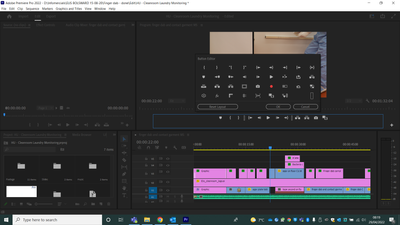
mandya27429169_0-1651216802389.png


Translate
Report
Community guidelines
Be kind and respectful, give credit to the original source of content, and search for duplicates before posting. Learn more
community guidelines
Community Expert ,
Apr 29, 2022 Apr 29, 2022

NO, that is not the reference monitor, that is the Program Monitor you are looking at now

Hit F1 and look up the difference between all the monitors:

https://helpx.adobe.com/premiere-pro/using/source-monitor-program-monitor.html


Translate
Report
Community guidelines
Be kind and respectful, give credit to the original source of content, and search for duplicates before posting. Learn more
community guidelines
Community Beginner ,
Apr 29, 2022 Apr 29, 2022
Make up your minds - yesterday I get told it is one monitor and today I get told it is another. Whatever it is, it's now got the buttons I need.

Get Outlook for Android<>
Translate
Report
Community guidelines
Be kind and respectful, give credit to the original source of content, and search for duplicates before posting. Learn more
community guidelines
Community Expert ,
Apr 29, 2022 Apr 29, 2022

Wow, you are most welcome!!!

Translate
Report
Community guidelines
Be kind and respectful, give credit to the original source of content, and search for duplicates before posting. Learn more
community guidelines
Explorer ,
Feb 08, 2023 Feb 08, 2023

I was having the same problem: after a Premiere Pro update, I lost most of the buttons in the Program Monitor.

Since Mandy didn't know what she did to get them back, here's what worked for me:

WINDOW / WORKSPACES / RESET TO SAVED LAYOUT

Got everything back.

Translate
Report
Community guidelines
Be kind and respectful, give credit to the original source of content, and search for duplicates before posting. Learn more
community guidelines
Explorer ,
Feb 10, 2023 Feb 10, 2023

...now RESET TO SAVED LAYOUT is not getting all those buttons back. If anyone knows how...

Translate
Report
Community guidelines
Be kind and respectful, give credit to the original source of content, and search for duplicates before posting. Learn more
community guidelines
New Here ,
Mar 19, 2023 Mar 19, 2023

You are a wizard, my friend! I thought I was losing my mind.

Translate
Report
Community guidelines
Be kind and respectful, give credit to the original source of content, and search for duplicates before posting. Learn more
community guidelines
New Here ,
Jun 22, 2024 Jun 22, 2024
LATEST

Thanks

Translate
Report
Community guidelines
Be kind and respectful, give credit to the original source of content, and search for duplicates before posting. Learn more
community guidelines
