


- Home
- Premiere Pro
- Discussions
- Re: MOGRT not updating Values with new CSV file
- Re: MOGRT not updating Values with new CSV file
MOGRT not updating Values with new CSV file

Copy link to clipboard
Copied
Hallo, I've created a stock market ticker in After Effects for a finance show. The values are being pulled from a CSV file. This works well in After Effects and when I dynamically link the Comp in After Effects, I can overwrite the CSV file containing up-to-date prices and these are carried over to Premiere through the dynamically Linked Comp. No Problem there. I would now like to create a MOGRT for this so that all editors on the show can simply use the Essential Graphics Tab to import a new CSV File, but when I do it like this, the values on screen are not being updated. In the Spreadsheet Data Window I can see that the new Prices and % Change are there, they are simply not being updated on screen. (Even after pressing OK)
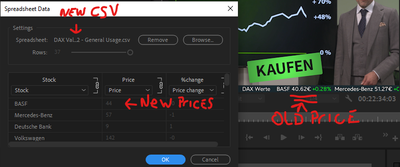
I would really like to make a MOGRT with this because all other graphic elements ar MOGRTs. Anybody got any Tips, I'd be really greatful for some help on this. Thanks!
P.S. I'm using PPro 22.5.0
and After effects 22.5.0


 8
Replies
8
8
Replies
8


Copy link to clipboard
Copied
^^^^^^^ someone help

Copy link to clipboard
Copied
I'm also having this issue. It let's me update the csv document, but then it doesn't actually work. I folowed this tutorial to build the workflow:
https://www.youtube.com/watch?v=yoXAmsjJoc4&t=147s

Copy link to clipboard
Copied

Copy link to clipboard
Copied
Hi I'm having the same problem. This used to work, but I haven't used it in ages, and now it imports the new file, shows the new data in the Spreadsheet Data dialog, and when I hit OK it doesnt do anything. Just shows the old data

Copy link to clipboard
Copied
I have the same problem. It works untill you change the CSV file after that no update in Premiere.
Copy link to clipboard
Copied
@DaciaSaenz ... and sorry, I forgot Annika's "ping" label ...

Copy link to clipboard
Copied
I had this same issue and eventually found the solution - it is well hidden within the comments on the previously linked video, but let me explain.
In short - the values do not update since in the AE file they are referenced in a static, or fixed manner, and not in a dynamic manner.
I had this same problem using the "footage" linking method (for example footage("Data.csv").dataValue([0,1]
The solution is to make that reference dynamic - and to link to a layer, NOT the "footage" method.
So I changed my expression to the following:
comp("MainComp").layer("DataSource")("Data")("Outline")(1)(2)
This method references the layer comp("MainComp").layer("DataSource")
Then, add ("Data")("Outline")
Finally, rather than an array, the field is referenced by column and row number - meaning you must increment the values you had in the array by 1. Thus my reference is (1)(2) and this references the same data point the array [0,1] did.
Using this method, I can now update the CSV file in Premier Pro, and the values refresh immediately.
Copy link to clipboard
Copied
Oh that's a good one.
The whole process is still too confusing for me though. I just use .jsx files now, so I can make my own objects with sensible names, and even functions to do the spreadsheety stuff. I use relative paths in the mogrt to read files outside of the mogrt with thisProject.fullPath and evalFile


Get ready! An upgraded Adobe Community experience is coming in January.
Learn more
 AdChoices