


Exit
  • Global community
    • Language:
      • Deutsch
      • English
      • Español
      • Français
      • Português
  • 日本語コミュニティ
  • 한국 커뮤니티
0

Multi-Cam Sequence sets clips end to end

New Here ,
Feb 18, 2020 Feb 18, 2020

Greetings All. It has been awhile since I worked with multi-cam sequencing, but I wonder if processes have changed since 2017. I have two clips in my project pannel. I select them individually, with the first one being my primary clip. I select Create Multi-Cam Source Sequence from the Clip tab. In the past, this would sync based on my setting of Audio, with camera 1 being the primary source. I would receive one clip and toggle between in the view to set the cam angle through the sequence. Now, when I perform this function, I get a timeline with each camera clip set end to end on the timeline. I am still using the audio settings with camera 1 as primary. Not sure why it won't sync?
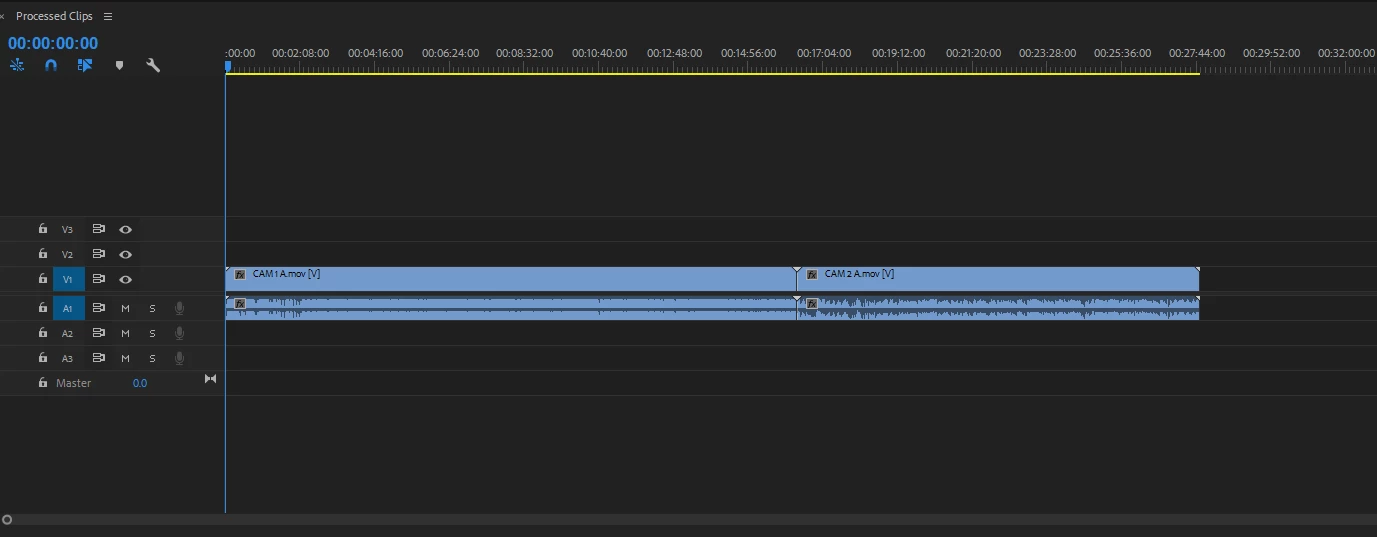
 

Premiere Pro Clip.png

TOPICS
Error or problem , User interface or workspaces
118
Translate
Report
Community guidelines
Be kind and respectful, give credit to the original source of content, and search for duplicates before posting. Learn more
community guidelines
New Here ,
Feb 19, 2020 Feb 19, 2020
LATEST

Ok all....I solved this chalenge. I now have one sequence contaning both camera angles. I also have the two angles displayed. Now my issue is that I am unable to toggle back and forth to set the camera angles in the sequence. I should just be able to click each camera angle and that will set that secton of the seuence. Any idea what I am missing?


Miulti Cam Issue.png

Translate
Report
Community guidelines
Be kind and respectful, give credit to the original source of content, and search for duplicates before posting. Learn more
community guidelines