


Deaf_Guy
Inspiring
November 30, 2018
Question

Never saw - timeline footage bleeding into other layer?

  • November 30, 2018
  • 2 replies
  • 1423 views

I've never seen this before. There seems to be a layer content that's bleeding into another layer.  See the image below:
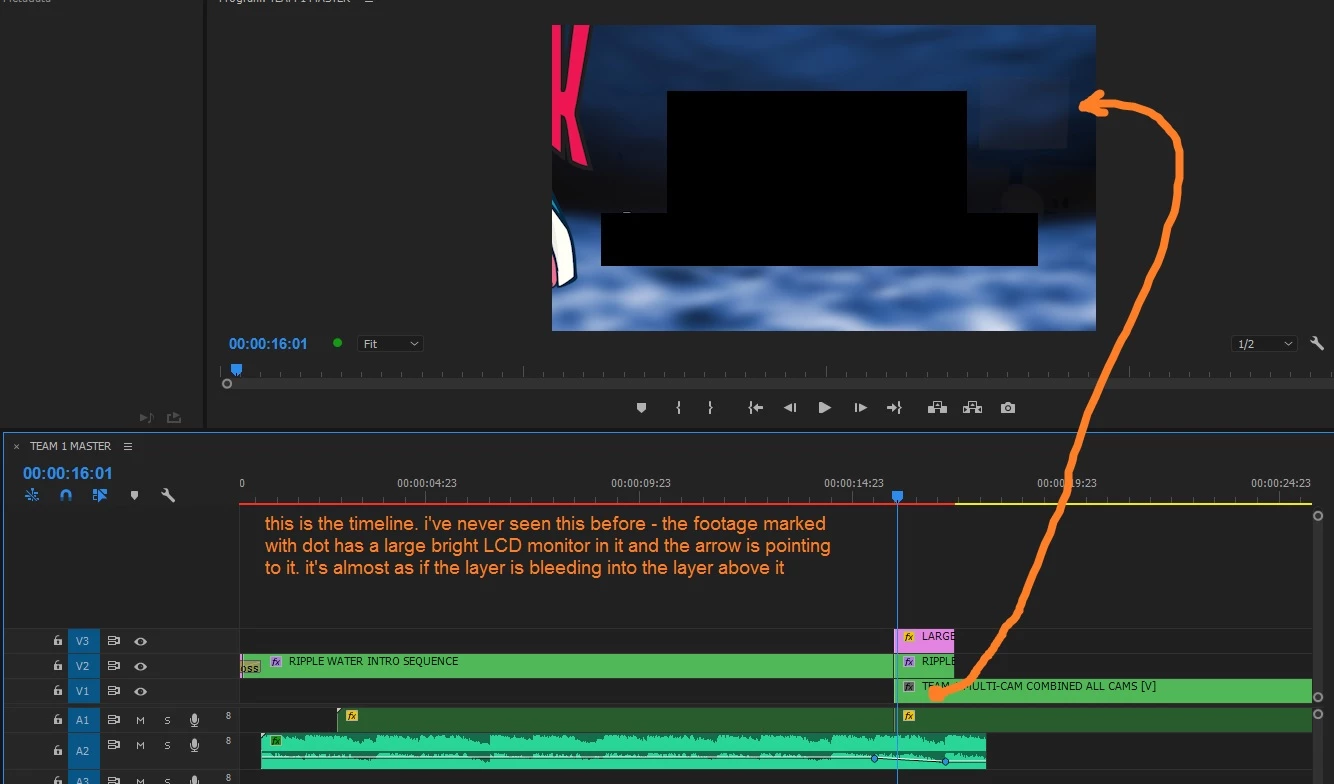
Has anyone ever seen this before? I checked all of my files and none of them have a reduced opacity causing the bleed.

Any ideas?

    This topic has been closed for replies.

    2 replies

    Community Expert
    December 4, 2018

    those are nested sequences right?

    check the assets inside the sequence if any of them have opacity or blending modes edited

    Deaf_Guy
    Deaf_GuyAuthor
    Inspiring
    December 4, 2018

    Correct.  What it basically shows is there's a still image of the ocean.  It has a light warp added to it to give it the look of waves underwater.  That's on a sequence.

    Then that sequence has been dragged down onto a new sequence.  You can see the edge of the logo. The logo flies left to right and then the ocean has a simple crop behind the logo and wipes to the next scene - logo is on top of it so it looks as if the logo is wiping to the next scene.

    Averdahl
    Community Expert
    Community Expert
    November 30, 2018

    Long shot, do you use any Blend Mode on V2?

    Deaf_Guy
    Deaf_GuyAuthor
    Inspiring
    November 30, 2018

    This is very possible.  I will check when I'm back at my work machine but I was using the crop tool to do the wipe effect and now I'm wondering if somehow I changed the blend mode accidentally.  Will let you know and thanks for the suggested fix.

    Deaf_Guy
    Deaf_GuyAuthor
    Inspiring
    December 4, 2018

    Hi - this is just an update but all blends are normal so I'm not sure why it's doing that.  Does anyone have any other ideas? It's really strange and I'd at least like to find out what the problem is.

    Thank you.