


Danielleelupo
Participant
March 19, 2018
Answered

Premier Pro changes the frame size

  • March 19, 2018
  • 4 replies
  • 728 views

All of my videos I need to use are imported but when I try to put them in the video the size of it changes and all of the sudden it is extremely zoomed in. I have been trying to fix it for about an hour and I am hopeless. I have also spend probably a total of 3 hours today to trouble shoot this and other problems. I am not happy with Adobe right now. Does anyone have a suggestion to this problem.
This topic has been closed for replies.
Correct answer Ann Bens

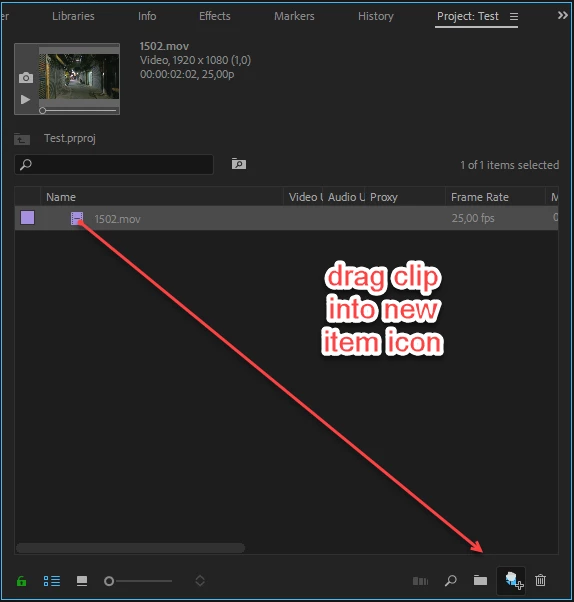
Sounds like an user error: to get a matching sequence for your footage do this:

4 replies

Legend
March 20, 2018
Jeff Bugbee
Community Expert
Community Expert
March 19, 2018

If you have 2k or 4k footage on a 1080 timeline, you're going to get the exact situation you're describing.

You can either match your sequence to your source using the method Ann Bens describes above, or you can click on your clip in your sequence, go to Effect Controls, and lower the Scale property.

Ann Bens
Community Expert
Ann BensCommunity ExpertCorrect answer
Community Expert
March 19, 2018

Sounds like an user error: to get a matching sequence for your footage do this:

jasontcox
Inspiring
March 19, 2018

Hi Danielle. Don't take this the wrong way, but it sounds like you need to learn a bit about some fundamental concepts of video resolutions. It sounds like your clips are a higher resolution than your sequence settings. Can you tell us what resolution the clips are, your sequence is and what resolution you need to output? That'll help us guide you to the settings you might need! When in doubt, the best way to generate a new sequence to make sure it matches a clip's settings is to right click on it in the Project Panel and select New Sequence from Clip.