


Participant
October 25, 2017
Answered

Premiere 2018 to After Effects Frame Rate malfunction

  • October 25, 2017
  • 1 reply
  • 1249 views

Hi There,

In Premiere 2018,

When copy pasting a clip, from premiere timeline to After Effects comp,

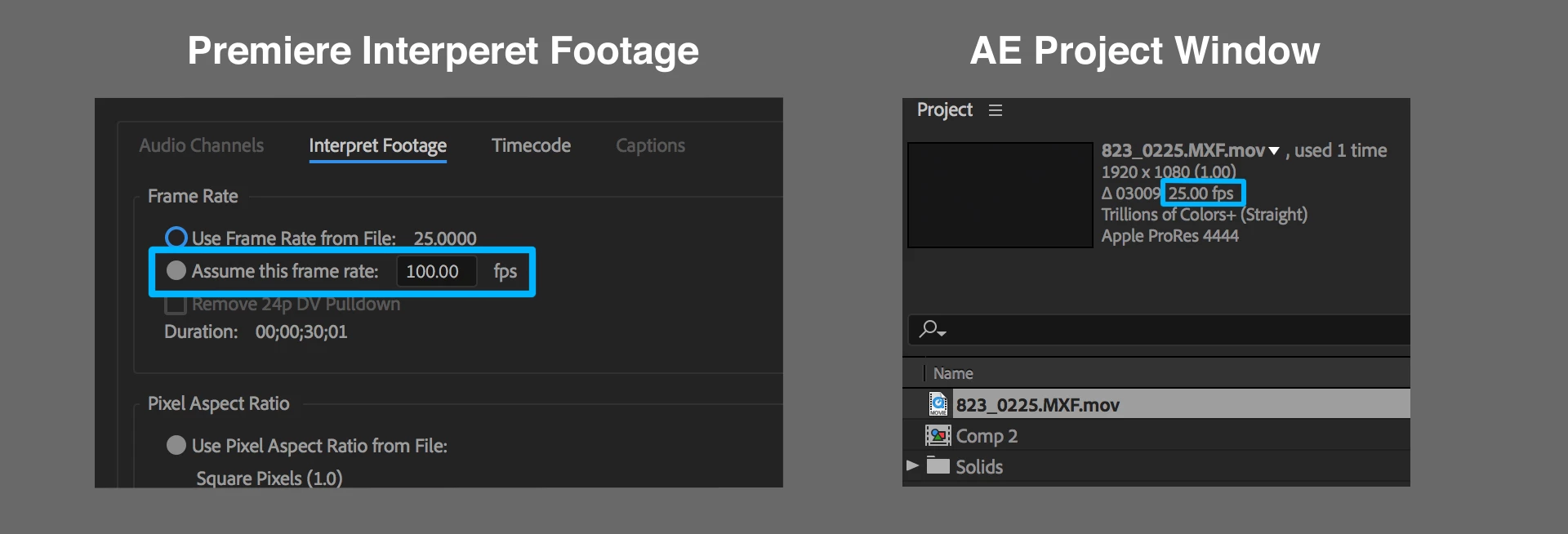
the frame rate that was set in premiere's interpret footage dialog is ignored.

My Clip in premiere is set  to be 100 FPS,

it comes into after effects with the original frame rate,

25 FPS in my case.

The same thing goes when using Project Manager to trim and transcode

and also when exporting XML to use in DaVinci.

Obviously all the edit's timing and in-outs, become unusable outside of premiere.

Hopefully there will be an urgent fix for this.

Thank you,

Tal
My station is :

Os X El Capitan 10.11.6

Mac (Retina 5K, 27-inch, Late 2014)

Processor 4 GHz Intel Core i7

Memory 32 GB 1600 MHz DDR3

Graphics AMD Radeon R9 M295X 4096 MB

This topic has been closed for replies.
Correct answer Tal Korjak

Came here to report the same bug. This used to work fine prior to the 2018 'update'. I do a lot of recutting of NTSC footage to PAL so I would always start by changing the 23.976 footage to 25fps in Premiere before cutting, then copy and paste over to AE. This used to work fine and AE would see all the clips as 25fps but now they come in as 23.976 which messes up all the in/out points. Changing the clips to 25fps works but it would be nice if things could go back to how they were please before please ie working. It would also be nice if frame holds from Premiere got carried across to AE as well.


Hi Chrisbrearley

I have it from good sources, it is fixed on the next update of cc2018.

1 reply

Legend
October 25, 2017

This is normal.  That Interpret setting exists only in the PP project.  It does not alter the actual media file in any way.

Participant
October 25, 2017

Hi Jim,

Thank you for answering but,

This is not the normal behavior.

When I set parameters in premiere, like scale , speed, frame rate etc

They use to transfer to AE unchanged, as it should be.

Until this update.

Now the frame rate parameter is ignored.

Legend
October 25, 2017

I'm more surprised that you once had it working, honestly.  The only idea I have here is to work with an Intermediate file with the desired frame rate "baked in".