


Premiere does not save my Mask Path Keyframes
Hi,
I have a simple zoom in, zoom out effect:
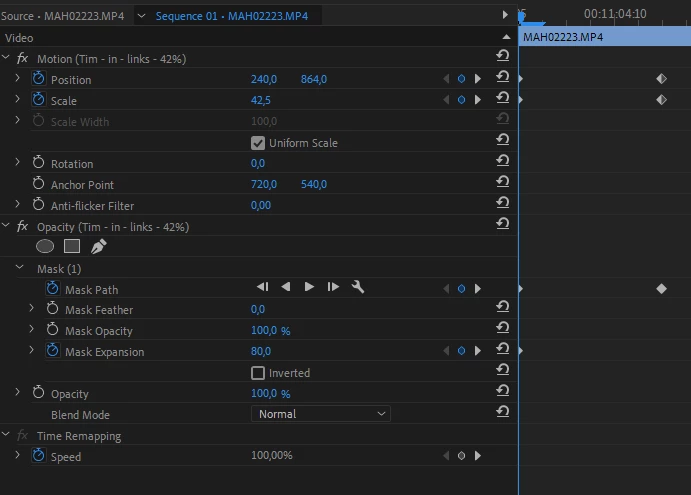
and it works completely normal... until I save and close Premiere Pro. Then all my Mask Path keyframes are deleted.
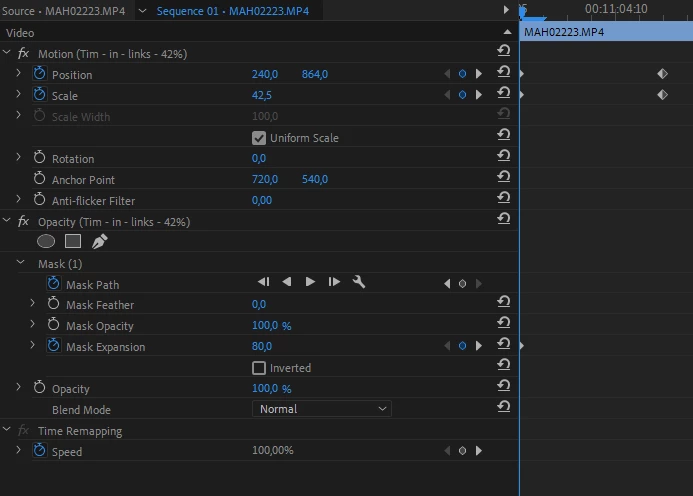
and I have to create them again... until I close Premiere Pro again. I can't finish my work like this.
Has anyone a solution for it?
I have opened older files, encountering the same problem: all Mask Path keyframes are deleted. Additionally, I increased the clip size to see if the keyframes had moved to another location, but they haven't.
Update:
I've discovered that the issue arises only when I use my custom-saved effects. Specifically, these are zoom effects that I created months ago, which until now, worked perfectly.
But, I tried the following:
- Use my Preset Effect -> Save -> Mask disappears
- Delete Mask and create new -> Save -> it works fine
- Save new creation as new Preset -> Save -> Mask disappears but! The keyframes are available; only the Mask disappears, making the clip in the layer below now visible (see next information below).
The problem isn't just the disappearance of keyframes; it's more complex. The mask effectively becomes invisible - it's not that the keyframes simply need to be re-applied. Instead, the entire clip gets obscured by this invisible mask, making it impossible to adjust its size since the anchor points are not visible. It's as though a mask has been applied over the entire scene, rendering only the content in the layer beneath visible. I hope this clarifies the issue I'm facing.
Sven
 AdChoices