


- Inicio
- Premiere Pro
- Hilos de conversación
- Re: Premiere Pro 2020: rotating a video in portrai...
- Re: Premiere Pro 2020: rotating a video in portrai...

Copiar vínculo al Portapapeles
Copiado
Hi all. I am an Adobe newbie. I am using Adobe Premier Pro 2020 CC
I shot a video with my camera in landscape mode, but when I try to view it on my laptop, it appears in portrait mode. In Premiere Pro, I tried to use the Rotation option in the Effect Controls, and this does rotate the video to landscape, but it chops off parts of the video and the video looks like a square instead of a rectangle.
It is as if it still maintains the portrait outline, even though the video has been rotated.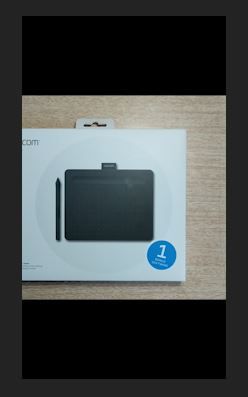

How can I rotate the video from portrait to landscape and not lose the rectangle shape.
Thanks in advance.


 1 respuesta correcta


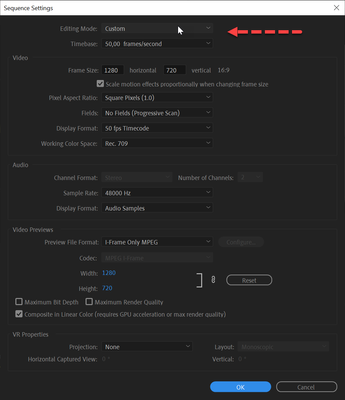
Go into the Sequence settings and set Editing mode to custom.
Now you can change the height and width: just swap the numbers.

 9
réplicas
9
9
réplicas
9

Copiar vínculo al Portapapeles
Copiado
Go into the Sequence settings and set Editing mode to custom.
Now you can change the height and width: just swap the numbers.

Copiar vínculo al Portapapeles
Copiado
How do you simply rotate the full screen with image?
Copiar vínculo al Portapapeles
Copiado
Transform effect?

Copiar vínculo al Portapapeles
Copiado
This tool is so difficult to use.
Where is the "Editing mode" inside the "Sequence settings"?
Copiar vínculo al Portapapeles
Copiado
Yes Premiere has a very steep leaning curve.
First line in the screenshot.

Copiar vínculo al Portapapeles
Copiado

when I rotate the video dis appears without rotating the video appears again!

Copiar vínculo al Portapapeles
Copiado
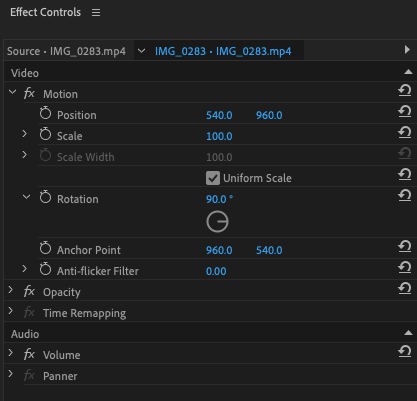
I just found this YouTube video that goes through the process and after using Sequence Settings then goes to Effect Controls > Motion > Rotation

Copiar vínculo al Portapapeles
Copiado
After struggling with this and getting nowhere in Premiere, I opened the movie in Quicktime, rotated it instantly, and reimported it into Premiere.

Copiar vínculo al Portapapeles
Copiado
I couldn't figure it out so I went to Adobe Express (accessed via my Adobe Creative Cloud account) and did the whole video, including reframing two portrait videos and rotating an accidentally portrait video. Easy peasy.


Encuentra más inspiración, eventos y recursos en la nueva comunidad de Adobe
Explorar ahora
 AdChoices