
Known Participant
April 5, 2020
Question

Premiere Pro - Crash - Timeline won't play

  • April 5, 2020
  • 1 reply
  • 187 views

Hello everyone,


I started experiencing a problem with any project I open now, since the last Premiere Pro update.

Once I open a project, the video won't play but I receive an error message instead


"Error. Cannot retrieve frame 0 of video etc etc."


I tried reverting premiere pro back to 4 different versions. Only once did I manage to get it working and make a few tweak until the program crashed and now I have a working timeline with no media in it.
Does anyone know what's happening?
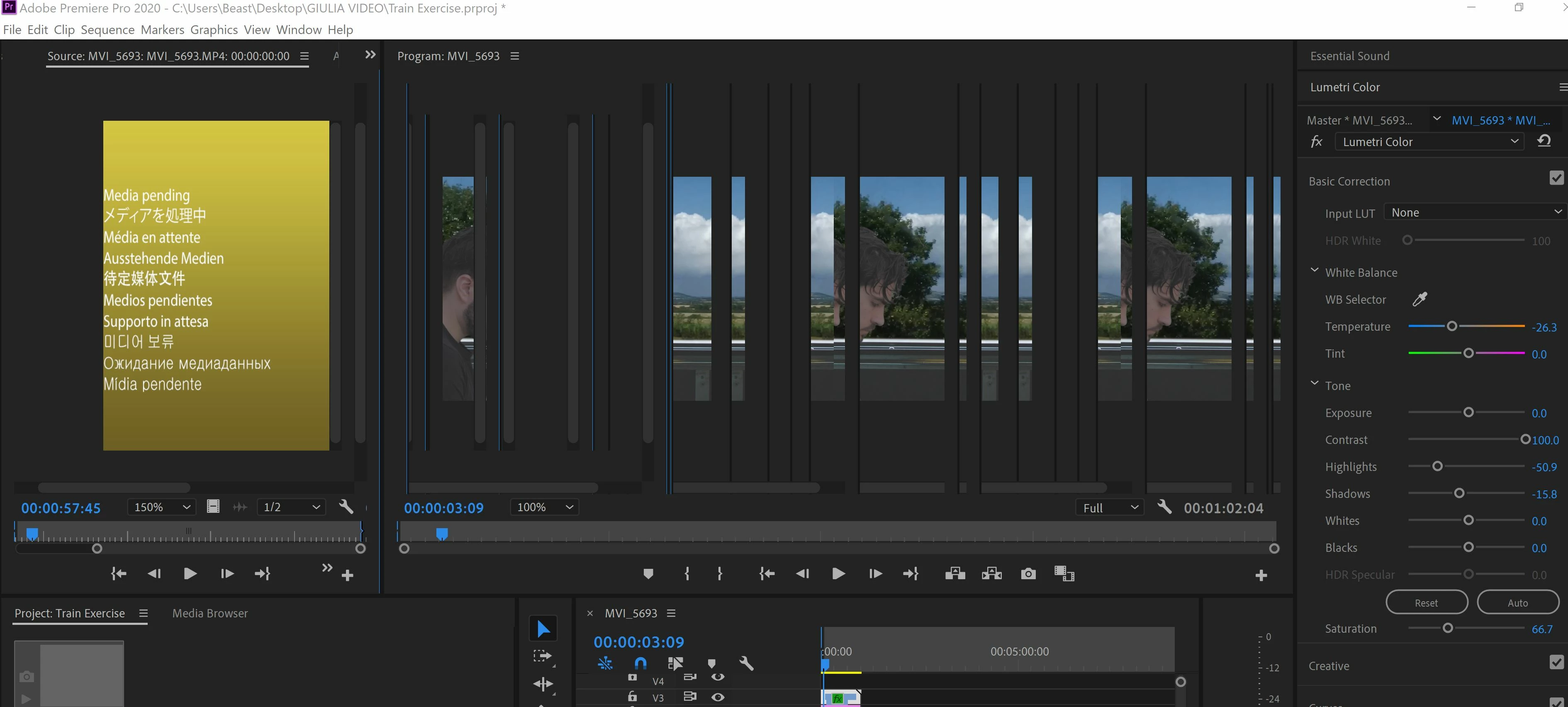


All I get is glitches, program freeze, and crashed!


This topic has been closed for replies.

1 reply

Peru Bob
Community Expert
Community Expert
April 5, 2020

Try resetting the preferences:
https://community.adobe.com/t5/Premiere-Pro/FAQ-How-to-reset-trash-preferences-in-Premiere-Pro/td-p/8236158

If that doesn't work, try resetting the Workspaces:
Reset a workspace
Reset the current workspace to return to its original, saved layout of panels.
1. Do one of the following:
• Click the Workspace menu icon and select Reset to Saved Layout.
• Choose Window > Workspace > Reset to Saved Layout.
from here:
https://helpx.adobe.com/premiere-pro/using/workspaces.html

If that doesn’t work, try updating or rolling back your graphics driver directly from the video card manufacturer’s site.