Not using Mercury Playback Engine GPU Acceleration
Footage & Project accessed through a Synology DS1515+
Render & cache set to local drive for both workstations
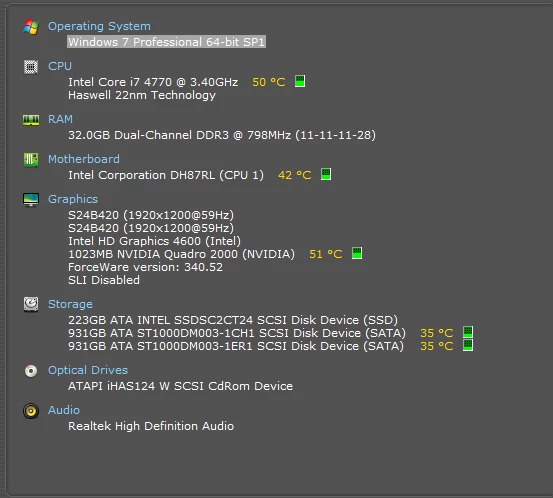
Specs in screen grab
Have been working on a project which includes video footage across 7 sequences (updating version after each edit). Two of the sequences include an After Effects sequence using Dynamic Link. Two of us accessing the files at two workstations, not simultaneously.
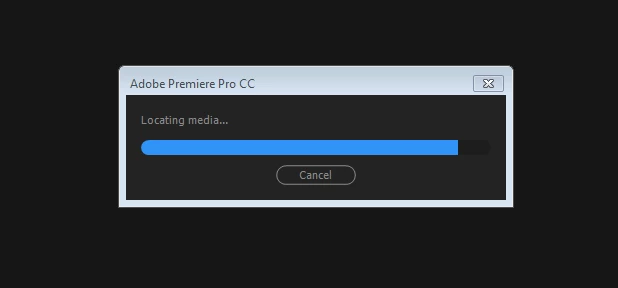
Dynamic Link started to really slow down late last week. Friday mid day I went out for lunch, shut it down in case my colleague wanted to work on it. When I came back it loaded the sequence, I got the standard message about only using Mercury Playback software, and then stuck as screen grab below. And has been stuck as such ever since.
I have tried opening a new project and importing the entire project in, however this worked for the video, but the Dynamic Link sequences disappeared. When I located them in Project Manager it locked up the system and crashed.
Issue 1 relates to AE comp being unable to be exported in Premiere. Note this sequence (including AE comp) is a separate sequence and AE comp, that is described in issue 2. However issue 1 and 2 relates to the same Premiere project.
Other details that might help with issue 1 - The AE comp contains footage from the project it is being exported from. i.e I created a new AE project and comp, used dynamic link to import the footage from Pr, worked on it in AE, saved, imported the AE project back in Pr into the sequence, exported, then had the problems (detailed below).
So the AE projects can be loaded fine in AE, seem to work fine when you preview in AE. Additionally, you created a brand new local (no server or NAS) fresh Pr project, used Pr's File/Adobe Dynamic Link/Import AE comp? That worked fine, you say, except for "export" ... can you elaborate on what you mean by export not working? I assume you could export the sequence where you placed the newly imported AE comp... you could preview the comp when playing that Pr sequence within that newly created Pr project but you say export is not right... what? blank? garbage? crash?
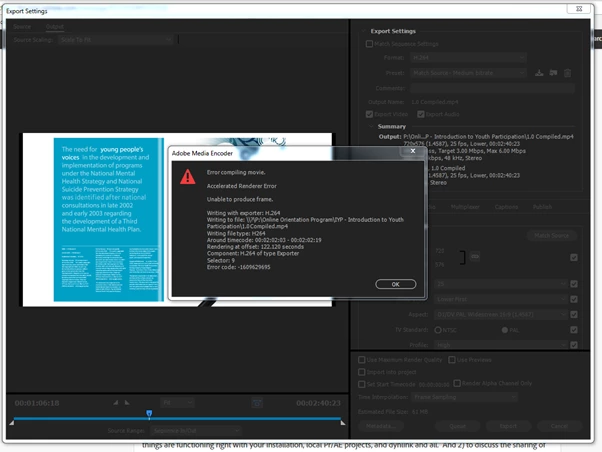
In response to your comment: Yes correct, I can do all of the above up until export. By that I mean, I exported the sequence which includes the newly imported AE comp, and I receive the following error when it gets to the point at which the AE file appears in the sequence.
Issue 2 relates to the same Pr project (original, not new Pr), but different footage. Apologies for the confusion
Additional issue - the link isn't working from Pr to AE. Pr footage can be imported and previewed in AE however won't appear in the timeline.
Assuming we're talking about the new Pr project created, the notion that the link isn't working doesn't seem to match your earlier comment but I assume I'm confused on the details here... can you clarify? Another confusing point... you refer to Pr footage that can be imported and previewed in AE... that confuses me further... perhaps that was a small test you did... but right now I'm focused on the notion that you're not importing Pr footage into AE but rather importing AE projects/comps into Pr and having issues with that. Can you clarify this one as well?
Issue 2 is persistent in the following scenarios:
1. New AE project saved to desktop, imported footage from original Pr file on NAS
2. New AE project saved on NAS, imported footage from original Pr file on NAS
3. New AE project saved on desktop, imported footage from new Pr file on desktop
See screen demo of the issue when I performed scenario 1. You'll see I can:
1. Open AE project saved to desktop
2. Import Prem pro sequence via dynamic link
3. Select the sequence to import (saved on NAS)
4. Create new comp
5. Drag footage into timeline (without success)
6. Open recently imported footage to preview - this indicates to me that dynamic link is working as I can see the footage. However something is preventing my from using it in the comp.
Any additional info required please let me know
Appreciate your help with this
Rachel
I did a little test... I created a Pr project w/seq... let's call it MySeq. I imported an AE comp, let's call it MyComp1 into MySeq via dynlink. So we have...
Pr project: MySeq --> dynlink import --> MyComp1
Now I created a new AE project, used dyn link to import Pr project MySeq... it imports fine, and I can preview it, but it cannot be placed within a comp. This appears to be by design as dynlink only supports one level...
PLEASE WHO CAN ASSIST ME IN FIXING MY ADOBE PREMIERE PRO THROUGH USING OF TEAM VIEWER, I REALLY NEED HELP THE ERROR THE ADOBE PREMIERE IS HAVING IS THAT ITS STOCK ON LOCATING MEDIA.
SO PLEASE IF YOU CAN HELP ME TO LOGIN TO MY COMPUTER VIA TEAM VIEWER SEND A MESSAGE TO ME ON GMAIL AT isiahmahone8@gmail.com and let us fi this issue please I am really stressed out right now.
Or maybe you guys can also instruct me on what to do on this platform any means necessary.Thank You
...Two of the sequences include an After Effects sequence using Dynamic Link. Two of us accessing the files at two workstations, not simultaneously. ...
You mean you share the same prproj file and other bits which are on a shared server/folder and accessed by different workstations each with its own separate Premiere installations? Someone else will have to clarify but I don't believe that's supported... I think you can each have a copy of the project on your workstations but I don't believe you want to share previews and stuff... I believe the Team version of CC solves that issue. I usually hear of shared projects informally by passing around or sharing the prproj but not a single folder accessed by multiple workstations... unless Team is used... but others might know better.
... I have tried opening a new project and importing the entire project in, however this worked for the video, but the Dynamic Link sequences disappeared. When I located them in Project Manager it locked up the system and crashed.
The Dyn Link projects are AE comps? Can you load them in AE directly? Can you create a new Pr project and import them directly into that (without having imported the major original project... I mean fresh new project and import the AE comps there)?
"You mean you share the same prproj file and other bits which are on a shared server/folder and accessed by different workstations each with its own separate Premiere installations?"
.... yes.... That is how we have it set up. Project file & footage on NAS (wired in directly from each workstation). Cache & rendering set to a local drive, so we aren't sharing previews etc. The AE set up is the same.
If that's not the way to go, how hard is it to rectify?
We came on to this project later than expected, and had to resource it very quickly, and without time to set up & test our design properly. I did check out Teams, but I couldn't quite get my head around how it worked with footage & storage etc.
.... yes.... That is how we have it set up. Project file & footage on NAS ... Cache & rendering set to a local drive, so we aren't sharing previews etc. The AE set up is the same. ... If that's not the way to go, how hard is it to rectify?
From what I can see, Adobe doesn't officially support sharing projects without Team. This just goes to say, I think you agree with this too. I looked around and see that Adobe has Team and there are some other 3rd party project sharing solutions. So I'm going to assume you'll look at those if you think it's feasible but for right now you want to establish a workflow as best you can for isolated project usage that can support a workflow that allows sharing. I can't say I know that workflow but I might have thoughts that help you get there... or others might chime in as we discuss this.
In my quick search for project sharing workflows that used single-user (non-Team) Pr/AE without assistance from any 3rd party "team" solutions, I found the following to be the closest to outlining a workflow... and of these three, really two go into details I'd expect are required to define a workflow, and even those only mention highlights... some good detail but I had questions given missing details...
Anyone using Premiere Pro in a shared/network storage environment? : Adobe Premiere Pro : from 2011... Nice details, but not spec'ing out everything... seem like a couple of pros has success with informal sharing that involved regimented naming of files/projects/folders and a protocol on when/how to read these bits... it's unclear how everything was done but I could fill in some of the blanks with obvious possibilities.
The gist of the two relatively comprehensive articles is that the systems which share projects informally with single-user Pr/AE do so by maximizing use of Pr/AE features to export/import/collect and so forth as a way of creating autonomous projects that users then use in an isolated manner on their own systems... they may ref source footage that's shared... but for those situations it was unclear what happens when, say, a clip marker is placed on such footage (clip markers can write to source footage on their sidecar files... for example, a clip marker on an MP4 will write to the MP4... an mxf will have its sidecar changed, etc.). So it seems a workflow would have to agree on either locally copied footage or shared footage without clip markers... unless somehow it's deemed okay and not to interfere with others... I mean, it could be a detail folks have skipped that just hasn't been done enough to cause confusion... but anyway, worth keeping these things in mind.
By maximizing "Pr/AE features" I mean using things like Project Manager to Collect a Pr project and its AE bits to a self-contained location that is autonomous (can be used, written to, by a single user without affecting the global resources). Additionally, they seem to make use importing back from those users into a master project which itself is standalone to that editors workstation and so on.
Finally, the two involved workflows at the links above seem to have defined good/strict naming conventions and processes to access and name files and folders. One seemingly pro user/editor discusses how it worked well but needed to be policed. IOW, the software wasn't doing that watchdog work... people needed to be aware off the pitfalls and cooperate. There needed to be solid naming and understanding of how projects would flow back-and-froth... for example, do you keep revisions stored on a share that are never written directly but only collected to new revisions for use locally that are copied to the server when those revisions "are closed" where another person can then collect those or import from those and so on.
I have a hunch one of two things: You guys got close to a good workflow and/or you had things right and you're seeing other system issues. I'm also bothered by the seemingly tangential thing that you are prompted to use software mercury but that doesn't account for the brokenness you're seeing... at least not in my thinking. So assuming that is a nonissue... I think you guys have a close to usable workflow but it was broken in some step or something, or something else happened
With the above in mind, toward perhaps moving you toward a good workflow, or perhaps to get things cleaned up, here is some brainstorming with possibly some questions...
I notice that neither Pr nor AE lock a project file from reading or writing by other processes... this means, while either Pr or AE have a project open, it's possible for some other process to write to those projects. On a single system, this generally not an issue... but on a server, there's no preventing two instances of Pr/AE on two different computers from writing to the same project... or from writing to a project while another system has it loaded. There is no locking that will prevent that. From what you've described, it seems like you've been cautious so I assume you are 100% certain nothing quirky like this happened. Given what I see here, I think I see the wisdom of the above workflows that do not write to the shared project file, but do things locally and move back/forth from local to shared through use of supported features such as collect/import/export. It seems it's wise to not write directly... I have more to say on this below.
Are you sharing files on a server via common drive letters, common UNC paths, or each person doing their own wild thing?
Are you copying a project to the share, then the other copies that project? Or are you opening the shared project and collecting that to a new local project, or exporting/importing to/from that? Collect may be your friend. I'm suggesting that you might consider having revisions of projects on the server which are never written after created there... you can open them and collect to a new project for local usage for the next rev... I think that's sort of what those articles above were referring to. Does this make sense?
I used process monitor to look generally at what Pr does when a persisted (saved within Pr) dynlink AE comp is accessed... as expected, it seems Pr references the AE project's last known location. For example, if I have a C:\Folder\MyPrProj.prproj and it imports dynlink AE comp C:\Folder\MyAeProj.aep, and I exit all apps, and copy C:\Folder\MyPrProj.prproj to C:\OtherFolder\MyPrProj.prproj... if I open the latter, and render/edit or touch the AE comp, it will read/render/open C:\Folder\MyAeProj.aep... so now translate my little test to that of a server... if you merely copy the last project without collecting first, you are using a Pr project that, if it can find that server aep, I think it will be using that. Did you only copy Pr projects for re-use locally by different people without collecting to a new project or importing into a new project something like that? If so, that may be connected to your workflow problems (not necessarily all problems).
You had mentioned "I got the standard message about only using Mercury Playback software"... okay for me this is not normal if this happens. Is that your norm? I don't consider the main topic here but I wanted to mention, I've seen this when, I think, restarting the apps to quickly... or it was something that led me to believe (I can't remember the details) that an app had not fully exited or resources were still being returned from my prior run of an app, and I had re-started or started an app too quickly such that I got that message... in those rare "race condition" cases, if I exit and restart I don't get it... it uses hardware as expected. This led me to being more slow than rushed when ending/restarting an app. While it's not bad that it's using software, if that's not normal for you, I'm wondering if you have a lingering headless app holding resources or something.
I think it would help, for starters, to forget for a second about the sharing workflow and get a local Pr project working with your AE comps again. I'll wait to hear your response to my prior post... and let me also add... you created a new Pr project, imported an AE comp via dynlink... yet "export" is not working. I want to hear elaboration on what that means... you might want to clear all caches and previews and retry that test... if the aep works fine in AE, and you can dynlink import it to and preview it in Pr but "export" isn't working... I'd like to hear more on that... but looking at that as isolated from your shared workflow issues, I'd recommend the standard clear caches, uninstall, Adobe CC cleaner tool, reinstall steps to just get a local copy working with your apparently working AE projects. After that you can focus on the workflow... your workflow may have been fine and perhaps you're seeing other issues... I can't say but hopefully the above thoughts offer something.
I mean, ideally you should be able to use hw/gpu mercury (no message), import AE via dynlnk to Pr and have it work for preview/export, and it seems you can device a workflow to share w/standalone Pr/AE with high attention to standards/processes/naming and so forth that define your workflow. The main issue at this stage actually seems getting this new Pr project AE import thing to work... without that, it seems your setup has issues.... is that related to your workflow before? I can't say.... but it should be working/fixed before proceeding further it seems.
Sorry for the verbosity but don't have time to shorten this post ... wanted to send you the thoughts for consideration.



 AdChoices