Not using Mercury Playback Engine GPU Acceleration
Footage & Project accessed through a Synology DS1515+
Render & cache set to local drive for both workstations
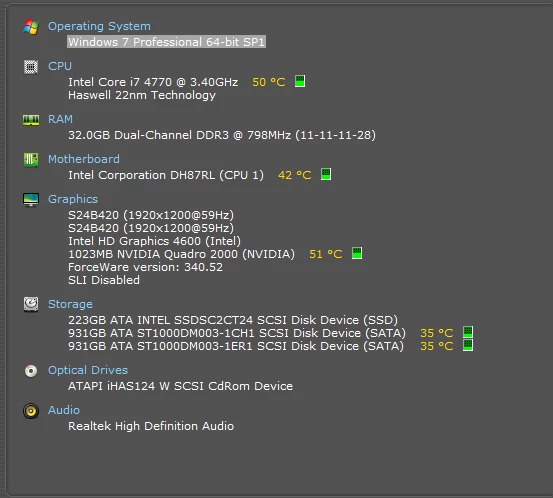
Specs in screen grab
Have been working on a project which includes video footage across 7 sequences (updating version after each edit). Two of the sequences include an After Effects sequence using Dynamic Link. Two of us accessing the files at two workstations, not simultaneously.
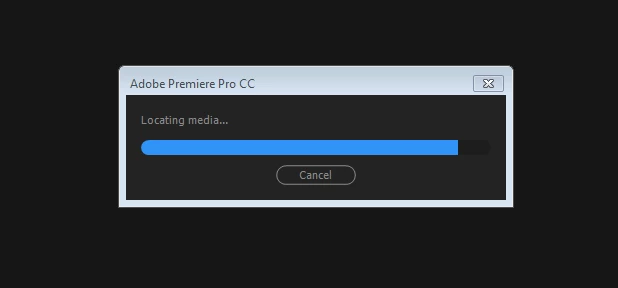
Dynamic Link started to really slow down late last week. Friday mid day I went out for lunch, shut it down in case my colleague wanted to work on it. When I came back it loaded the sequence, I got the standard message about only using Mercury Playback software, and then stuck as screen grab below. And has been stuck as such ever since.
I have tried opening a new project and importing the entire project in, however this worked for the video, but the Dynamic Link sequences disappeared. When I located them in Project Manager it locked up the system and crashed.
Issue 1 relates to AE comp being unable to be exported in Premiere. Note this sequence (including AE comp) is a separate sequence and AE comp, that is described in issue 2. However issue 1 and 2 relates to the same Premiere project.
Other details that might help with issue 1 - The AE comp contains footage from the project it is being exported from. i.e I created a new AE project and comp, used dynamic link to import the footage from Pr, worked on it in AE, saved, imported the AE project back in Pr into the sequence, exported, then had the problems (detailed below).
So the AE projects can be loaded fine in AE, seem to work fine when you preview in AE. Additionally, you created a brand new local (no server or NAS) fresh Pr project, used Pr's File/Adobe Dynamic Link/Import AE comp? That worked fine, you say, except for "export" ... can you elaborate on what you mean by export not working? I assume you could export the sequence where you placed the newly imported AE comp... you could preview the comp when playing that Pr sequence within that newly created Pr project but you say export is not right... what? blank? garbage? crash?
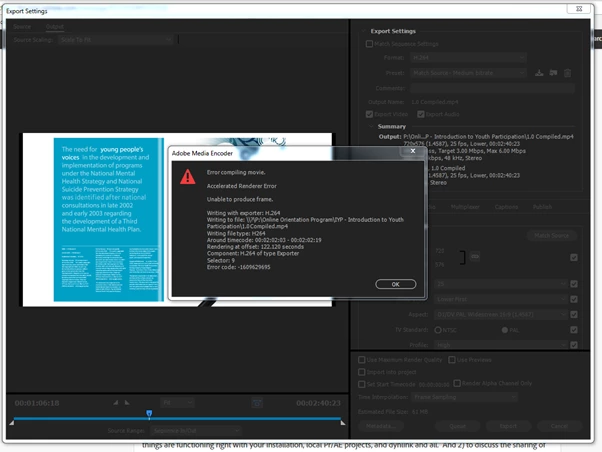
In response to your comment: Yes correct, I can do all of the above up until export. By that I mean, I exported the sequence which includes the newly imported AE comp, and I receive the following error when it gets to the point at which the AE file appears in the sequence.
Issue 2 relates to the same Pr project (original, not new Pr), but different footage. Apologies for the confusion
Additional issue - the link isn't working from Pr to AE. Pr footage can be imported and previewed in AE however won't appear in the timeline.
Assuming we're talking about the new Pr project created, the notion that the link isn't working doesn't seem to match your earlier comment but I assume I'm confused on the details here... can you clarify? Another confusing point... you refer to Pr footage that can be imported and previewed in AE... that confuses me further... perhaps that was a small test you did... but right now I'm focused on the notion that you're not importing Pr footage into AE but rather importing AE projects/comps into Pr and having issues with that. Can you clarify this one as well?
Issue 2 is persistent in the following scenarios:
1. New AE project saved to desktop, imported footage from original Pr file on NAS
2. New AE project saved on NAS, imported footage from original Pr file on NAS
3. New AE project saved on desktop, imported footage from new Pr file on desktop
See screen demo of the issue when I performed scenario 1. You'll see I can:
1. Open AE project saved to desktop
2. Import Prem pro sequence via dynamic link
3. Select the sequence to import (saved on NAS)
4. Create new comp
5. Drag footage into timeline (without success)
6. Open recently imported footage to preview - this indicates to me that dynamic link is working as I can see the footage. However something is preventing my from using it in the comp.
Any additional info required please let me know
Appreciate your help with this
Rachel
I did a little test... I created a Pr project w/seq... let's call it MySeq. I imported an AE comp, let's call it MyComp1 into MySeq via dynlink. So we have...
Pr project: MySeq --> dynlink import --> MyComp1
Now I created a new AE project, used dyn link to import Pr project MySeq... it imports fine, and I can preview it, but it cannot be placed within a comp. This appears to be by design as dynlink only supports one level...
PLEASE WHO CAN ASSIST ME IN FIXING MY ADOBE PREMIERE PRO THROUGH USING OF TEAM VIEWER, I REALLY NEED HELP THE ERROR THE ADOBE PREMIERE IS HAVING IS THAT ITS STOCK ON LOCATING MEDIA.
SO PLEASE IF YOU CAN HELP ME TO LOGIN TO MY COMPUTER VIA TEAM VIEWER SEND A MESSAGE TO ME ON GMAIL AT isiahmahone8@gmail.com and let us fi this issue please I am really stressed out right now.
Or maybe you guys can also instruct me on what to do on this platform any means necessary.Thank You
...Two of the sequences include an After Effects sequence using Dynamic Link. Two of us accessing the files at two workstations, not simultaneously. ...
You mean you share the same prproj file and other bits which are on a shared server/folder and accessed by different workstations each with its own separate Premiere installations? Someone else will have to clarify but I don't believe that's supported... I think you can each have a copy of the project on your workstations but I don't believe you want to share previews and stuff... I believe the Team version of CC solves that issue. I usually hear of shared projects informally by passing around or sharing the prproj but not a single folder accessed by multiple workstations... unless Team is used... but others might know better.
... I have tried opening a new project and importing the entire project in, however this worked for the video, but the Dynamic Link sequences disappeared. When I located them in Project Manager it locked up the system and crashed.
The Dyn Link projects are AE comps? Can you load them in AE directly? Can you create a new Pr project and import them directly into that (without having imported the major original project... I mean fresh new project and import the AE comps there)?
Your suggestion worked fine, until I tried to export the file.
So the AE projects can be loaded fine in AE, seem to work fine when you preview in AE. Additionally, you created a brand new local (no server or NAS) fresh Pr project, used Pr's File/Adobe Dynamic Link/Import AE comp? That worked fine, you say, except for "export" ... can you elaborate on what you mean by export not working? I assume you could export the sequence where you placed the newly imported AE comp... you could preview the comp when playing that Pr sequence within that newly created Pr project but you say export is not right... what? blank? garbage? crash?
Additional issue - the link isn't working from Pr to AE. Pr footage can be imported and previewed in AE however won't appear in the timeline.
Assuming we're talking about the new Pr project created, the notion that the link isn't working doesn't seem to match your earlier comment but I assume I'm confused on the details here... can you clarify? Another confusing point... you refer to Pr footage that can be imported and previewed in AE... that confuses me further... perhaps that was a small test you did... but right now I'm focused on the notion that you're not importing Pr footage into AE but rather importing AE projects/comps into Pr and having issues with that. Can you clarify this one as well?
Correct me if wrong, but think the immediate goal here is twofold... 1) To do our best to get your local Pr project working well with the imported local AE project/comps in a standalone manner without worrying about sharing. This will ensure things are functioning right with your installation, local Pr/AE projects, and dynlink and all. And 2) to discuss the sharing of the project to whatever degree we can. I will make another post now with my thoughts on the sharing aspect ... a response to the post prior to yours.
To clarify - we have 2 issues:
Issue 1 relates to AE comp being unable to be exported in Premiere. Note this sequence (including AE comp) is a separate sequence and AE comp, that is described in issue 2. However issue 1 and 2 relates to the same Premiere project.
Other details that might help with issue 1 - The AE comp contains footage from the project it is being exported from. i.e I created a new AE project and comp, used dynamic link to import the footage from Pr, worked on it in AE, saved, imported the AE project back in Pr into the sequence, exported, then had the problems (detailed below).
So the AE projects can be loaded fine in AE, seem to work fine when you preview in AE. Additionally, you created a brand new local (no server or NAS) fresh Pr project, used Pr's File/Adobe Dynamic Link/Import AE comp? That worked fine, you say, except for "export" ... can you elaborate on what you mean by export not working? I assume you could export the sequence where you placed the newly imported AE comp... you could preview the comp when playing that Pr sequence within that newly created Pr project but you say export is not right... what? blank? garbage? crash?
In response to your comment: Yes correct, I can do all of the above up until export. By that I mean, I exported the sequence which includes the newly imported AE comp, and I receive the following error when it gets to the point at which the AE file appears in the sequence.
Issue 2 relates to the same Pr project (original, not new Pr), but different footage. Apologies for the confusion
Additional issue - the link isn't working from Pr to AE. Pr footage can be imported and previewed in AE however won't appear in the timeline.
Assuming we're talking about the new Pr project created, the notion that the link isn't working doesn't seem to match your earlier comment but I assume I'm confused on the details here... can you clarify? Another confusing point... you refer to Pr footage that can be imported and previewed in AE... that confuses me further... perhaps that was a small test you did... but right now I'm focused on the notion that you're not importing Pr footage into AE but rather importing AE projects/comps into Pr and having issues with that. Can you clarify this one as well?
Issue 2 is persistent in the following scenarios:
1. New AE project saved to desktop, imported footage from original Pr file on NAS
2. New AE project saved on NAS, imported footage from original Pr file on NAS
3. New AE project saved on desktop, imported footage from new Pr file on desktop
See screen demo of the issue when I performed scenario 1. You'll see I can:
1. Open AE project saved to desktop
2. Import Prem pro sequence via dynamic link
3. Select the sequence to import (saved on NAS)
4. Create new comp
5. Drag footage into timeline (without success)
6. Open recently imported footage to preview - this indicates to me that dynamic link is working as I can see the footage. However something is preventing my from using it in the comp.



 AdChoices