


Exit
  • Global community
    • Language:
      • Deutsch
      • English
      • Español
      • Français
      • Português
  • 日本語コミュニティ
  • 한국 커뮤니티
2

Radial shadow missing from Premiere Pro

New Here ,
Oct 23, 2017 Oct 23, 2017

I just downloaded Premier Pro for a trial period. I am trying to make a video with pictures and want to add a border to the photos. When trying to type "Radial" or "Shadow" in the effects, I do not get any results.

Are some of the features not available for the trial period? Or is there another way to find this?

Thank you in advance!
7.1K
Translate
Report
Community guidelines
Be kind and respectful, give credit to the original source of content, and search for duplicates before posting. Learn more
community guidelines

correct answers 1 Correct answer

LEGEND , Nov 07, 2017 Nov 07, 2017

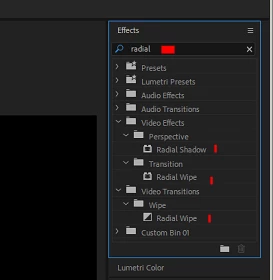
In 2018, when I type "Radial" into the Effects panel Search box, this is what I get ...

Those should be in the trial ... the only thing different about the trial version is they set it to run for what, 7 days? ... without it needing to have the CC Desktop app tell it that it's ok.

Neil

Translate
LEGEND ,
Nov 07, 2017 Nov 07, 2017

In 2018, when I type "Radial" into the Effects panel Search box, this is what I get ...

Those should be in the trial ... the only thing different about the trial version is they set it to run for what, 7 days? ... without it needing to have the CC Desktop app tell it that it's ok.

Neil

Translate
Report
Community guidelines
Be kind and respectful, give credit to the original source of content, and search for duplicates before posting. Learn more
community guidelines
New Here ,
Oct 17, 2024 Oct 17, 2024

In 2024 version i never get the option of radial shadow 

Translate
Report
Community guidelines
Be kind and respectful, give credit to the original source of content, and search for duplicates before posting. Learn more
community guidelines
Community Expert ,
Oct 17, 2024 Oct 17, 2024
LATEST
Translate
Report
Community guidelines
Be kind and respectful, give credit to the original source of content, and search for duplicates before posting. Learn more
community guidelines