Exit
  • Global community
    • Language:
      • Deutsch
      • English
      • Español
      • Français
      • Português
  • 日本語コミュニティ
  • 한국 커뮤니티
0

Remove border from rounded rectangle

New Here ,
Jan 05, 2021 Jan 05, 2021

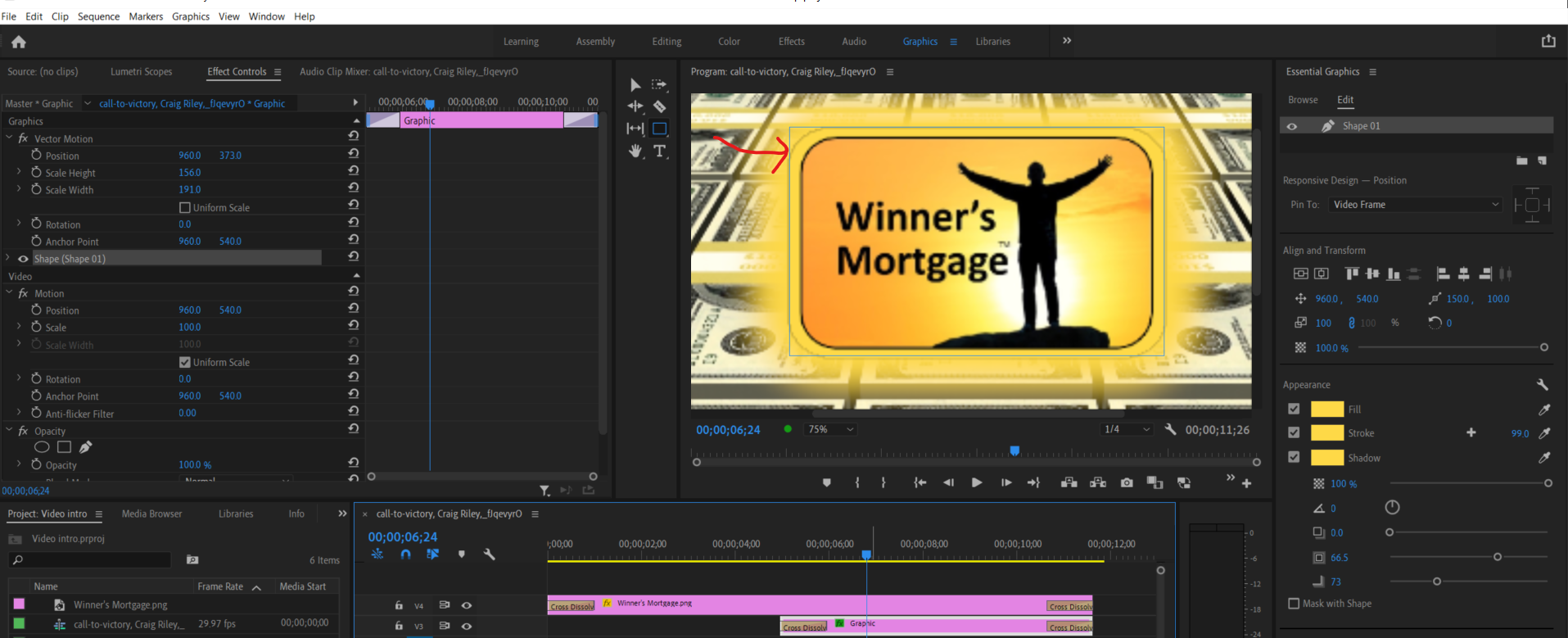
Hi - I created a rounded rectangle with a shadow to put a glow around this logo image.  However, the rounded rectangle has a black line border around the rounded rectangle, also a blue line around the rectangle perimeter.  I cannot find a setting to remove these two lines (see red arrow pointing to both).  How can I remove these two lines?  Or is there a better way to accomplish what I am trying to do?  Thanks!

926
Translate
Report
Community guidelines
Be kind and respectful, give credit to the original source of content, and search for duplicates before posting. Learn more
community guidelines
Guest
Jan 05, 2021 Jan 05, 2021

Moving thread to the Premiere Pro forum from Using the Community

Translate
Report
Community guidelines
Be kind and respectful, give credit to the original source of content, and search for duplicates before posting. Learn more
community guidelines
Advocate ,
Jan 05, 2021 Jan 05, 2021
LATEST

The blue line is just a selection marker, when you deselect the clip it should disappear.

As for the black line, try to set the preview quality to full and see if it's still there.

Translate
Report
Community guidelines
Be kind and respectful, give credit to the original source of content, and search for duplicates before posting. Learn more
community guidelines