


질문
Remove markers from frame hold, markers shouldn't appear.
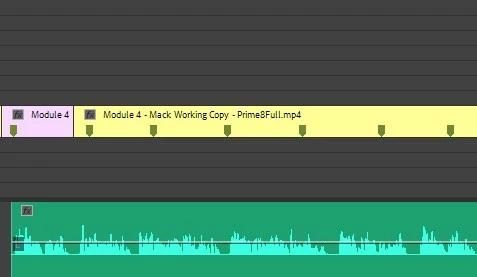
The pink block on the timeline below is a regular video clip, the yellow block is a frame hold clip that follows for about 4 seconds. Presently, the frame hold shows markers. A frame hold should NOT show markers, this is a bug and it causes the editor confusion. When I create a frame hold I also color code it differently from a regular video clip to help me organize. It seems logical for a it to be an automatic feature to change a frame hold so that it can look differently from a regular video clip. Remove markers please and if possible create a unique way to identify a frame hold on the timeline.
 AdChoices