Exit
  • Global community
    • Language:
      • Deutsch
      • English
      • Español
      • Français
      • Português
  • 日本語コミュニティ
  • 한국 커뮤니티
0

Rendering in frames/sequences

Explorer ,
Mar 28, 2022 Mar 28, 2022

Hi, i'm just wondering does anyone know how to from premire pro render into aftter effects in frames so that i can edit single frames rather then the full video


kind regards elise 


TOPICS
Editing , Export
889
Translate
Report
Community guidelines
Be kind and respectful, give credit to the original source of content, and search for duplicates before posting. Learn more
community guidelines

correct answers 1 Correct answer

Community Expert , Mar 28, 2022 Mar 28, 2022

That is what you asked for: single frames not single photos/stills.


If this is your first time editing on any video editor might want to learn the basics first.

https://helpx.adobe.com/premiere-pro/user-guide.html

https://www.linkedin.com/learning/?setupTimeGoal=false&showCongrats=false

Translate
Community Expert ,
Mar 28, 2022 Mar 28, 2022

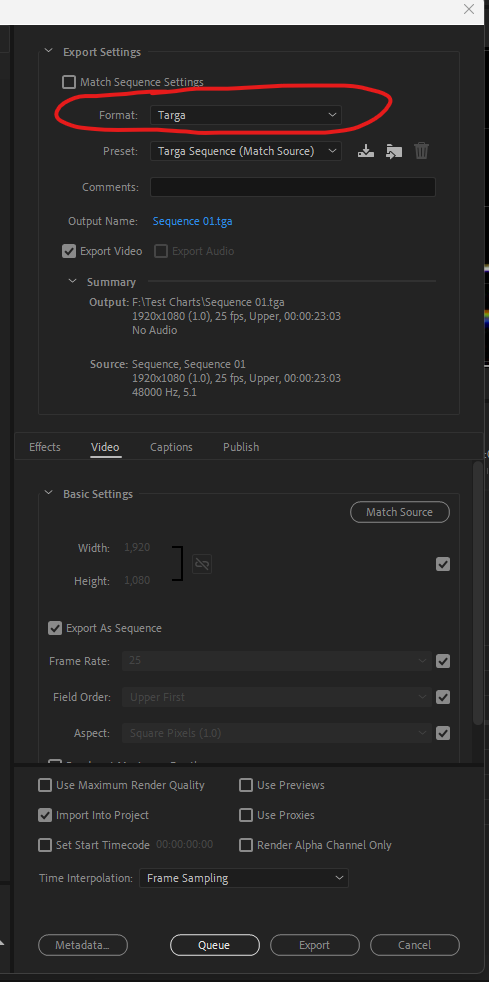
You can export from Premiere as an image sequence and use that in Ae.


Some lingo: render means making preview files.

Translate
Report
Community guidelines
Be kind and respectful, give credit to the original source of content, and search for duplicates before posting. Learn more
community guidelines
Explorer ,
Mar 28, 2022 Mar 28, 2022

how would i go about doing that, won't it just come up as one video file in after effects

kind regards elise


Translate
Report
Community guidelines
Be kind and respectful, give credit to the original source of content, and search for duplicates before posting. Learn more
community guidelines
Community Expert ,
Mar 28, 2022 Mar 28, 2022

Did you try?

Translate
Report
Community guidelines
Be kind and respectful, give credit to the original source of content, and search for duplicates before posting. Learn more
community guidelines
Explorer ,
Mar 28, 2022 Mar 28, 2022

Screenshot 2022-03-28 at 7.30.58 pm.png

Translate
Report
Community guidelines
Be kind and respectful, give credit to the original source of content, and search for duplicates before posting. Learn more
community guidelines
Explorer ,
Mar 28, 2022 Mar 28, 2022

when i click export it does nothing 


Translate
Report
Community guidelines
Be kind and respectful, give credit to the original source of content, and search for duplicates before posting. Learn more
community guidelines
Community Expert ,
Mar 28, 2022 Mar 28, 2022

You need to have the timeline panel active to export a sequence.

Translate
Report
Community guidelines
Be kind and respectful, give credit to the original source of content, and search for duplicates before posting. Learn more
community guidelines
Explorer ,
Mar 28, 2022 Mar 28, 2022

Screenshot 2022-03-28 at 8.27.07 pm.png


what to i click on to get it to export as an image sequence 

Translate
Report
Community guidelines
Be kind and respectful, give credit to the original source of content, and search for duplicates before posting. Learn more
community guidelines
Community Expert ,
Mar 28, 2022 Mar 28, 2022

This is one option:

targa sequence.png

Translate
Report
Community guidelines
Be kind and respectful, give credit to the original source of content, and search for duplicates before posting. Learn more
community guidelines
Explorer ,
Mar 28, 2022 Mar 28, 2022

i did that but just got a zillon photos put on to my desktop rather then a file to put into after effects and edit single photos one by one


Translate
Report
Community guidelines
Be kind and respectful, give credit to the original source of content, and search for duplicates before posting. Learn more
community guidelines
Community Expert ,
Mar 28, 2022 Mar 28, 2022

That is what you asked for: single frames not single photos/stills.


If this is your first time editing on any video editor might want to learn the basics first.

https://helpx.adobe.com/premiere-pro/user-guide.html

https://www.linkedin.com/learning/?setupTimeGoal=false&showCongrats=false

Translate
Report
Community guidelines
Be kind and respectful, give credit to the original source of content, and search for duplicates before posting. Learn more
community guidelines
Explorer ,
Mar 28, 2022 Mar 28, 2022

i want the full video but i want to be able to click on an image and edit it but not the full video, like you can in preimire pro where the colour or whatever you change only applies to the image youve clicked on


Translate
Report
Community guidelines
Be kind and respectful, give credit to the original source of content, and search for duplicates before posting. Learn more
community guidelines
Community Expert ,
Mar 28, 2022 Mar 28, 2022

Open Ae and import the Premiere Pro Project.


After Effects in not an editor. What is it you want to do with these images.

Translate
Report
Community guidelines
Be kind and respectful, give credit to the original source of content, and search for duplicates before posting. Learn more
community guidelines
Community Expert ,
Mar 28, 2022 Mar 28, 2022
LATEST

You can Export single frames from a sequence with the key combination CTRL/CMD+SHIFT+E.


Hope this helps.

Translate
Report
Community guidelines
Be kind and respectful, give credit to the original source of content, and search for duplicates before posting. Learn more
community guidelines