


Rendering is mostly using CPU

Copy link to clipboard
Copied
Hi,
I have a problem where all adobe products don't use gpu for rendering even though they detect it
Tested in Premiere, AfterFX, and media encoder
NOTE: Render engine already selected Mercury Playback Engine GPU Accelleration (OpenCL)
Laptop Specs:
- Windows 10 Enterprise 1803
- Intel i7-6500U 2.5GHz dual core (doesn't support manual overclocking but i saw it automatically overclocked to 3.1ghz)
- AMD Radeon R5 M330 (2gb gpu, 4gb shared)
- 8GB ram ddr3
- 5600rpm 0.5TB hdd (want to get an ssd soon)
- More system information... (DxDiag)
I have a premiere project ~5m-10m long, contains 3 major parts, intro,outro and the content all are AE compositions + premiere additions like some graphics
Rendering: it completes the intro in about 10s then when reaches the content of the video it says 2h time left and takes about 3h to complete rendering
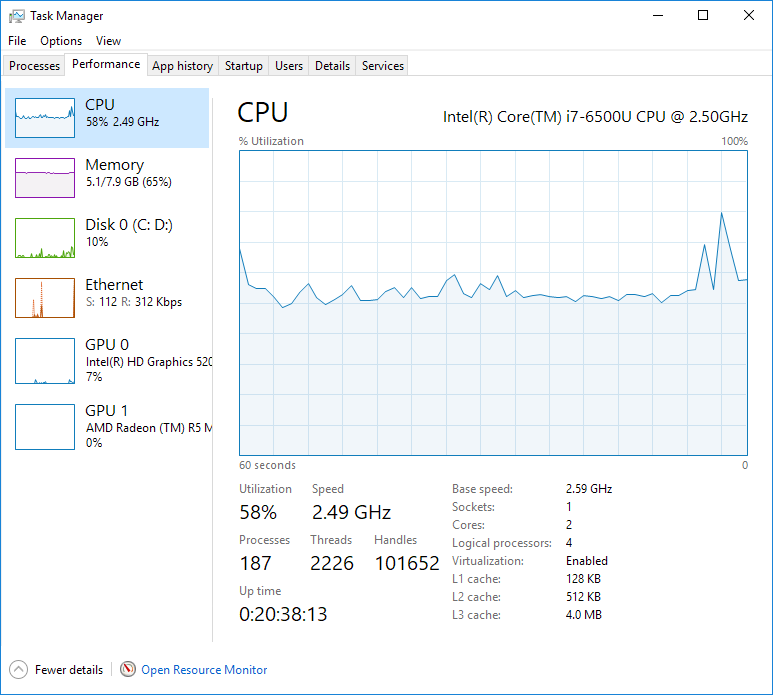
and it rarely uses gpu at all (0.2% of amd, and 10% of intel hd graphics, other is all on the cpu)
It does not even use 100% cpu... it is just chilling




 6
Replies
6
6
Replies
6


Copy link to clipboard
Copied
NHKomaiha wrote
Hi,
I have a problem where all adobe products don't use gpu for rendering even though they detect it
correct
Copy link to clipboard
Copied
oh thank you, that's the perfect answer, my laptop now renders within a second, and also shoots fire

Copy link to clipboard
Copied
Hi.
There may be several options for the problem, to start the chart is not certified in the installation requirements:
https://helpx.adobe.com/premiere-pro/system-requirements.html
Its graphic is something old and it is known that there are drawbacks with the new AMD controllers with these graphics because they are not compatible with the openCL and that is why the AMD Catalyst controllers are used.
It can also be the speed of your DD, 5600, which limits the data transfer, called bottleneck, therefore, if there is not enough information, the use of memory and the CPU is limited, you must add the SSD drives .
You must find where the problem is.
Copy link to clipboard
Copied
Thanks for help.
This is reasonable, but before i formatted, it did render great on gpu but now it doesnt (details in previous reply)
Also i tried not using AE compositions also using different video effects and stuff like that... still uses cpu only.. im certainly sure that one of them uses gpu, (neat video reduce noise) doesn't it?

Copy link to clipboard
Copied
The GPU is only used in renders and exports if and when GPU accelerated effects are being used on the section of the clip being processed at the moment. Here's the list of those:
Learn about effects in Premiere Pro
For general work on exports, the GPU isn't used that much. That's a CPU job.
You note you have multiple Ae comps involved, and for Dynamic Link bits that can slow exports. Many of the folks I know work their comps to 'final' status, then export those from Ae to replace the comp on the PrPro sequence with a full media clip. Then exports from PrPro tend to go faster.
I'm not sure about the settings for the Radeon card, but ... that's a slow 2-core CPU with only 8Gb of slow older RAM. Sadly, not a particularly fast rig for PrPro 2018.
Neil
Copy link to clipboard
Copied
Thanks for help
True it is a weak rig for rendering but i don't need speed that much .. i mean im happy if it only uses its full potential (gpu), but it's not so it's a problem for me
I want to add a piece of info, everything was working well about 2 weeks ago.. but i had a problem with ntoskrnl so i had to reinstall windows
Now it's like this.. (i also tried win 8.1, and soon will try 7)
All with the best recommended driver by lenovo and by the part company (amd or intel)
About the hdd, you're right it is a bottleneck and i wanna get an ssd.. but it doesn not prevent using gpu.. in fact the disk usage while rendering is only 0~4%


Get ready! An upgraded Adobe Community experience is coming in January.
Learn more
 AdChoices