


Answered
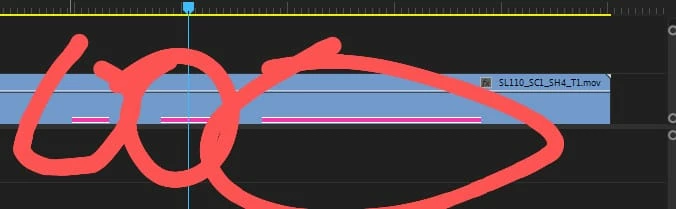
Small pink bar on lower footage
App version: 15.4.0 (Build 47)
OS: Windows 11
Please help , I found the audio related to the video that I removed the audio from, but it still sounds. Strangely enough, the audio that concerns this video only sounds through the speakers, while it doesn't sound through headphones.
Following is the picture, the pink bar is hidden audio, not all over one clip footage, only in certain parts.
with a note, previously I synchronized audio with the PluralEyes 4 application, not all footage is like this, but there are some. Is this a problem with the codec or something?
This problem seems rare, looking forward for the immediate solution, thanks.
 AdChoices