


- Home
- Premiere Pro
- Discussions
- Re: Smoothing Wrinkles on Shirt in Premiere
- Re: Smoothing Wrinkles on Shirt in Premiere

Copy link to clipboard
Copied
Hello,
I am editing a video and the talent in the video has a sleeve that's noticeably wrinkled. I know that there is a way to blur wrinkles out on the skin to hide blemishes. I am also aware of the patch tool that could be used in Photoshop. However, I'm not sure if there's a way to essentially digitally iron out wrinkles in Premiere. Can someone share their knowledge with me regarding this issue I've found myself in?
Thank you!


 1 Correct answer


Does that really need to be fixed? (find the patch on her shoulder more distracting).
This doc (tutorial all the way down) will give you an idea.
Masking and Tracking in Premiere Pro
You can do this in Pr but AE is really the way to go.

 8
Replies
8
8
Replies
8


Copy link to clipboard
Copied
Please post a still frame grab from the video so we can see what it is that you have to work with
Thanks
Jeff
Copy link to clipboard
Copied
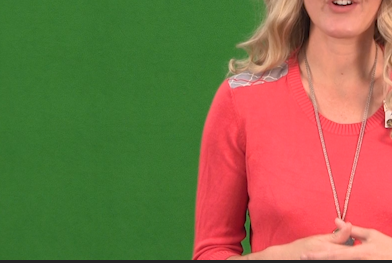
Hi SAFEHARBOR11--This is a shot of the sleeve I need to fix. I'm just not sure what to do. I don't know if it's as simple as adding an effect or if it's something that would need to be key framed in After Effects for the duration of the video. I really appreciate the help, though!
Copy link to clipboard
Copied
Either stationary or moving you can use a (animated) mask with a slight blur effect.
Copy link to clipboard
Copied
This is great to hear that there is a fix. I'm not very seasoned in Premiere, I can do the basic editing, but when it comes to these types of effects, I don't know where to start.
Would you mind clarifying how I would add an animated mask that will follow her arm throughout the video?
Thanks so much
Copy link to clipboard
Copied
Does that really need to be fixed? (find the patch on her shoulder more distracting).
This doc (tutorial all the way down) will give you an idea.
Masking and Tracking in Premiere Pro
You can do this in Pr but AE is really the way to go.
Copy link to clipboard
Copied
I really appreciate you!
My boss pays particular attention to detail and I would rather be safe than sorry.
Great learning experience for the future, that's for sure.
I appreciate your input, though! I hope you have a great day. 

Copy link to clipboard
Copied
if you can get away with a mask tracker, I would apply the median effect that is good for removing noise while keeping detail. good for wrinkles while keeping good transitions of color.
Copy link to clipboard
Copied
I'll give that a shot, thank you so much!


Find more inspiration, events, and resources on the new Adobe Community
Explore Now
 AdChoices