
Exit
  • Global community
    • Language:
      • Deutsch
      • English
      • Español
      • Français
      • Português
  • 日本語コミュニティ
  • 한국 커뮤니티
0

Source timecode in sequence

New Here ,
Sep 28, 2018 Sep 28, 2018

Hi,

I consolidated several clips into a sequence (item). The newly created sequence doesn't use the original source timecode. The timecode from the sequence starts from zero. Does anyone know how i could display my source timecodes?

Many thanks,

Clem

1.4K
Translate
Report
Community guidelines
Be kind and respectful, give credit to the original source of content, and search for duplicates before posting. Learn more
community guidelines

correct answers 1 Correct answer

LEGEND , Sep 28, 2018 Sep 28, 2018

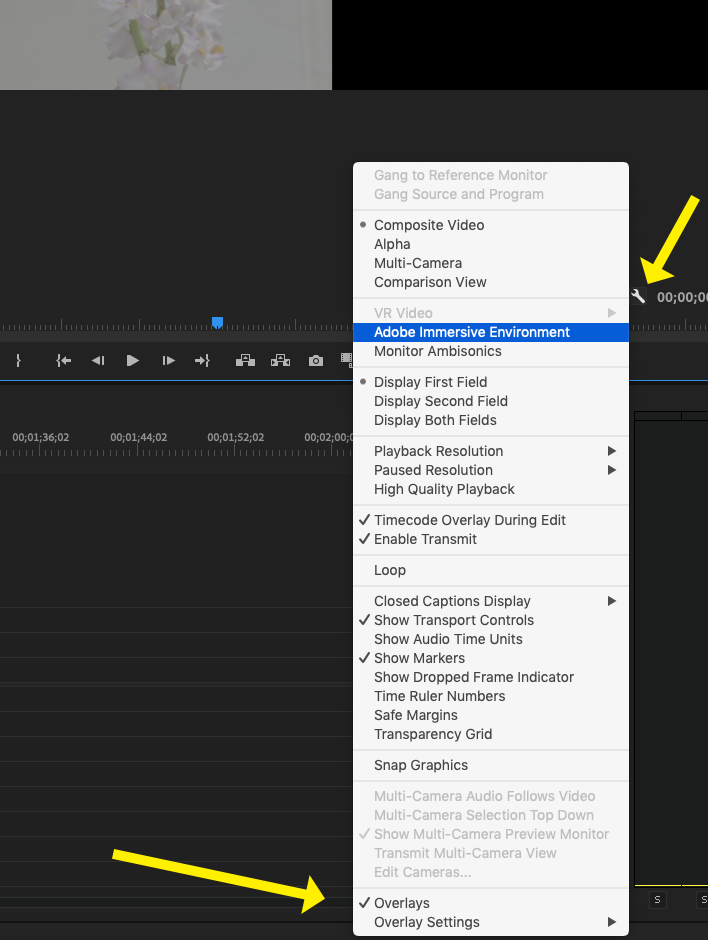
In the bottom right corner of the Program Monitor, click on the wrench icon and on the drop down menu, select (check, toggle on) Overlays.
Screen Shot 2018-09-28 at 6.47.46 AM.png

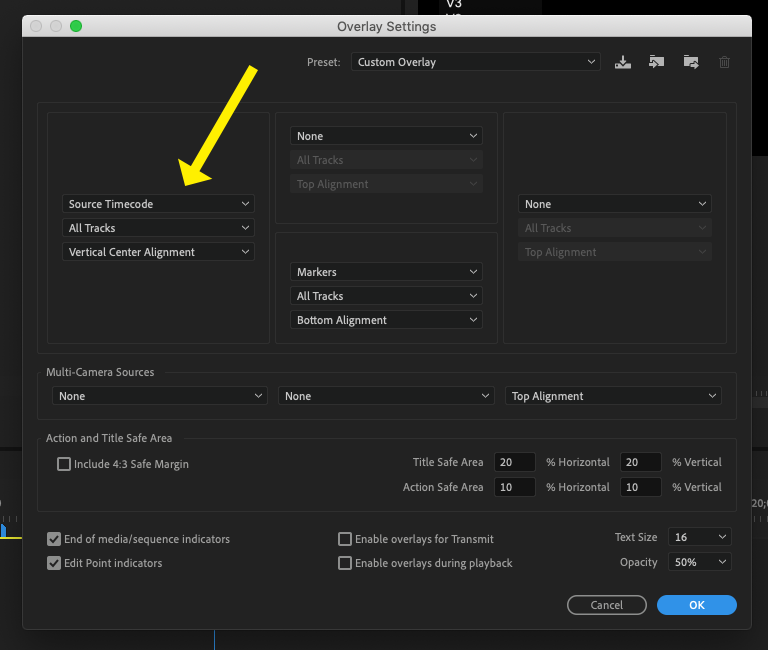
If you choose Overlay Settings, you can configure the type a placement of the overlay information:
Screen Shot 2018-09-28 at 6.50.38 AM.png

MtD

Translate
LEGEND ,
Sep 28, 2018 Sep 28, 2018

In the bottom right corner of the Program Monitor, click on the wrench icon and on the drop down menu, select (check, toggle on) Overlays.

Screen Shot 2018-09-28 at 6.47.46 AM.png

If you choose Overlay Settings, you can configure the type a placement of the overlay information:

Screen Shot 2018-09-28 at 6.50.38 AM.png

MtD

Translate
Report
Community guidelines
Be kind and respectful, give credit to the original source of content, and search for duplicates before posting. Learn more
community guidelines
New Here ,
Oct 01, 2018 Oct 01, 2018

Thank you so much!

Translate
Report
Community guidelines
Be kind and respectful, give credit to the original source of content, and search for duplicates before posting. Learn more
community guidelines
Community Expert ,
Sep 28, 2018 Sep 28, 2018

Alternatively, use the Timecode Window or the Info panel. Both can show you source timecode.

Translate
Report
Community guidelines
Be kind and respectful, give credit to the original source of content, and search for duplicates before posting. Learn more
community guidelines
New Here ,
Jan 18, 2022 Jan 18, 2022

some reason this is not working on one of my producers work stations

Translate
Report
Community guidelines
Be kind and respectful, give credit to the original source of content, and search for duplicates before posting. Learn more
community guidelines
New Here ,
Jan 18, 2022 Jan 18, 2022

PS in the window with the clips they all start at 0 and not like 12;02:22

Translate
Report
Community guidelines
Be kind and respectful, give credit to the original source of content, and search for duplicates before posting. Learn more
community guidelines
Community Beginner ,
Dec 21, 2024 Dec 21, 2024
LATEST

I've set the overlay to the source timecode and it's still not showing that timecode in the monitor?

Translate
Report
Community guidelines
Be kind and respectful, give credit to the original source of content, and search for duplicates before posting. Learn more
community guidelines
