


Answered
The choice of "Preview File Format" in "Sequence Settings"
I have two questions about customing "Sequence Settings":
Which item should I choose in "Preview File Format"? And based on what?
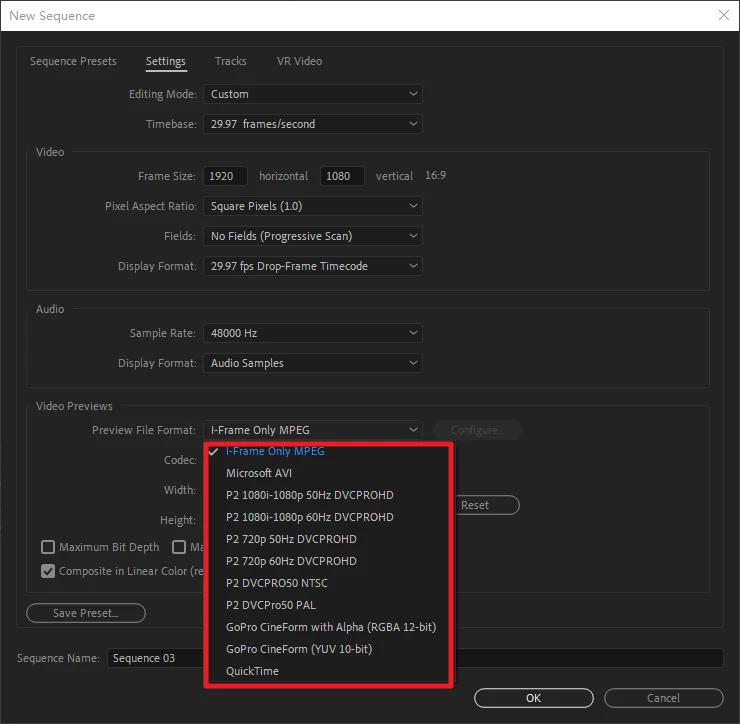

I have two questions about customing "Sequence Settings":
Which item should I choose in "Preview File Format"? And based on what?
Vidéo previews is in case you have to render a part of your timeline for real time. By default it's I frame only MPEG because it doesnt' take too much place on ytour hard drive compared to other high quality format such as ProRes or esle. If your workflow is to use ProRes only in your timeline, you can take benefit of this option when you render FX or a part of your timeline. If you select Prores for preview ( for exemple ProRes 422 ) and you have ProRes 422 on your timeline it can be a huge time saver since you can ask to use previews on export. If you export in ProRes 422 It won't re encode the ProRes and since your preview are already rendered and encoded on ProRes 422 , the render will be faster than ever.
Already have an account? Login
Enter your E-mail address. We'll send you an e-mail with instructions to reset your password.
 AdChoices