


Participant
December 19, 2023
Answered

THE COLORS OF THE CLIPS DO NOT CHANGE SEPARATELY

  • December 19, 2023
  • 3 replies
  • 528 views

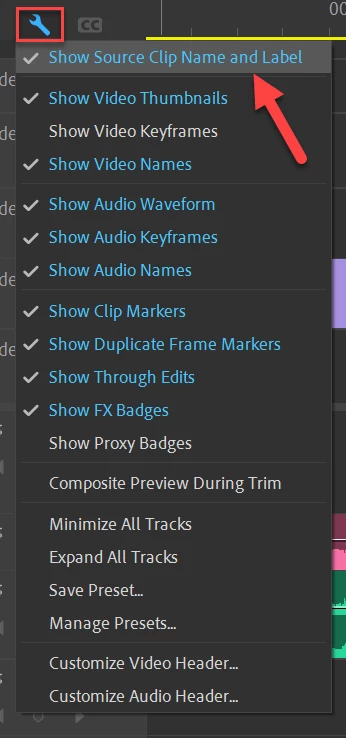
Greetings to all, I don't know if I modified something without realizing it in Adobe Premiere Pro, but the clips that I have in the sequence when I want to change their color, all the original clips are changed, if I make a cut to a clip and I want to change only that fragment changes color, the entire general clip changes color, I hope you can help me, thank you.


I attach the video so you can see the problem.
This topic has been closed for replies.
Correct answer Ann Bens

3 replies

Ann Bens
Community Expert
Ann BensCommunity ExpertCorrect answer
Community Expert
December 19, 2023

Participant
December 19, 2023

Thank you very much for the help, you just took away a headache from me. 👌🔥

R Neil Haugen
Legend
December 19, 2023

There's now a setting called something like apply label color to all instances. Find that and deselect it.

Everyone's mileage always varies ...
Participant
December 19, 2023

Sorry, I didn't understand your question, what does the effects panel have to do with the colors of the clips?

R Neil Haugen
Legend
December 19, 2023

Re-read please ...

Everyone's mileage always varies ...