Exit
  • Global community
    • Language:
      • Deutsch
      • English
      • Español
      • Français
      • Português
  • 日本語コミュニティ
  • 한국 커뮤니티
0

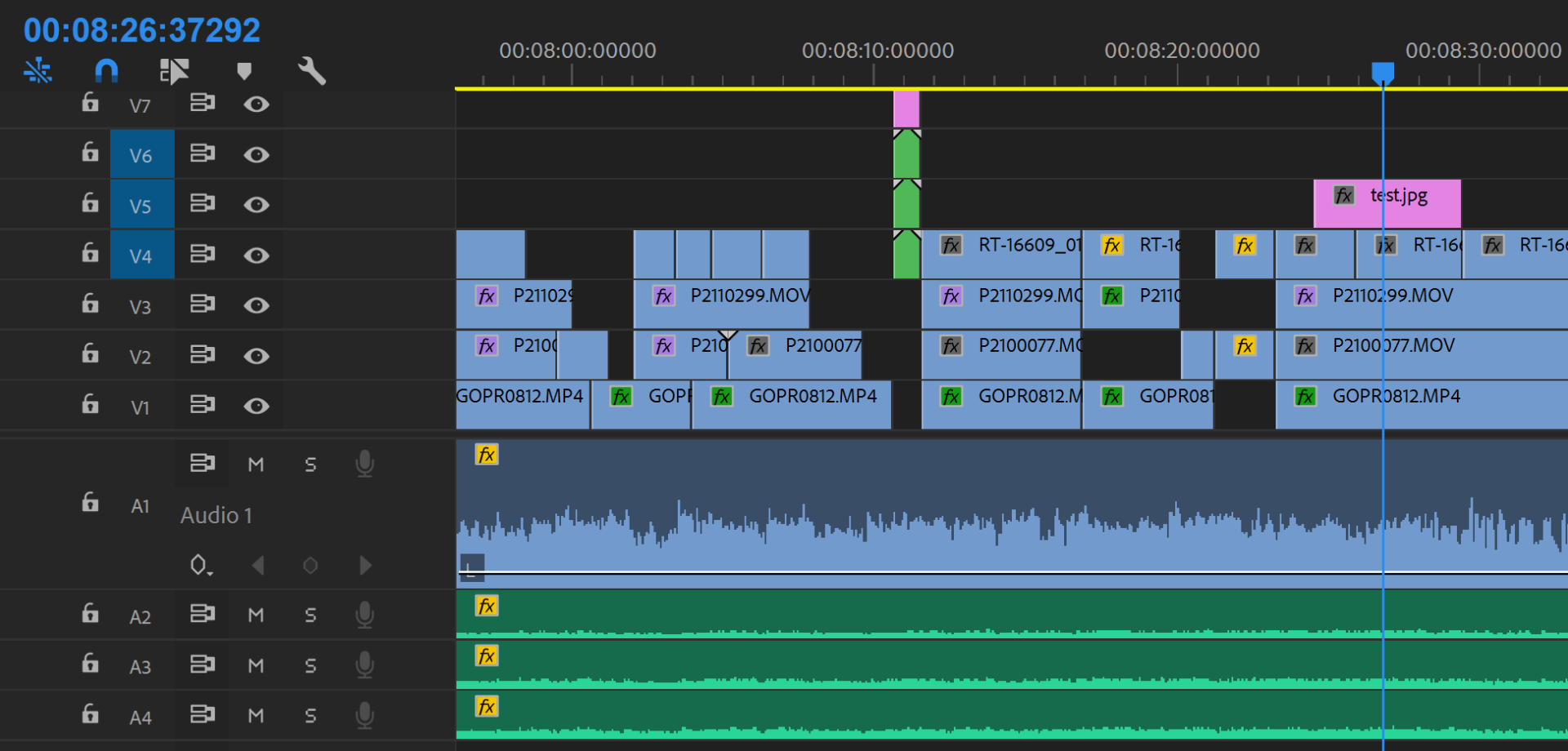
Timecode display on sequence has 5 numbers for frames. CORRUPT SEQUENCE?

Community Beginner ,
Jun 26, 2018 Jun 26, 2018

problem 1.PNG

There are 4 different cameras on this timeline. Sony PMW-EX3, 2 Lumix GH4s and a GoPro. They are all 29.97 frame rate. Sequence created from Sony PMW-EX3. I've edited with this set up MANY times. This is the first time I've EVER seen this.

I have closed the project several times and uninstalled and re-installed adobe premiere already.

I have also created another sequence from my A camera, Sony PMW-ex3 and copied over the cuts. It seems to have worked, with only 2 digits for frames.

I WANT TO KNOW WHY PREMIERE DID THIS. CORRUPT SEQUENCE?

1.2K
Translate
Report
Community guidelines
Be kind and respectful, give credit to the original source of content, and search for duplicates before posting. Learn more
community guidelines
LEGEND ,
Jun 26, 2018 Jun 26, 2018

You're seeing Audio Samples, rather than frames.  Look it up:

https://helpx.adobe.com/pdf/premiere_pro_reference.pdf

Translate
Report
Community guidelines
Be kind and respectful, give credit to the original source of content, and search for duplicates before posting. Learn more
community guidelines
Community Beginner ,
Jun 26, 2018 Jun 26, 2018

I just created a new project and copied sequence contents to a new sequence within new project.

problem 2.PNG

WTF is this?

Translate
Report
Community guidelines
Be kind and respectful, give credit to the original source of content, and search for duplicates before posting. Learn more
community guidelines
LEGEND ,
Jun 26, 2018 Jun 26, 2018
LATEST

A separate issue.  Should have a separate thread.

Translate
Report
Community guidelines
Be kind and respectful, give credit to the original source of content, and search for duplicates before posting. Learn more
community guidelines

