


- Home
- Premiere Pro
- Discussions
- Trying to get the workspace bar to appear/stay at ...
- Trying to get the workspace bar to appear/stay at ...

Copy link to clipboard
Copied
Hi, recently upgraded to PP 2017 and wanted to get the workspace bar to sit at the top of my PP screen. I checked a quick tutorial here: Premiere Pro CC: Replace Missing Workspace Panel or Bar - YouTube but when I tried this, a blank window appears that will not attach to the top. Here's a screen shot of what I'm seeing (below). Any help would be appreciated, would just like to able to quickly change from Editing to color space with doing the dropdowns.



 1 Correct answer

Hi SeanW,
Sorry about the trouble, that seems to be an issue of the corrupt workspace.
Please reset your workspace:
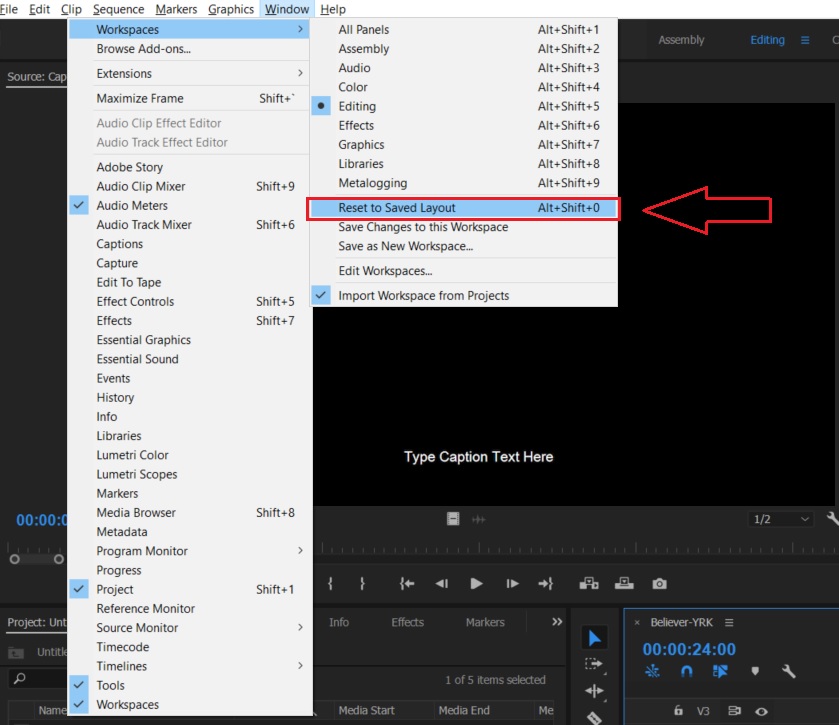
Let me know if that helps.
Thanks,
Kulpreet Singh

 4
Replies
4
4
Replies
4

Copy link to clipboard
Copied
Ok, looks like it's just when you're in the 'editing' workspace that bar won't show up...why in the world it that? Doesn't make sense to me, and since this is the workspace I stay in, not sure I have an option...
Copy link to clipboard
Copied
Hi SeanW,
Sorry about the trouble, that seems to be an issue of the corrupt workspace.
Please reset your workspace:

Let me know if that helps.
Thanks,
Kulpreet Singh
Copy link to clipboard
Copied
Thank you Kulpreet, this worked!
Copy link to clipboard
Copied
Thanks for confirming, SeanW.
-Kulpreet Singh


Get ready! An upgraded Adobe Community experience is coming in January.
Learn more
 AdChoices