


cosvide66482824
New Participant
November 19, 2017
Answered

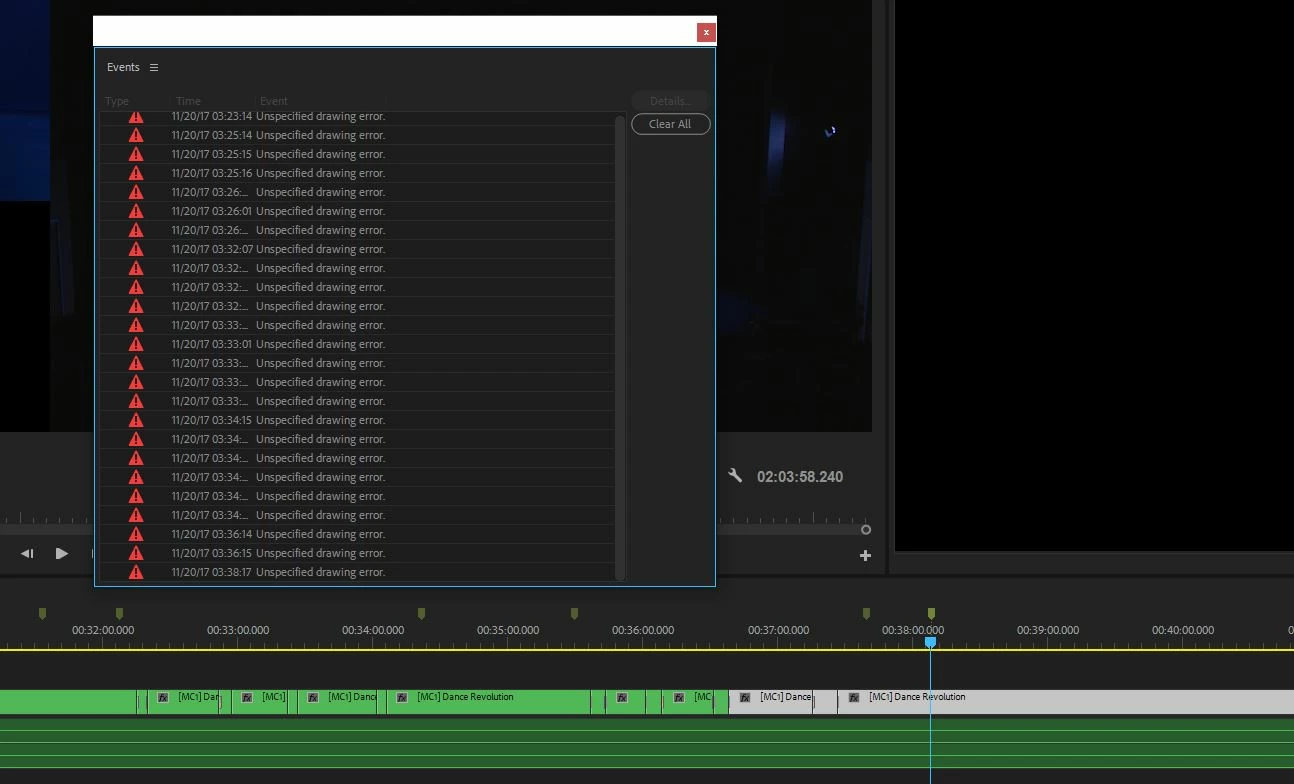
Unspecified Drawing Error
  • November 19, 2017
  • 4 replies
  • 35666 views

I currently run a modest post production company with multiple Adobe CC seats.  Recently I have come across this error.

The project is a simple 2 camera multicam sequence and I keep receiving this "Unspecified Drawing Error".  Has anyone else come across this and have a solution to fix it?  I am not sure if it will affect my render, but it is coming up periodically.

This topic has been closed for replies.
Correct answer JOHN MONDO

I too have experienced this issue when in a multicam timeline with show audio time units selected. Confirmed as an issue.

4 replies

New Participant
January 26, 2021

Look, I've used premire for 2 or so years atthis point, and I'm switching to davinci resolve, just because of extensive problems I've had with this program and it's inherent limitations and nonstop neccessity for additional plugins.

Now, for this problem, I followed the steps found in this thread ( https://community.adobe.com/t5/premiere-pro/input-contract-violation-every-time-i-try-to-create-a-timeline/td-p/10140313?page=1 )


After that, I realized the problem was a selection of 6 different audiofiles, that I grouped together, and in fixing it, I went to an older save (I have premiere autosaving every 2 minutes since it is such a buggy mess), and then first thing I did was go and ungroup those audio files before cutting them.

I also had the timline showing audiounits when cutting the first time when they were grouped and I got this game ending error, so i turned that off as well. It seems to be chugging again, but what a mess, that what, I've paid over 1.5k on, when I could used a simpler product or invested in davinci sooner.

New Participant
July 24, 2019

How is this an answer? I have this error message and it is not related to multi cam it occurs when I add a title.

SquareEyz
Inspiring
January 28, 2020

I agree with @zoltans51768737
I'm getting this for no reason that I can determine- except perhaps a corruption in the project? 
Mostly just a nuisance, however it does cause my bin colums to flicker and be ilegible. 
All drivers and CC up to date.


SquareEyz
Inspiring
January 28, 2020

Actually what does seem to invoke the problem is when I mazimize my project/bin frame with the ` key.
It does not seem to happen without that.

cosvide66482824
New Participant
November 20, 2017

I think I have found the issue.

My multicam sequence timeline was set to show audio time units.  I have since unchecked this and haven't had an unspecified drawing error since.

JOHN MONDOCorrect answer
Inspiring
December 11, 2017

I too have experienced this issue when in a multicam timeline with show audio time units selected. Confirmed as an issue.

Inspiring
January 9, 2019

Well, well. over a year later.... out of the blue, "unspecified drawing error."  Win 10, multi camera (4).,( premiere cc 2018, "Ver 12.1, Kentos).. found this thread ... went to "..audio units;" it was unchecked, so checked it and problem disappeared. Unchecked it again, no problem.  Hopefully OK.

Thank you very much people; without this thread, I probably would still be worried (altho nothing seemed to happen other than the message).

A personal note. I have been at this with Adobe for a very long time (started when it was at the bottom of the status heap), but really am not proficient at it because of the lack of time (and getting old); problems get solved like above, often by "chance."  "Dr." Simon has always been a good help, if sometimes a little harsh.

What is bothering me now to the extent that I would probably quit if something better came along, is the video-card problem. It is a PIA with my muti camera; I assumed bec of its antiquated nature; but if I read the threads correctly it is so deeply embedded in the Adobe system, that spending $$ that I don't have won't help.

Any thoughts?  Thanks.

Brainiac
November 19, 2017
cosvide66482824
New Participant
November 19, 2017

Thanks @Jim_Simon, that was the first thing I tried. Previously this solution had fixed similar issues with After Effects. However no luck this time with Premiere.  Appreciate the prompt response though.

Brainiac
November 19, 2017

OK.

I've noticed issues when using the automatic multi-cam creation method.  Maybe try the following instead.  I've noticed superior performance when done this way.

Manual Multi-Camera Method