

Inspiring
October 20, 2019
Question

Vertical red line on video

  • October 20, 2019
  • 3 replies
  • 3338 views

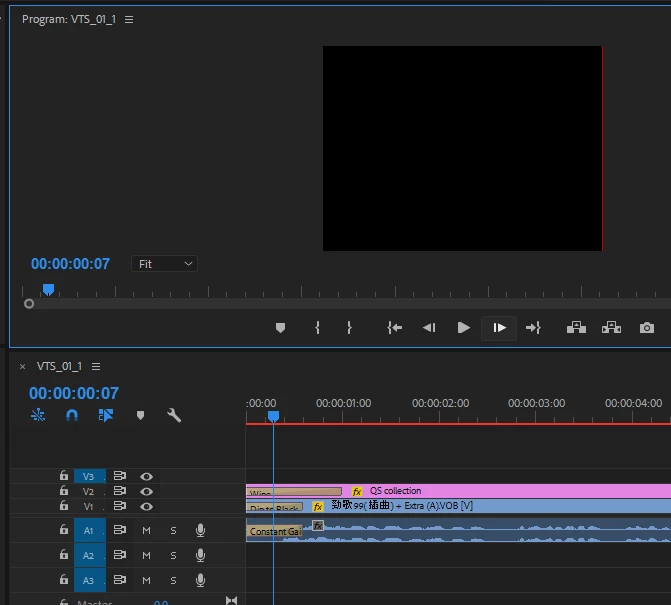
There's a vertical red line on the right hand side of the video whenever I apply "dissolve" transition (see the image as below). Any way to fix please?

 

    This topic has been closed for replies.

    3 replies

    Ann Bens
    Community Expert
    October 20, 2019

    You cannot keep it in hi-res.

    When vob's which are basicly ripped from a dvd get upscaled it will look even worse.

    Inspiring
    October 20, 2019

    I meant I've added some text to the video and I want it (the text) to look good when people are watching in full screen, so forget about the VOB content resolution. If I really wanna keep 1350*1080, any thing I can do to get rid of that red line when doing dip to black please?

    Ann Bens
    Community Expert
    October 20, 2019

    MIght want to set the sequence setting the same as the vob file as they are SD and probalby non square pixels.

    Inspiring
    October 20, 2019

    Thanks but I want to keep the text and stuff that I've added in hi-res... And it only happens when dip to black or dissolve transition is applied, so there must be a way to fix this I guess?

    Ann Bens
    Community Expert
    October 20, 2019

    Does this red line also appear in the export file?

    I see a dip to black? and wipe? (somewhat unreadable)

    Delete the dip to black as this is a double side transition and not suited to be used as a single side one.

    Use cross dissolve or better yet keyframe opacity.

    Inspiring
    October 20, 2019

    Thanks and yeah I meant "dip to black".


    Changed to "cross dissolve" and problem still occurres. Actually it happened only after I changed the frame size from 720 something to 1350*1080 in sequence settings, and made everything set to frame size, previously the video didn't have such problem...