


Answered
Waveform not displaying properly after update to 24.4.1
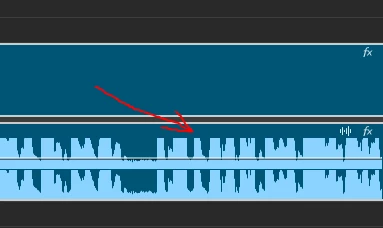
After the 24.4.1 update, the audio waveform no longer touches the top of the audio layer if it's at 0. I'm assuming because they wanted to make room for this useless "essential sound" button.
I use the waveform to judge audio levels, and if I can't tell where the top is, this is going to be very frustrating.
Is there an option to disable this gap at the top? If not, Adobe: Please Fix.
 AdChoices