


Copy link to clipboard
Copied
Just updated my Premiere, and whoops now the titles are gone and in stead there is "Graphics" ???
How do i make titles now???


 1 Correct answer


You either use the new Graphics or go to File / New / Legacy title to use the old one.

 34
Replies
34
34
Replies
34


Copy link to clipboard
Copied
Absolutely. This change coincided with a huge job of more than 100 interviews to title. It more of less doubled the time it took - I nearly cried when the deadline came and went. I’m so cross!
[private info removed per forum rules]
twitter @dmart000

Copy link to clipboard
Copied
That's so frustrating. I'm right there with you. I came in to work today needing to get a quick title job done. I could have finished it in 2-3 hours. But I haven't even started yet and my day is almost over.

Copy link to clipboard
Copied
See my other reply in this thread. Two quick things: it takes five minutes to make a custom workspace using the Legacy titler as of old, and ... an hour spent learning how to use the EGP will pay for itself fast. Spending a day fighting things the wrong way is frustrating and horrific.
Neil
Copy link to clipboard
Copied
The way they implemented the change wasn't ... optimal. Including that when you first "launch" the Legacy Titler, it pops up in a separate window. Yea, that's a pain.
But as with anything else in the UI, it's pretty easy to create a custom workspace and get the thing back in a "normal" panel, as I did. Took what, five minutes? So now it's pretty normal for me.
And the controls for it are in their various sub-panels and the ECP as they were before. That hasn't changed.
The EGP is going to be a great tool when fully fleshed out, and for some things it's pretty slick now. The work-pattern through it is very different, though in some ways closer to some of the other effects than the old Titler was. The EGP is designed so that the main controls of the text/graphics will be in the EGP panels, but the animation of anything EGP will be handled in the Effects Control Panel.
When I first saw the EGP ... I couldn't get anything to work. So I understand the initial shock. There are resources to get you running though ... here's a list of video tutorials that I highly recommend showing how & when to use the EGP ... and also importantly, what not to do with the EGP.
The first is a pretty good and short look at the basics ... the Vimeo is by James Strawn, a member of the EGP development team who's also posted on here in several threads (and that's on his own time, not clocked to Adobe), and the last two by reTooled.net, which are longer and more detailed.
Neil
Essential Graphics Links:
https://www.youtube.com/watch?v=mAoZme5rOfM&t=205s


Copy link to clipboard
Copied
elliea84894156 wrote
Where's the effect controls usually on the right side? The new effect controls for titles in the new update certainly don't look the same. They seem more complicated and disorganized. I feel like I'm going cross-eyed just looking at it. And where's the title presets/templates that usually popup with the title, below the work space area?
The properties pane was not removed from the Legacy Titler. It sounds like you may need to reset your Titler's panels back to their default settings, which look like this:
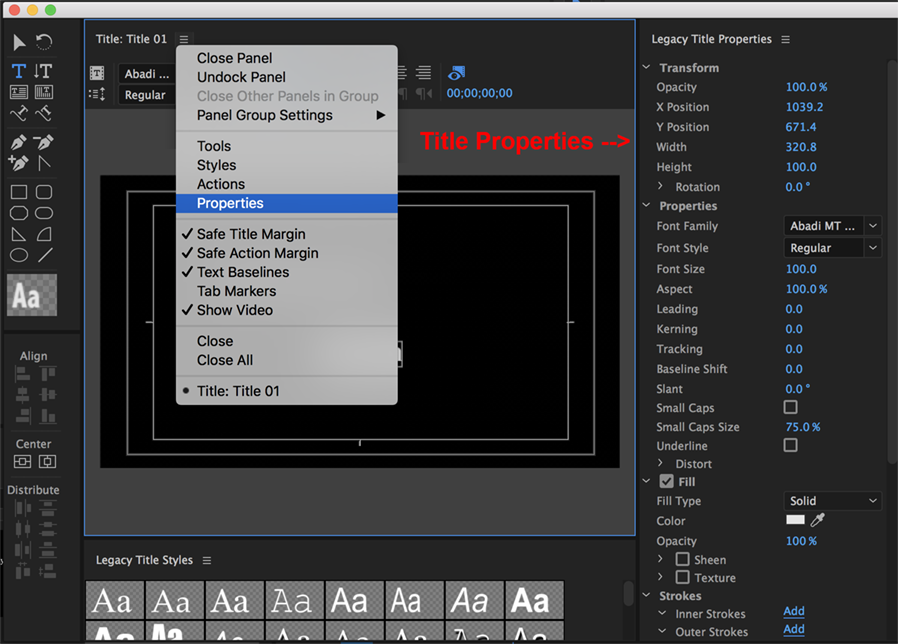
Also, I can't tell what you are seeing, but since you mentioned "Effect Controls", I think you may not be looking at the right panel/workspace. Make sure you have the Graphics workspace selected and that you can see the Essential Graphics panel and then use that to edit your layer params. The Effect Controls (ECP) should really only be used for advanced effects & animation workflows. If the default Graphics workspace is not available, you may need to reset your layout preferences or perhaps make your own workspace if you prefer.
The templates dialog was removed from the Legacy Titler. We have requests to bring it back but I honestly have no idea whether that will happen or not. I have posted a fairly detailed set of workaround instructions onto some other recent thread(s) in this forum. You should be able to search them out, or if I come across them again soon I'll paste the link into here. The short of it is that you can import existing prtl files and use them as you would have in previous versions. Also, you can copy and paste things from Titler to Graphics to make it a little easier to start upgrading your older templates into MOGRT's.
Disclaimer: I am not an official Adobe support person. I am a member of the Pr product team, monitoring this forum when I can as a 'fellow user'. If you wish to submit official feedback (the negative kind is fine too), it needs to be submitted as a bug/feature request on our wishform, or if you still feel like something in your app is really broken, you might try contacting Adobe Customer Care.
Copy link to clipboard
Copied
Thanks to all for constructive help. I really would like the templates dialog back though. I just don’t have time at the moment to learn a new system in the middle of a big job - which related on many templates I’ve created. I’m sure I’ll get to know and like the new system - I guess my issues is that Adobe have moved the goalposts without warning or any way back for those of us right in the thick of it.
Image this Adobe. You arrive at a conference of 5000 people in a foreign country with the job of recording 50 interviews and getting them up over four days with a team of two. It’s pretty chaotic in the first place - you really need reliable, tried and tested systems to get you through it and then this happens! I can’t imagine how many people there were across the globe like me.
D
David Martin
Impact Media Specialists Ltd
[details removed by ussnorway]
Copy link to clipboard
Copied
davidm92643928 wrote
I really would like the templates dialog back...
I really understand your, and other people's, frustrations about that. So the thing to do is to let your voice be heard...
--> wishform
Copy link to clipboard
Copied
Thanks James. Will do.
David
David Martin
[personal information removed by moderator]

Copy link to clipboard
Copied
How to EXPORT titles as prtl files? The export option file>export>title has disappeared. Why? Please bring it back!
Copy link to clipboard
Copied
Make a Graphic, right click on it in the Timeline and choose "Export as Motion Graphics Template". Then apply that from the Essential Graphics > Browse Tab.
The Legacy Titler is still intact in CC2017.1+ in order to support older projects containing Legacy Titles. But if you prefer to continue working with older features, then it is best to use older versions. PrPro 2015.4 (10.4) is the last version before Graphics began to replace the Legacy Titler. The benefits of Graphics are large though, so I recommend learning these new features when you get a chance.

-
- 1
- 2

Get ready! An upgraded Adobe Community experience is coming in January.
Learn more
 AdChoices