


Exit
  • Global community
    • Language:
      • Deutsch
      • English
      • Español
      • Français
      • Português
  • 日本語コミュニティ
  • 한국 커뮤니티
3

Copy Paste Multiple Clips to a Target Track (forces clips to one track no matter previous tracks)

Participant ,
Nov 16, 2025 Nov 16, 2025

Allow us to select two or clips or any kind, and copy/cut then paste to a target track, but if they were on separate tracks previously, it forces them all to appear on the target track. See illustration of how this would work in the screenshot.Untitled-1.jpg
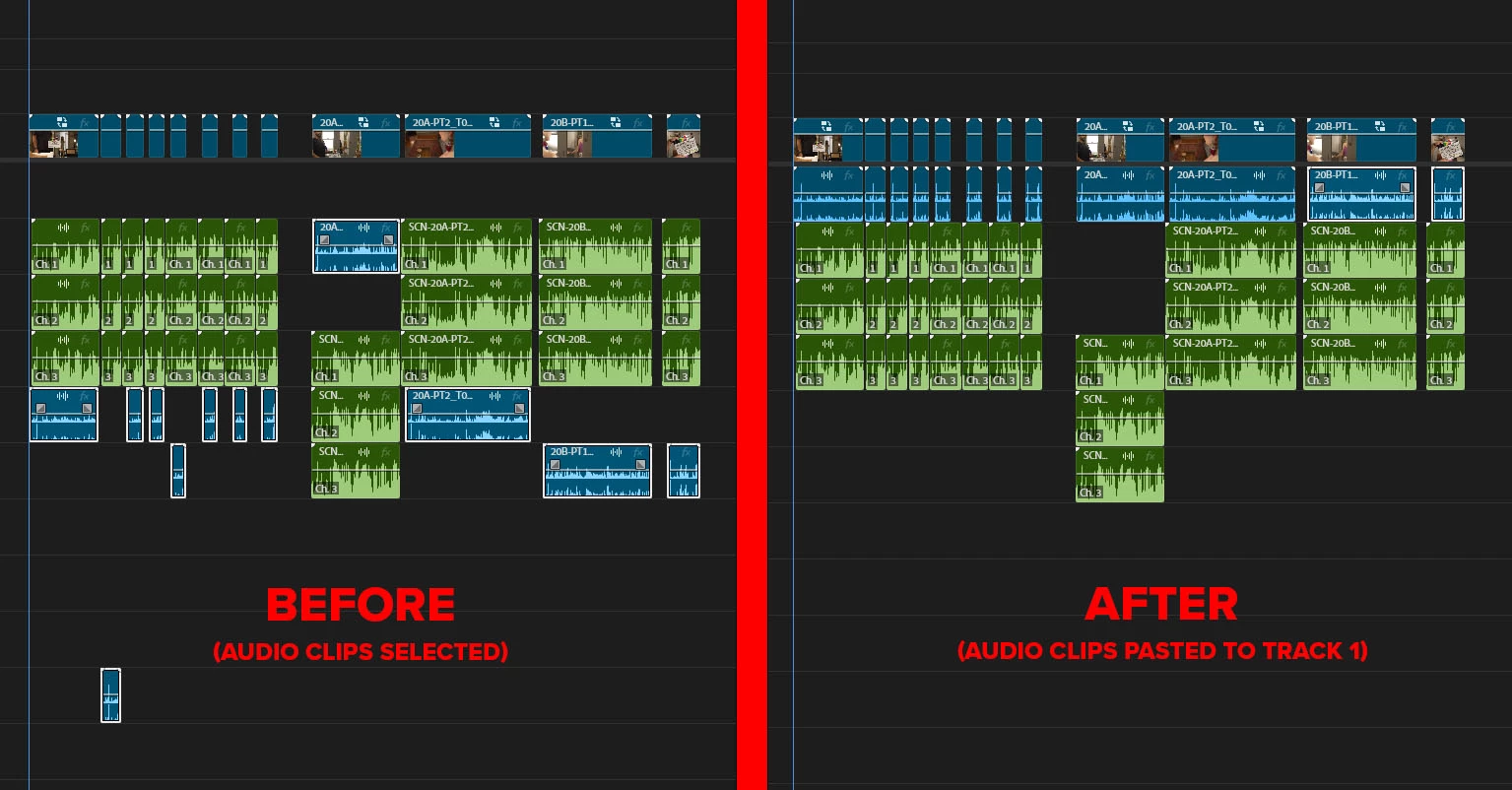
 

This would be HUGE for organizing timelines and prepping for mix etc.

Idea No status
TOPICS
Editing and Playback , User experience or interface
242
Translate
Report
Community guidelines
Be kind and respectful, give credit to the original source of content, and search for duplicates before posting. Learn more
community guidelines
3 Comments
Community Expert ,
Nov 16, 2025 Nov 16, 2025

Wow, 3 upvotes already!

Make sure you check your 'Paste" options in keyboard shortcuts, like such: 

(Especially 'Paste to Same Track')


MyerPj_1-1763341519248.png


Translate
Report
Participant ,
Dec 05, 2025 Dec 05, 2025

@MyerPj Thanks, but that is not the issue. It's an issue with how paste to target track works. If you try what I'm saying you'll see you cannot paste to target track mulitple clips if their source was different audio tracks, as I show in the example. In that example I select a large number of audio clips that are unlinked, and on different audio tracks, and I want to paste them to audio track 1, essentially consolidating them to that track. Useful when I'm prepping for mix. I am using the correct shortcuts (Not that you'd know, but I've been editing for 20 years in Premiere).

Translate
Report
Community Expert ,
Dec 06, 2025 Dec 06, 2025
LATEST

@pigsalreadyfly,


Yes, what you want is not currently possible. And I wonder what the chances are that this would get picked as a feature to add. One way I look at that is to consider workarounds. Is the hardest part is selecting the clips to begin with?


Workaround 1: Copy all the clips you want from only one track at a time, which you can paste into a single track.


Workaround 2: I'd have a backup for sure on this one. Select all the clips (as you do now), position the playhead to the point where you want the beginning of the paste, create a subsequence (which does not replace the clips), delete the clips while they're all selected, and then:


Version A (Subsequence stays in original sequence; I don't think you want this): Open the subsequence in the Source Monitor, drag the audio only to the target track.


Version B (Original clips are copied back to original sequence): Open the subsequence in the timeline, select all clips on each track starting with the lowest, Alt+Up to move them to the next track with any clips, repeat until they are all on one track, select all and copy to original sequence target track.


Stan


Translate
Report