


- Home
- Premiere Pro
- Discussions
- Re: Adobe Premiere Pro CS5- No entry point and Err...
- Re: Adobe Premiere Pro CS5- No entry point and Err...
Adobe Premiere Pro CS5- No entry point and Error 127

Copy link to clipboard
Copied
Waaay back in 2011 I bought Adobe Creative Suite Production Premium. Now 7 years later I realize that Premiere Pro CS5 has disappeared from my computer. I must have accidentally purged it. I of course don't have the installation disk because I have moved five times since then and somehow my parents (1500 miles away) have it and they are out of town this week. I need Premiere Pro, so I went online last night, found an installer and got the product installed.
Even though Premiere is now installed and I can click on the icon, I immediately get two pop ups.
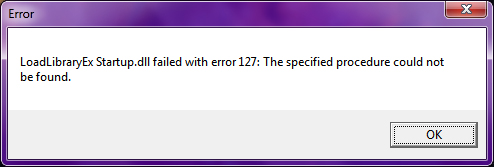
I have looked all over the internet and I am not the only one with this problem, but either the solution did not work for me or there was no solution posted at all. Yes, I have updated Premiere Pro CS5 to 5.0.3-- it won't update to 5.5.1 or 5.5.2. Yes, I have uninstalled and re-installed and re-updated. There is no change in the errors. I have already sat through three different live chat sessions that ended in not talking to a human and being told "Thanks for Visiting Adobe. Visit our Forums."
I'm at a loss, guys. I don't have the money to get CC, or I would have done it. I'm pretty sure that I've already used my trial of Premiere Pro CC in the last 2 years, so that's out too. I spent so much money on the Production Premium package and I really want to be able to use my program 
I really hope there is a simple solution that I'm missing here.
Note- I installed Flash and lllustrator at the same time and they both work fine, so this doesn't seem like an installer problem, but who knows.


 5
Replies
5
5
Replies
5


Copy link to clipboard
Copied
Version 5.5 is a paid upgrade, and it is no longer sold
Search http://www.microsoft.com/en-us/default.aspx to find and re-install the C runtime
Two ideas that MAY work to install and/or run old programs in Windows 10
-RIGHT click the program icon or EXE and select a compatibility mode in the pop up option window
-or Run as Administrator http://forums.adobe.com/thread/969395 to assign FULL Windows permissions may help... this says Encore, but is sometimes required for ALL Adobe programs (this is NOT the same as using an Administrator account) so follow the instructions for your specific program
Copy link to clipboard
Copied
Oh, I didn't think to mention it, but I'm running Windows 7 64 bit. Does that make any difference?
Is C Runtime necessary for running Premiere?
Thank you so much!
Copy link to clipboard
Copied
Yes, the Microsoft C runtime is a part of all Adobe programs that run on Windows of any version... so you need to go to the link I provided and find the runtime for your version of Windows
Other than that, I have no idea
Copy link to clipboard
Copied
I tried all the things you recommended and none of them helped. Thank you very much for trying to help!
Copy link to clipboard
Copied
OK... a GPU dll is your video card... the below may help
Do not count on Windows to be fully up to date when it comes to device drivers
Go to the vendor site to be sure you have an updated driver for your graphic adapter
•nVidia Driver Downloads http://www.nvidia.com/Download/index.aspx?lang=en-us
•ATI Driver Autodetect http://support.amd.com/en-us/download/auto-detect-tool
There are also intermittent reports that the newest driver is not always the best driver due to driver bugs or compatibility issues, so you MAY need to try an earlier driver version


Get ready! An upgraded Adobe Community experience is coming in January.
Learn more
 AdChoices