Inspiring
June 5, 2018
Answered

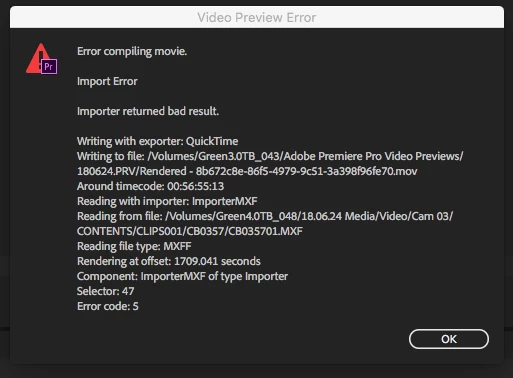
Cannot Render Full Sequence (timeline) - Selector: 47 Error code:5

  • June 5, 2018
  • 4 replies
  • 13205 views

Hi,

I am having a problem trying to render the full sequence (timeline) in one instance. This is a consistent fail. Premiere Pro freezes. I force close the app and then have no renders. The only color filters on the video clips are Lumetri color and Video Limiter. I have been doing this editing process for years. This failure to allow the full sequence to be rendered is a new development. The only thing I can do is render portions of the sequence.

The camera footage is from three Canon 1920x1080 .mxf and one Sony 4K .mxf camera.

The timeline is 29:30 long.

1920 x 1080

Square Pixels

Progressive

29.97 Drop-Frame

48000hz

ProRes 422 (LT)

Thanks,

Jason

Below is the error code details:

This topic has been closed for replies.
Correct answer HeartNation

Hi,

I am doing more tests. I ran into an error trying to export. It looks like the ProRes LT codec is not good for editing. I had two failed exports through Media Encoder. Both stopped within the first minute. I put a ProRes LT video onto the timeline. The bulk of the media on the timeline is still the Canon .mxf files, one Sony file, and various still images. The failed export error information is listed below. To check if the error was the ProRes LT video for exporting I choose to convert the LT to a ProRes (not LT). This ProRes video was put onto the timeline with the camera footage, etc. This export was successful. The Preview files were I-Frame Only MPEG.

Thus, two problems were listed in this forum thread and both seem to be associated with the ProRes LT format. ProRes LT should not be the Preview files and ProRes LT files do not export out to become new files. This is a disappointment because more space is used in hard drives without a perceived visual benefit.

Any other suggestions besides stop using ProRes LT?

Thanks,

Jason

------------------------------------------------------------

- Encoding Time: 00:00:42

06/12/2018 11:39:00 AM : Encoding Failed

------------------------------------------------------------

Export Error

Error compiling movie.

Export Error

Exporter returned bad result.

Writing with exporter: QuickTime

Writing to file: /Volumes/Green2.5TB_025/MASTER 180624.mov

Around timecode: 00;00;59;29

Component: QuickTime of type Exporter

Selector: 9

Error code: -2147287036

------------------------------------------------------------

- Encoding Time: 00:00:39

06/12/2018 11:41:12 AM : Encoding Failed

------------------------------------------------------------

Export Error

Error compiling movie.

Export Error

Exporter returned bad result.

Writing with exporter: QuickTime

Writing to file: /Volumes/Green2.5TB_025/MASTER 180624_1.mov

Around timecode: 00;00;59;29

Component: QuickTime of type Exporter

Selector: 9

Error code: -2147287036

------------------------------------------------------------

4 replies

Community Expert
June 12, 2018

Which type of rendering option you try? pressing enter while timeline panel is selected, or rendering for edit menu?

Inspiring
June 12, 2018

Hi Miriam,

Most often "option+r". That is "render in to out" on my system.

Jason

Kevin-Monahan
Community Manager
Community Manager
June 19, 2018

Hi Jason,

Are you still having trouble with your exports? Have you tried the smart rendering workflow, if so? Let us know if that might work better for you.

Thanks,
Kevin

Kevin Monahan - Sr. Community & Engagement Strategist – Pro Video and Audio
Inspiring
June 11, 2018

Hi again,

I have another update about this problem.

I noticed that the error also occurs when I change something on the timeline and then I have to re-render. For example; I just changed lower third text that is organically created within Premiere Pro. After changing the text those sections needed to re-render. Then I received the same type of error. This error is not the same place on the timeline that was from the original post. What I will do is close Premiere Pro and then open the project again. This would usually allow me to re-render those few sections of the timeline that were changed.

Thanks,

Jason

Inspiring
June 12, 2018

I changed the Preview settings in the sequence to I-Frame Only MPEG. The renders worked for one sequence. The second sequence with the same footage/b-roll/graphics, etc. but only less content received this error. The second sequence just has some content cut out to be delivered for broadcast. No new camera footage was included to the second sequence.

HeartNationAuthorCorrect answer
Inspiring
June 12, 2018

Hi,

I am doing more tests. I ran into an error trying to export. It looks like the ProRes LT codec is not good for editing. I had two failed exports through Media Encoder. Both stopped within the first minute. I put a ProRes LT video onto the timeline. The bulk of the media on the timeline is still the Canon .mxf files, one Sony file, and various still images. The failed export error information is listed below. To check if the error was the ProRes LT video for exporting I choose to convert the LT to a ProRes (not LT). This ProRes video was put onto the timeline with the camera footage, etc. This export was successful. The Preview files were I-Frame Only MPEG.

Thus, two problems were listed in this forum thread and both seem to be associated with the ProRes LT format. ProRes LT should not be the Preview files and ProRes LT files do not export out to become new files. This is a disappointment because more space is used in hard drives without a perceived visual benefit.

Any other suggestions besides stop using ProRes LT?

Thanks,

Jason

------------------------------------------------------------

- Encoding Time: 00:00:42

06/12/2018 11:39:00 AM : Encoding Failed

------------------------------------------------------------

Export Error

Error compiling movie.

Export Error

Exporter returned bad result.

Writing with exporter: QuickTime

Writing to file: /Volumes/Green2.5TB_025/MASTER 180624.mov

Around timecode: 00;00;59;29

Component: QuickTime of type Exporter

Selector: 9

Error code: -2147287036

------------------------------------------------------------

- Encoding Time: 00:00:39

06/12/2018 11:41:12 AM : Encoding Failed

------------------------------------------------------------

Export Error

Error compiling movie.

Export Error

Exporter returned bad result.

Writing with exporter: QuickTime

Writing to file: /Volumes/Green2.5TB_025/MASTER 180624_1.mov

Around timecode: 00;00;59;29

Component: QuickTime of type Exporter

Selector: 9

Error code: -2147287036

------------------------------------------------------------
Inspiring
June 6, 2018

Yo,

I have been running more tests this am. I deleted the entire cache and previews. I tried rendering the full sequence all at once. That failed at about 55%. I rendered sections of 1-2 minutes. I encountered two errors just by doing sections. I'm still not finished. I found a repeat error issue for those sections. Both times the Selector 47 Error code:5 occurred at a "Cross Dissolve". These are native 2 second Cross Dissolves in Premiere Pro. I add them by "right+click" and add dissolve. So if this is the problem that means we cannot use Cross Dissolves in projects.

Jason

R Neil Haugen
Legend
June 6, 2018

Man, you've been running quite the tests on this, great job.

And ... yea, what a pain.

So, without the cross-d's, it goes? That definitely needs to get filed in the new bug system.

Neil

Adobe Bug /Feature Request service: https://adobe-video.uservoice.com/forums/911233-premiere-pro

Everyone's mileage always varies ...
Mitch W
Community Manager
Community Manager
June 6, 2018

Hi Mitch,

I did a bunch of tests this am and the error popped up multiple times at different random places on the timeline. Based on your information I need to transcode 5 cameras of footage each week that are over 45 minutes long. That would result in a lot more time and hard drive space considering it's a weekly program. This sounds like Premiere Pro doesn't like the Canon MXF files. I've had problems in the past with Canon MXF files that needed to be transcoded. It took 6 months and two Adobe Premiere Pro updates before there was an update to fix the problem to allow the files to be used natively.

The Canon XF305 cameras have been around a long time.

Asking the end user to transcode 5 cameras for long form programs doesn't sound like an actual fix.

Jason


I'm not aware of a specific issue with Canon XF305 MXF files. It's possible that there's a bug there, but it's also possible that the files were just corrupted in some way. This could occur during the recording process or the copying process. Send me a private message and we'll work out how to get a sample file to me.

R Neil Haugen
Legend
June 5, 2018

Have you checked to see what's happening on the timeline at the point in that dialog? And is that failure point consistent, or does it list a fail-time at different places?

Have you ...

  • closed PrPro, dumped all the cache/media cache/cache database files; reboot, relaunch the project, give a couple minutes for cache rebuilding, then exported ...
  • gone to the 'fail' point, and removed the effects there, save/close, relaunch, add the effects back ...
  • created a new sequence, copied the contents of this sequence to the new one ...

Neil

Everyone's mileage always varies ...
Inspiring
June 5, 2018

Hi Neil,

This fail point is arbitrary in the timeline. This is consistently a random freeze. Sometimes the freeze happens if I select too large of a range for "in" and "out" points. The same process for new projects each week results in the problem. Each week a new project and new sequence is created. Cache media has been deleted and restarting of the computer. That is something I've tried a few times. This isn't an export error. This is just trying to render the sequence to then play for review.

Have I addressed all of your questions thoroughly?

Thanks,

Jason

R Neil Haugen
Legend
June 5, 2018

Yep, nice reply.

What are the preview settings used? Codec, location,  all that?

Neil

Everyone's mileage always varies ...